Particle trails (Trail Enabled with a RibbonTrailMesh or TubeTrailMesh) are a Forward+ and Mobile feature. In the Compatibility renderer, Godot printed The Compatibility renderer does not support particle trails as soon as we turned them on. For sparks, embers and bullets, draw each particle as a thin quad and set transform_align to Z Billboard, Y to Velocity: the quad points where the particle is going and turns as it curves.
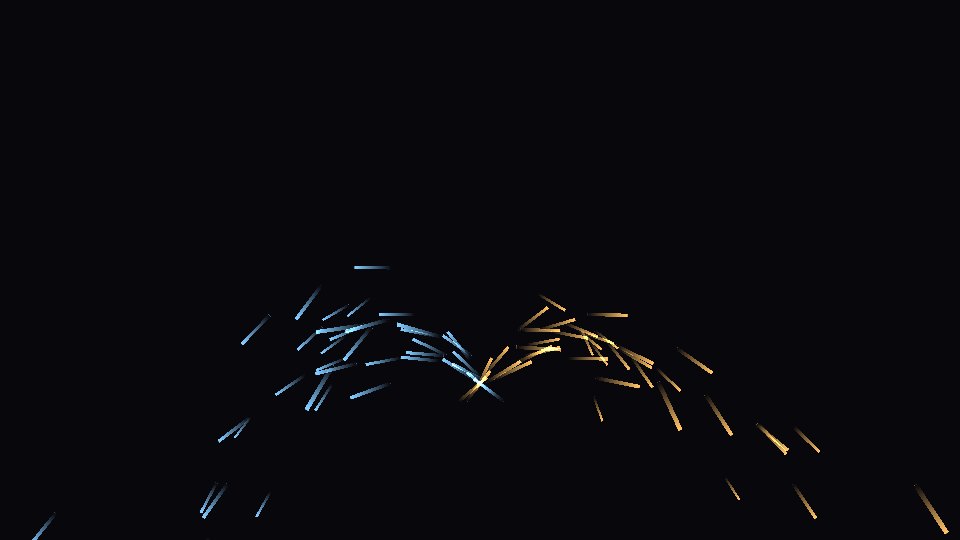
The code
Add a GPUParticles3D and attach this script. It is a spray of sparks that fly up and fall back down.
extends GPUParticles3D
## Sparks drawn as streaks that point where each one is going.
## Use this where you wanted particle trails: the Compatibility renderer does not draw those.

@export var length := 0.6  # meters, along the direction of travel
@export var width := 0.05
@export var color := Color(1.0, 0.75, 0.35)


func _ready() -> void:
	amount = 40
	lifetime = 1.2
	local_coords = false
	# The quad's Y axis follows the velocity, its Z faces the camera.
	transform_align = GPUParticles3D.TRANSFORM_ALIGN_Z_BILLBOARD_Y_TO_VELOCITY
	var m := ParticleProcessMaterial.new()
	m.direction = Vector3(1, 1, 0)
	m.spread = 25.0
	m.initial_velocity_min = 5.0
	m.initial_velocity_max = 7.0
	m.gravity = Vector3(0, -9.8, 0)
	process_material = m
	var g := Gradient.new()  # bright at the head, fading toward the tail
	g.colors = PackedColorArray([Color(1, 1, 1, 0), Color(1, 1, 1, 1)])
	var t := GradientTexture2D.new()
	t.gradient = g
	t.fill_from = Vector2(0, 1)
	t.fill_to = Vector2(0, 0)
	var mat := StandardMaterial3D.new()
	mat.shading_mode = BaseMaterial3D.SHADING_MODE_UNSHADED
	mat.transparency = BaseMaterial3D.TRANSPARENCY_ALPHA
	mat.blend_mode = BaseMaterial3D.BLEND_MODE_ADD
	mat.billboard_mode = BaseMaterial3D.BILLBOARD_DISABLED  # transform_align does the facing
	mat.cull_mode = BaseMaterial3D.CULL_DISABLED
	mat.albedo_texture = t
	mat.albedo_color = color
	var q := QuadMesh.new()
	q.size = Vector2(width, length)
	q.center_offset = Vector3(0, -length * 0.5, 0)  # the particle is the head, the tail is behind it
	q.material = mat
	draw_pass_1 = q
Does the streak really follow the particle
We shot one particle at a time and measured which way its streak pointed on screen, from all its lit pixels (0 degrees is to the right, 90 is straight up).
- Flying up and to the right at 45 degrees, with no gravity: the streak pointed at 45.0 degrees.
- The same particle with transform_align set back to Disabled: 90.0 degrees. The streak stayed upright while the particle flew at 45.
- Flying straight to the right: 0.0 degrees.
- With gravity: 44.8 degrees on the way up and -51.9 on the way down. It turns over as the particle falls.
Why the quad is shifted
center_offset moves the quad back by half its length, so the particle sits at the bright head and the faded tail is behind it, like a short trail. The gradient goes from clear at the tail to full at the head.
What to change
length: longer for fast sparks and bullets, shorter for embers.widthandcolor: the look of each streak.direction,spreadand the gravity in_ready(): where the spray goes.
The same trick for rain: rain that follows the camera. For sparks in a blast: explosion particles in one burst.
All four Compatibility gaps in one place: particles not working in a web export. The same idea in 2D: GPUParticles2D trails in a web export.
Tested in Godot 4.7 with the Compatibility renderer.
More how-tos: When particles do not show up
- GPUParticles3D not showing in Godot 4
- GPUParticles2D not showing in Godot 4
- GPUParticles2D collision: fall through or vanish
- Particles look black or dark
- Particles only fall down or fly sideways
- Particles not working in a web export
- Particles fall through the floor
- Particles on terrain and uneven ground
- Flipbook animation on GPUParticles3D
- GPUParticles2D sprite sheet not animating
- Pixel art particles look blurry
- GPUParticles2D trails not working
- Particle color over lifetime not working
- Particle texture shows a square box
- Custom particle shader ignores the color ramp
- Particle scale curve not working
- Additive particles invisible on a white background
- Scale a 3D particle effect evenly
- Particles the same size on screen at any distance