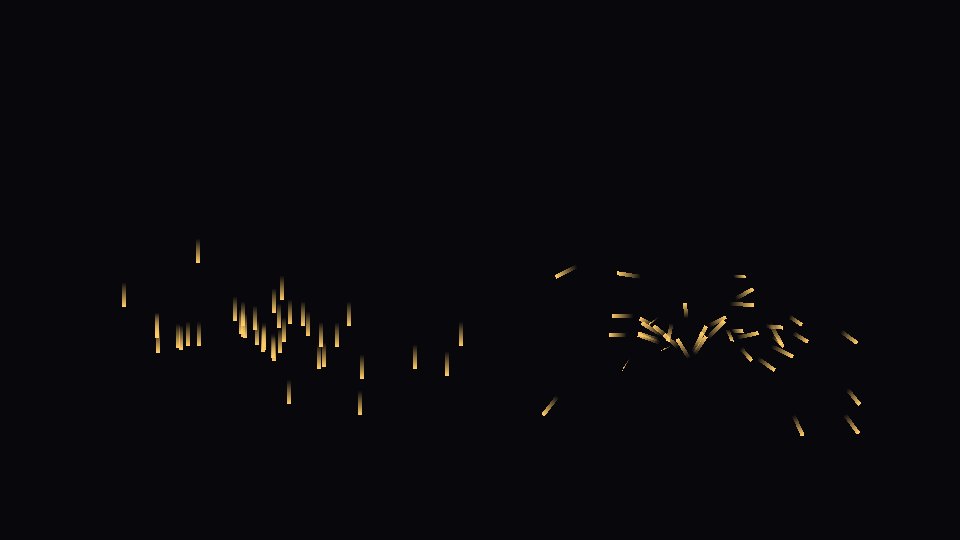
The Compatibility renderer, which web exports use, does not draw particle trails. With trail_enabled on, our GPUParticles2D drew nothing at all, not even the particle, and Godot only printed a warning. Leave trails off and use a long, thin texture with particle_flag_align_y on in the ParticleProcessMaterial: each particle turns so it points where it flies.
The code
Attach this to a GPUParticles2D for sparks that burst up and fall. The script draws the streak texture itself, 4 by 24 pixels, so it runs as it is. The align line is the fix. The leading end is the bottom of the texture, so make that end bright.
extends GPUParticles2D
## 2D sparks drawn as short streaks that point where they fly. Works in the
## Compatibility renderer that web exports use, where 2D particle trails are not drawn.


func _ready() -> void:
	amount = 40
	lifetime = 0.8
	texture = make_streak()
	var m := ParticleProcessMaterial.new()
	m.particle_flag_align_y = true  # the fix: turn each spark so its long side follows its velocity
	m.direction = Vector3(0, -1, 0)
	m.spread = 60.0
	m.initial_velocity_min = 250.0
	m.initial_velocity_max = 400.0
	m.gravity = Vector3(0, 600, 0)
	process_material = m
	# trail_enabled = true would hide every particle in the Compatibility renderer


func make_streak() -> Texture2D:
	# 4 px wide and 24 px long: clear at the top, bright at the bottom.
	# The bottom of the texture is the side that leads.
	var img := Image.create(4, 24, false, Image.FORMAT_RGBA8)
	for y in 24:
		var a := float(y + 1) / 24.0
		for x in 4:
			img.set_pixel(x, y, Color(1.0, 0.8, 0.4, a))
	return ImageTexture.create_from_image(img)
What we measured
One spark flying right at 400 pixels per second with no gravity. We measured the box around its lit pixels and how bright each end was (red + green + blue, 0 to 3). Two runs gave the same picture.
- The script: 22 to 23 pixels wide and 4 high, lying along the path. The right end, the front, was 2.09 to 2.14, the back end 0.39 to 0.45.
- Align Y off: 4 pixels wide and 22 high. Standing up whatever way it flew.
- Trails on (
trail_enabledwith atrail_lifetimeof 0.3): nothing on screen. Godot printedThe Compatibility renderer does not support particle trails. - A new ParticleProcessMaterial had
particle_flag_align_yoff.
What to change
- The size in
make_streak(): a longer texture for faster sparks. scale_minandscale_max: longer and shorter streaks in one burst.- The velocities and gravity: how far and how high the sparks go.
The same thing for 3D particles: particle trails in Compatibility. Other features a web export skips: particles not working in a web export. 2D sparks that land on a floor: GPUParticles2D collision.
Tested in Godot 4.7 with the Compatibility renderer.
More how-tos: When particles do not show up
- GPUParticles3D not showing in Godot 4
- GPUParticles2D not showing in Godot 4
- GPUParticles2D collision: fall through or vanish
- Particles look black or dark
- Particles only fall down or fly sideways
- Particles not working in a web export
- Particles fall through the floor
- Particles on terrain and uneven ground
- Flipbook animation on GPUParticles3D
- GPUParticles2D sprite sheet not animating
- Pixel art particles look blurry
- Particle trails in the Compatibility renderer
- Particle color over lifetime not working
- Particle texture shows a square box
- Custom particle shader ignores the color ramp
- Particle scale curve not working
- Additive particles invisible on a white background
- Scale a 3D particle effect evenly
- Particles the same size on screen at any distance