A GPUParticles2D draws its whole texture on every particle unless its material is a CanvasItemMaterial with particles_animation on and particles_anim_h_frames and particles_anim_v_frames set to your grid. Then each particle shows one frame, but only the first one while anim_speed_min and anim_speed_max in the ParticleProcessMaterial are 0, which is their default. 1 plays the sheet once per lifetime.
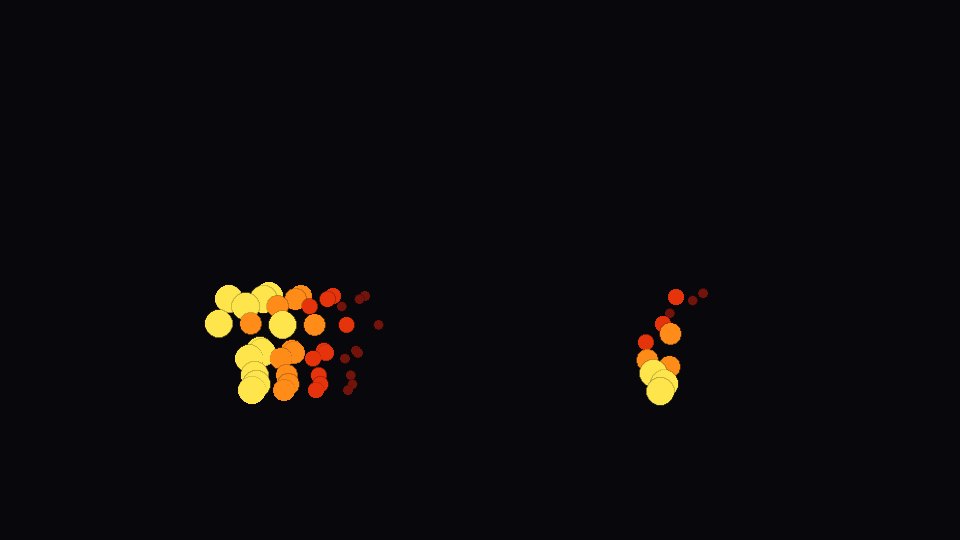
The code
Attach this to a GPUParticles2D for dots that rise, shrink and go from yellow to dark red, played from a sprite sheet of 4 frames. The script draws the sheet itself, so it runs as it is. The lines marked fix 1 and fix 2 are the two settings.
extends GPUParticles2D
## 2D particles that play a sprite sheet: 4 frames in one row, once over each particle's life.
## With your own sheet, replace make_demo_sheet() with preload("res://your_sheet.png").


func _ready() -> void:
	amount = 12
	lifetime = 1.6
	texture = make_demo_sheet()
	var cm := CanvasItemMaterial.new()
	cm.particles_animation = true  # fix 1: without this, every particle shows the whole sheet
	cm.particles_anim_h_frames = 4
	cm.particles_anim_v_frames = 1
	cm.particles_anim_loop = false
	material = cm
	var m := ParticleProcessMaterial.new()
	m.direction = Vector3(0, -1, 0)
	m.spread = 25.0
	m.initial_velocity_min = 60.0
	m.initial_velocity_max = 90.0
	m.gravity = Vector3.ZERO
	m.anim_speed_min = 1.0  # fix 2: the default 0 stays on the first frame
	m.anim_speed_max = 1.0  # 1 = the whole sheet once per lifetime
	process_material = m


func make_demo_sheet() -> Texture2D:
	# four 32x32 frames: a dot that shrinks and goes from yellow to dark red
	var img := Image.create(128, 32, false, Image.FORMAT_RGBA8)
	var cols := [Color(1, 0.9, 0.3), Color(1, 0.55, 0.1), Color(0.9, 0.2, 0.05), Color(0.45, 0.08, 0.05)]
	for f in 4:
		var r := 14.0 - f * 3.0
		for y in 32:
			for x in 32:
				if Vector2(x - 15.5, y - 15.5).length() <= r:
					img.set_pixel(f * 32 + x, y, cols[f])
	return ImageTexture.create_from_image(img)
What we measured
One particle that does not move, in the middle of the screen, with a lifetime of 2 seconds. We read the color in the middle of it and the width of its lit pixels at 0.25, 0.75, 1.25 and 1.75 seconds. Two runs gave the same numbers.
- The script: yellow 1.00/0.90/0.30 and 28 pixels wide, then orange 1.00/0.55/0.10 and 22, red 0.90/0.20/0.05 and 16, dark red 0.45/0.08/0.05 and 10. One frame after the other.
- Particles Animation off: 115 pixels wide at all four times, and the middle was the dark background, the gap between two dots. The whole sheet of four dots on one particle.
- Anim Speed at 0: yellow and 28 pixels wide at all four times. The first frame only.
- A new ParticleProcessMaterial had
anim_speed_minandanim_speed_maxat 0.0, and a new CanvasItemMaterial hadparticles_animationoff.
What to change
particles_anim_h_framesandparticles_anim_v_frames: the columns and rows of your sheet.particles_anim_loop: on for a sheet that should keep repeating, such as a flickering flame.anim_offset_minandanim_offset_max: start each particle on a different frame.
The same thing for 3D particles: flipbook particles. 2D particles that do not show at all: GPUParticles2D not showing.
Tested in Godot 4.7 with the Compatibility renderer.
Ready-made: 12 Free VFX Textures is free and has two 8x8 flipbooks (spark burst and magic swirl), white on black: set both frame counts to 8 and use blend_mode Add.
More how-tos: When particles do not show up
- GPUParticles3D not showing in Godot 4
- GPUParticles2D not showing in Godot 4
- GPUParticles2D collision: fall through or vanish
- Particles look black or dark
- Particles only fall down or fly sideways
- Particles not working in a web export
- Particles fall through the floor
- Particles on terrain and uneven ground
- Flipbook animation on GPUParticles3D
- Pixel art particles look blurry
- Particle trails in the Compatibility renderer
- GPUParticles2D trails not working
- Particle color over lifetime not working
- Particle texture shows a square box
- Custom particle shader ignores the color ramp
- Particle scale curve not working
- Additive particles invisible on a white background
- Scale a 3D particle effect evenly
- Particles the same size on screen at any distance