A GPUParticlesCollisionBox3D is a flat box, so on hills the particles stop at its top: inside the slopes, or floating over the low parts. Use a GPUParticlesCollisionHeightField3D instead. It draws the meshes inside its box from above into a height map, and the particles land on that shape. It works in the Compatibility renderer, where SDF colliders do not. collision_mode on the emitter still has to be turned on.
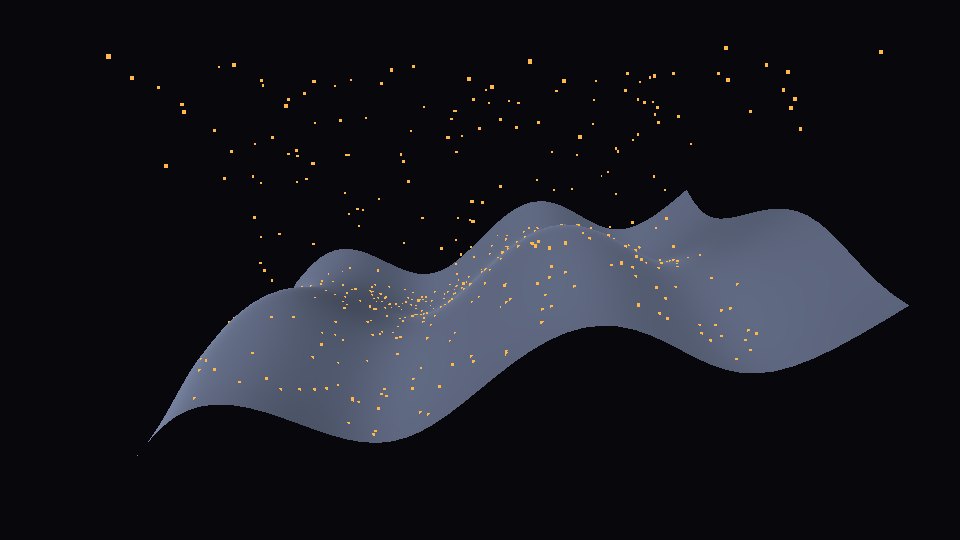
The code
Add a GPUParticlesCollisionHeightField3D over your ground and attach this script. Set area so the box covers the ground, and put your particle emitters in emitters. For emitters you spawn later, call use_with().
extends GPUParticlesCollisionHeightField3D
## Lets GPU particles land on bumpy ground: terrain, hills, ramps and rocks.
## It draws the meshes inside its box from above into a height map, and particles collide with that.
## Works in the Compatibility renderer. SDF colliders do not.

@export var area := Vector3(16, 8, 16)  # meters: x and z cover the ground, y must reach from the lowest to the highest point
@export var follow_camera := false  # big worlds: the box moves with the current camera
@export var emitters: Array[GPUParticles3D] = []  # collision is off on emitters by default


func _ready() -> void:
	size = area
	resolution = RESOLUTION_1024
	follow_camera_enabled = follow_camera
	# WHEN_MOVED draws the height map again only when this box moves: ground that never changes.
	# ALWAYS draws it every frame: ground that moves, or a box that follows the camera.
	update_mode = UPDATE_MODE_ALWAYS if follow_camera else UPDATE_MODE_WHEN_MOVED
	for p in emitters:
		use_with(p)


## Turn on collision for one emitter. Call it for emitters you spawn later too.
func use_with(p: GPUParticles3D) -> void:
	var m := p.process_material as ParticleProcessMaterial
	m.collision_mode = ParticleProcessMaterial.COLLISION_RIGID
	m.collision_bounce = 0.1
	m.collision_friction = 0.8
How we tested it
We dropped 500 sparks on a wavy strip of ground and looked at it from the side, 2.5 seconds in. We counted lit points more than 20 centimeters under the ground line (gone through) and lit points on the line (landed). Each number below is the range over two runs.
- No collision: 154 to 155 under the ground, 12 to 32 on it.
- A flat collision box with its top at the lowest part of the ground: 423 to 451 under the ground, 40 to 51 on it. The sparks stopped at the flat top, inside the hills.
- The script: 14 to 34 under the ground, 766 to 767 on it.
It only sees visible meshes on its layers
The height field only draws meshes that are visible. With the ground mesh's visible turned off, 168 to 175 points went under the ground: the same as no collision.
heightfield_mask picks which render layers it draws. With the ground on layer 2 and the mask set to layer 1 only, 165 to 168 points went under the ground too. Leave meshes that particles should not land on out of the mask.
For a ground that collides but is not drawn, keep the mesh visible and put it on a layer that your camera's cull mask leaves out. That is how our test hid it: the ground was on layer 2 and the camera only drew layer 1.
Big worlds: follow the camera
The box has a fixed size. We moved the ground and the camera 40 meters away and left the box where it was: 153 to 172 points under the ground. With follow_camera on, the box moved with the camera: 16 to 45 under the ground and 755 to 762 on it. With it on, the script redraws the height map every frame (UPDATE_MODE_ALWAYS). With it off, only when the box moves (UPDATE_MODE_WHEN_MOVED).
SDF colliders in the Compatibility renderer
A GPUParticlesCollisionSDF3D also takes the shape of the meshes inside it, but in the Compatibility renderer Godot printed SDF Particle Colliders are not available in the Compatibility renderer. With one in place, 180 points went under the ground in both runs. That makes the height field the one to use for web exports and low-end PCs.
What to change
area: x and z cover the ground. y must reach from the lowest point of the ground to the highest.resolution: 1024 over 16 meters is about 1.6 centimeters per pixel of the height map. Bigger areas need a higher resolution orfollow_camera.collision_bounceandcollision_frictioninuse_with(): how the particles bounce and slide once they land.
A flat floor only needs a box: particles fall through the floor. Particles that vanish where they touch: underwater bubbles that stop at the water surface.
All four Compatibility gaps in one place: particles not working in a web export.
Tested in Godot 4.7 with the Compatibility renderer.
More how-tos: When particles do not show up
- GPUParticles3D not showing in Godot 4
- GPUParticles2D not showing in Godot 4
- GPUParticles2D collision: fall through or vanish
- Particles look black or dark
- Particles only fall down or fly sideways
- Particles not working in a web export
- Particles fall through the floor
- Flipbook animation on GPUParticles3D
- GPUParticles2D sprite sheet not animating
- Pixel art particles look blurry
- Particle trails in the Compatibility renderer
- GPUParticles2D trails not working
- Particle color over lifetime not working
- Particle texture shows a square box
- Custom particle shader ignores the color ramp
- Particle scale curve not working
- Additive particles invisible on a white background
- Scale a 3D particle effect evenly
- Particles the same size on screen at any distance