A ParticleProcessMaterial made with new() starts with initial_velocity_min and initial_velocity_max at 0, direction at (1, 0, 0) and gravity pulling down. So the particles only drop: in our test they fell 5 m in a straight line. Give them a speed and they shoot along +X, to the right. Set both: direction to Vector3.UP and a speed above 0.
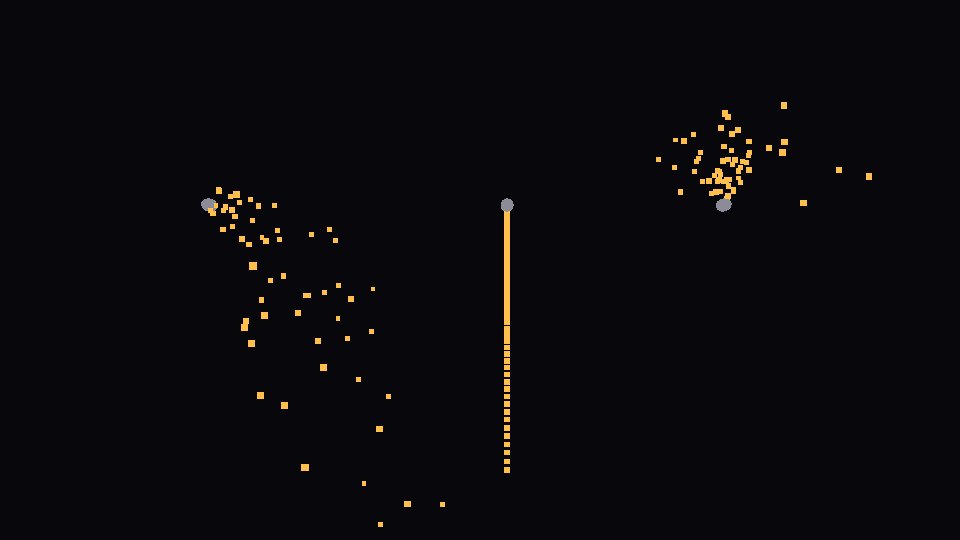
The code
Attach this to a GPUParticles3D for a small fountain. The direction and initial velocity lines are the fix.
extends GPUParticles3D
## A fountain of sparks with a ParticleProcessMaterial made in code. A new material has
## no speed and points along +X, so set the direction and the speed yourself.


func _ready() -> void:
	amount = 60
	lifetime = 1.5
	var m := ParticleProcessMaterial.new()
	m.direction = Vector3.UP  # fix 1: the default (1, 0, 0) points sideways
	m.spread = 25.0
	m.initial_velocity_min = 3.0  # fix 2: the default speed is 0, so particles only fall
	m.initial_velocity_max = 4.5
	m.gravity = Vector3(0, -6, 0)  # in 2D, use a positive y: Vector3(0, 98, 0) falls down the screen
	process_material = m
	var mat := StandardMaterial3D.new()
	mat.shading_mode = BaseMaterial3D.SHADING_MODE_UNSHADED
	mat.billboard_mode = BaseMaterial3D.BILLBOARD_PARTICLES
	mat.albedo_color = Color(1.0, 0.75, 0.3)
	var q := QuadMesh.new()
	q.size = Vector2(0.1, 0.1)
	q.material = mat
	draw_pass_1 = q
What we measured
We set the lifetime to 1 second, looked from the front with an orthographic camera and measured where the lit pixels were, in meters from the emitter, over five frames. Two runs of each.
- A new material: direction (1, 0, 0), spread 45, speed 0 to 0, gravity (0, -9.8, 0).
- Used as it is: the particles fell straight down, 5.07 to 5.16 m, never more than 0.04 m to either side.
- With only a speed of 3 to 4.5 added: they flew up to 3.96 m to the right as they fell, their middle 1.59 to 1.64 m right of the emitter.
- The script: a fountain 1.42 to 1.60 m high and about 1.3 m to each side, its middle 0.79 to 0.80 m up and within 0.1 m of center.
In 2D
A GPUParticles2D with a new material had the same direction and speed. One thing changed: when we assigned the material, its gravity went from (0, -9.8, 0) to (0, 98, 0) on its own, and the particles fell 204 to 206 pixels in 2 seconds. A gravity we set ourselves, (0, -98, 0), was kept, and those particles rose 204 pixels. In 2D, y points down the screen, so a positive y falls.
What to change
spread: the cone around the direction, in degrees.initial_velocity_minandinitial_velocity_max: how fast they leave.gravity: -6 here instead of -9.8, for a softer arc.
Particles that fall sideways when the emitter is turned: gravity on a rotated emitter. One burst that flies out every way: explosion particles in one burst.
Tested in Godot 4.7 with the Compatibility renderer.
More how-tos: When particles do not show up
- GPUParticles3D not showing in Godot 4
- GPUParticles2D not showing in Godot 4
- GPUParticles2D collision: fall through or vanish
- Particles look black or dark
- Particles not working in a web export
- Particles fall through the floor
- Particles on terrain and uneven ground
- Flipbook animation on GPUParticles3D
- GPUParticles2D sprite sheet not animating
- Pixel art particles look blurry
- Particle trails in the Compatibility renderer
- GPUParticles2D trails not working
- Particle color over lifetime not working
- Particle texture shows a square box
- Custom particle shader ignores the color ramp
- Particle scale curve not working
- Additive particles invisible on a white background
- Scale a 3D particle effect evenly
- Particles the same size on screen at any distance