Set one_shot to true and explosiveness to 1, so every particle leaves at the same moment. Set spread on the process material to 180 so they fly in every direction, then call restart() and remove the effect when its longest emitter fires finished.
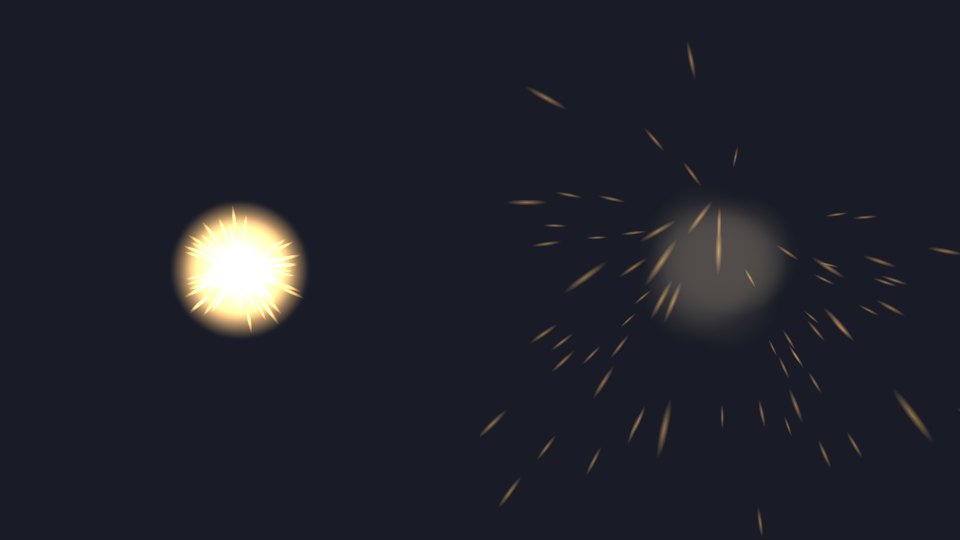
The code
Put this on a Node3D in your level and call explode() with a position. It builds all three emitters itself, so there is no scene to set up.
extends Node3D
## An explosion in one burst: a flash, sparks and smoke. Call explode(position).

func explode(at: Vector3) -> Node3D:
	var root := Node3D.new()
	add_child(root)
	root.global_position = at
	var flash := _burst(6, 0.35, Vector2(0.0, 0.3), 0.0, Color(1.0, 0.75, 0.4, 0.7), Vector2(2.4, 2.4))
	var sparks := _burst(70, 0.9, Vector2(5.0, 10.0), -7.0, Color(1.0, 0.7, 0.3), Vector2(0.07, 0.5))
	var smoke := _burst(20, 1.8, Vector2(0.6, 1.6), 0.8, Color(0.32, 0.3, 0.29, 0.7), Vector2(1.8, 1.8))
	_grow(flash)
	_grow(smoke)
	# sparks: long thin quads that point where they fly
	sparks.transform_align = GPUParticles3D.TRANSFORM_ALIGN_Z_BILLBOARD_Y_TO_VELOCITY
	((sparks.draw_pass_1 as QuadMesh).material as StandardMaterial3D).billboard_mode = BaseMaterial3D.BILLBOARD_DISABLED
	# smoke: normal alpha, so it can be darker than the background
	((smoke.draw_pass_1 as QuadMesh).material as StandardMaterial3D).blend_mode = BaseMaterial3D.BLEND_MODE_MIX
	for fx in [flash, sparks, smoke]:
		root.add_child(fx)
		fx.restart()  # one-shot: start now, so finished fires
	smoke.finished.connect(root.queue_free)  # the smoke lives longest
	return root


func _grow(fx: GPUParticles3D) -> void:
	var c := Curve.new()
	c.add_point(Vector2(0.0, 0.3))
	c.add_point(Vector2(1.0, 1.0))
	var t := CurveTexture.new()
	t.curve = c
	(fx.process_material as ParticleProcessMaterial).scale_curve = t


func _burst(amount: int, life: float, speed: Vector2, gravity: float, col: Color, size: Vector2) -> GPUParticles3D:
	var fx := GPUParticles3D.new()
	fx.one_shot = true
	fx.explosiveness = 1.0  # every particle at once, not a stream
	fx.amount = amount
	fx.lifetime = life
	fx.visibility_aabb = AABB(Vector3(-6, -6, -6), Vector3(12, 12, 12))
	var p := ParticleProcessMaterial.new()
	p.direction = Vector3.UP  # the default is +X
	p.spread = 180.0  # every direction
	p.initial_velocity_min = speed.x
	p.initial_velocity_max = speed.y
	p.gravity = Vector3(0, gravity, 0)
	p.damping_min = speed.y * 0.5  # fast at first, then slows down
	p.damping_max = speed.y * 0.8
	var g := Gradient.new()
	g.colors = PackedColorArray([col, Color(col, 0.0)])
	var ramp := GradientTexture1D.new()
	ramp.gradient = g
	p.color_ramp = ramp
	fx.process_material = p
	fx.draw_pass_1 = _quad(size)
	return fx


func _quad(size: Vector2) -> QuadMesh:
	var g := Gradient.new()
	g.colors = PackedColorArray([Color(1, 1, 1, 1), Color(1, 1, 1, 0)])
	var soft := GradientTexture2D.new()
	soft.gradient = g
	soft.fill = GradientTexture2D.FILL_RADIAL
	soft.fill_from = Vector2(0.5, 0.5)
	soft.fill_to = Vector2(1.0, 0.5)

	var mat := StandardMaterial3D.new()
	mat.shading_mode = BaseMaterial3D.SHADING_MODE_UNSHADED
	mat.transparency = BaseMaterial3D.TRANSPARENCY_ALPHA
	mat.blend_mode = BaseMaterial3D.BLEND_MODE_ADD  # glows; the smoke switches back to mix
	mat.billboard_mode = BaseMaterial3D.BILLBOARD_PARTICLES
	mat.vertex_color_use_as_albedo = true
	mat.albedo_texture = soft
	var q := QuadMesh.new()
	q.size = size
	q.material = mat
	return q
In our test, 2.6 seconds after explode() the effect node was gone and nothing was left on screen.
It comes out as a stream, not a burst
That is explosiveness at 0, the default. Particles then leave one after another over the whole lifetime. We checked a grid of 129,600 points on the screen 0.1 seconds after the start: the sparks covered 653 of them with Explosiveness at 1, and only 58 at 0. At 0 the effect also took longer to end. It was still in the scene after 2.6 seconds, and gone by 4.1.
All the sparks fly to one side
A new ParticleProcessMaterial points along +X with a spread of 45 degrees. With those defaults, our sparks all went to the right: 595 points on the right half of the screen and 0 on the left. With direction set to up and spread at 180, they split about evenly, 325 on the left and 332 on the right.
It plays once and never again
A one-shot emitter turns itself off when it ends. This script makes a new effect for every explode() call instead of replaying one. Why it calls restart() right after add_child(): remove a one-shot particle effect when it ends.
What to change
initial_velocity_minandinitial_velocity_maxon the sparks: how big the blast is.gravityon the sparks: how fast they fall back down.amount: how many sparks, and how thick the smoke is.- The smoke uses Mix and the flash uses Add. Why: bright fire with dark smoke.
A burst high in the air at the end of a rocket: fireworks without sub-emitters. A short freeze when a big one goes off: hit stop and slow motion.
The same burst on every replay: particles that play the same way every time.
Tested in Godot 4.7 with the Compatibility renderer.
Ready-made: Modern Battlefield VFX for Godot 4 has an artillery barrage, an airstrike and a tank cannon, in Stylized and PSX looks.
More how-tos: Fire, smoke and explosions
- Fire that turns to smoke in a cone
- Bright fire with dark smoke
- Smoke particles leave a hard line on the ground
- Particles drawing in the wrong order
- 3D debris particles not rotating
- Particles all disappear at once
- Muzzle flash with a real light
- Glowing particles in Godot 4
- Glowing particles cast dark shadows
- Particles from the surface of a mesh, at runtime
- Fireworks without sub-emitters
- Fire or dust over a whole building