Each restart() of a GPUParticles3D picks new random numbers, so a burst never comes out the same way twice. Turn on use_fixed_seed and set seed: in our test, the burst then matched pixel for pixel on every restart. Another seed gives another pattern, also the same every time.
The code
Attach this to a GPUParticles3D for a burst of sparks you can replay with play_again(), the same way every time. The two seed lines are the fix.
extends GPUParticles3D
## A burst of sparks that comes out the same way every time it plays,
## for cutscenes, replays and trailer captures. Call play_again() to replay it.


func _ready() -> void:
	amount = 40
	lifetime = 1.2
	one_shot = true
	explosiveness = 1.0
	use_fixed_seed = true  # the fix: the same random numbers on every restart
	seed = 1234  # another number gives another pattern, also the same every time
	var m := ParticleProcessMaterial.new()
	m.direction = Vector3.UP
	m.spread = 60.0
	m.initial_velocity_min = 2.0
	m.initial_velocity_max = 4.0
	m.gravity = Vector3(0, -6, 0)
	process_material = m
	var mat := StandardMaterial3D.new()
	mat.shading_mode = BaseMaterial3D.SHADING_MODE_UNSHADED
	mat.billboard_mode = BaseMaterial3D.BILLBOARD_PARTICLES
	mat.albedo_color = Color(1.0, 0.75, 0.3)
	var q := QuadMesh.new()
	q.size = Vector2(0.08, 0.08)
	q.material = mat
	draw_pass_1 = q


func play_again() -> void:
	restart()
What we measured
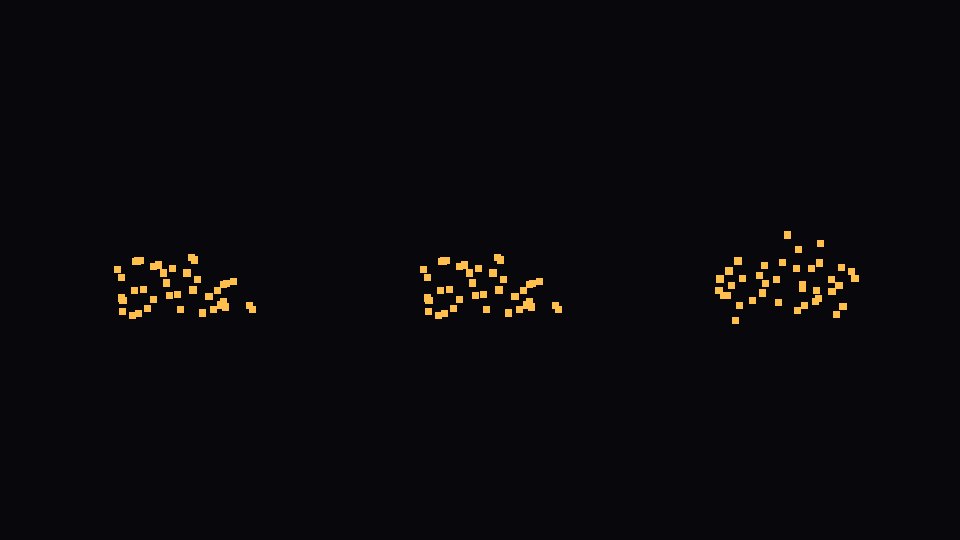
We let the burst run for 0.4 seconds with preprocess, froze it with speed_scale at 0, and compared two pictures, every second pixel. Three runs gave the same result for the fixed seed. About 300 of those points were lit by sparks.
- Seed 1234 on two new emitters: 0 points different. A third one: 0 again.
- Seed 1234 on one emitter restarted twice, the way
play_again()does it: 0 points different. - Use Fixed Seed off: 514 to 591 points different between two new emitters over the three runs, and 536 to 541 for one emitter restarted twice.
- Seed 99 against seed 1234: 610 points different.
Copies look like copies
Two emitters with the same seed make the same shape, as in the picture. If several of the same effect play at once, give each one its own seed, or leave Use Fixed Seed off for them.
What to change
seed: try numbers until you like the pattern, then keep it.amount,spreadand the velocities: the size and shape of the burst.
Bursts from a pool of emitters: hit sparks from an emitter pool. One burst for an explosion: explosion particles in one burst.
Tested in Godot 4.7 with the Compatibility renderer.
More how-tos: Play, stop and remove effects
- Remove a one-shot particle effect when it ends
- Fade out and stop looping particles
- Spawn a hit effect facing the surface
- Hit sparks from a pool of emitters
- Changing one particle effect's color changes all of them
- Freeze particles in mid-air
- Running dust and landing puffs
- Particles left behind by a moving object
- 2D particles follow the player or stay behind
- Footstep particles that match the ground
- A level up effect that plays while paused
- Hide particle effects far from the camera
- Death particles disappear when the enemy is freed
- Remove all particles at once