Set the effect's process_mode to PROCESS_MODE_ALWAYS. Many games pause with get_tree().paused = true to show a level up screen, and a paused effect does not move at all: in our test it lit 0 points on the screen. Build it from an open cylinder with a texture that fades upward, plus one-shot sparkles with local_coords on, so they rise with the character as it walks.
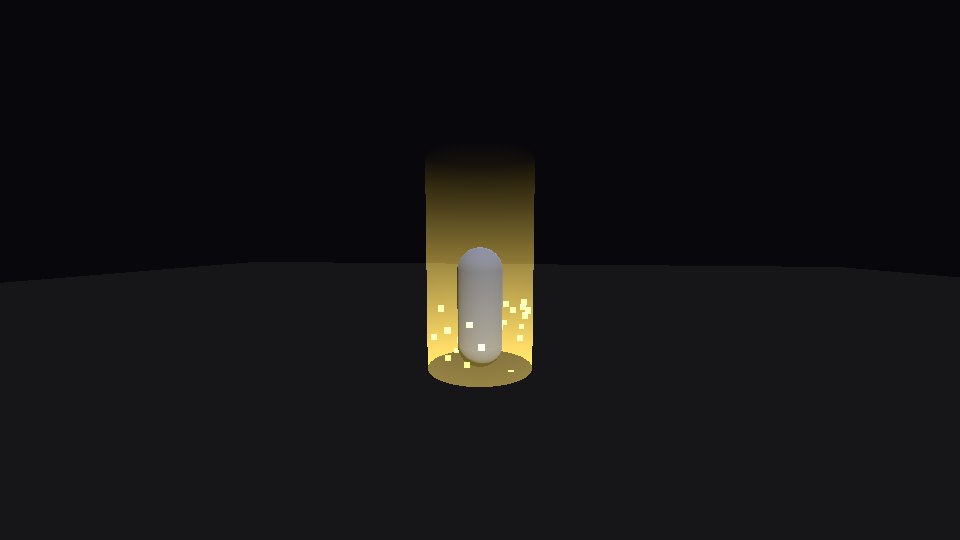
The code
Add a Node3D as a child of the character, at the feet, give it this script and call play(). It frees itself at the end.
extends Node3D
## A level up effect: a pillar of light and rising sparkles around the character.
## Add it as a child of the character and call play(). It keeps playing while the game is
## paused, so a "Level up!" screen can pause the game without freezing it. It frees itself.

@export var color := Color(1.0, 0.85, 0.35)
@export var height := 3.0  # meters
@export var radius := 0.7  # meters
@export var duration := 1.2  # seconds

var pillar := MeshInstance3D.new()
var sparks := GPUParticles3D.new()


func _ready() -> void:
	process_mode = Node.PROCESS_MODE_ALWAYS  # runs under get_tree().paused = true
	var cyl := CylinderMesh.new()  # an open tube: no caps
	cyl.top_radius = radius
	cyl.bottom_radius = radius
	cyl.height = height
	cyl.cap_top = false
	cyl.cap_bottom = false
	cyl.material = _glow(_fade_up())
	pillar.mesh = cyl
	pillar.position.y = height / 2.0
	pillar.scale = Vector3(0.01, 1.0, 0.01)
	add_child(pillar)
	sparks.one_shot = true
	sparks.emitting = false
	sparks.amount = 40
	sparks.lifetime = 1.0
	sparks.explosiveness = 0.3
	sparks.local_coords = true  # the sparkles move with the character
	var pm := ParticleProcessMaterial.new()
	pm.emission_shape = ParticleProcessMaterial.EMISSION_SHAPE_RING
	pm.emission_ring_axis = Vector3.UP
	pm.emission_ring_radius = radius
	pm.emission_ring_inner_radius = radius * 0.6
	pm.emission_ring_height = 0.1
	pm.direction = Vector3.UP
	pm.spread = 10.0
	pm.initial_velocity_min = 1.5
	pm.initial_velocity_max = 3.0
	pm.gravity = Vector3.ZERO
	sparks.process_material = pm
	var q := QuadMesh.new()
	q.size = Vector2(0.08, 0.08)
	var qm := _glow(null)
	qm.billboard_mode = BaseMaterial3D.BILLBOARD_PARTICLES
	q.material = qm
	sparks.draw_pass_1 = q
	add_child(sparks)


func play() -> void:
	sparks.restart()
	var t := create_tween()  # a tween made here also runs while the game is paused
	t.tween_property(pillar, "scale", Vector3.ONE, 0.15)
	t.tween_interval(maxf(duration - 0.45, 0.0))
	t.tween_property(pillar, "scale", Vector3(0.01, 1.0, 0.01), 0.3)
	t.tween_callback(queue_free)


func _glow(tex: Texture2D) -> StandardMaterial3D:
	var m := StandardMaterial3D.new()
	m.shading_mode = BaseMaterial3D.SHADING_MODE_UNSHADED
	m.transparency = BaseMaterial3D.TRANSPARENCY_ALPHA
	m.blend_mode = BaseMaterial3D.BLEND_MODE_ADD
	m.cull_mode = BaseMaterial3D.CULL_DISABLED
	m.albedo_color = color
	m.albedo_texture = tex
	m.texture_repeat = false  # or the bright bottom bleeds into a thin line at the top
	return m


func _fade_up() -> GradientTexture2D:
	# Bright at the feet, nothing at the top. Black adds nothing with additive blending.
	var g := Gradient.new()
	g.set_color(0, Color.BLACK)  # top of the tube
	g.set_color(1, Color.WHITE)  # bottom
	var gt := GradientTexture2D.new()
	gt.gradient = g
	gt.fill_from = Vector2(0, 0)
	gt.fill_to = Vector2(0, 1)
	return gt
1.6 seconds after play(), the node was gone from the scene.
It still plays when the game is paused
We paused the game, then called play(). With PROCESS_MODE_ALWAYS, 0.3 seconds later the effect lit 2,947 points on the screen. With the default process mode under a pausable parent, it lit 0: the pillar did not grow and no sparkle left the ring. The tween comes from create_tween() on the same node, so it runs while paused too.
The sparkles walk with the character
We moved the character 2 meters to the side while the sparkles were rising. That is 117 pixels on our screen. Over 4 runs, with local_coords on, the middle of the sparkles moved between 111 and 133 pixels, along with the character. With it off, they moved only 26 to 35 pixels and stayed behind in the air.
A pillar that fades upward
The tube has no caps and a gradient from white at the bottom to black at the top. With additive blending, black adds nothing, so the top just fades out. Near the feet the pillar read 1.09 (red + green + blue) and near the top 0.14.
Turn texture repeat off on that material. With it on, the bright bottom of the gradient bled into the top edge of the tube: a thin bright ring that read 1.05, against 0.1 with repeat off.
What to change
color: gold for a level up, blue for a new skill, green for a heal.heightandradius: about twice the height of the character and a bit wider than it.duration: how long the pillar stays before it shrinks away.
Particles that stay around a character for a long time: magic aura particles around a character.
Tested in Godot 4.7 with the Compatibility renderer.
Ready-made: VFX Collection for Godot 4 has Rewards & Progress with level up pillars and a spiral, rank up chevrons, stat up and down arrows and skill unlocks.
More how-tos: Play, stop and remove effects
- Remove a one-shot particle effect when it ends
- Fade out and stop looping particles
- Spawn a hit effect facing the surface
- Hit sparks from a pool of emitters
- Changing one particle effect's color changes all of them
- Particles that play the same way every time
- Freeze particles in mid-air
- Running dust and landing puffs
- Particles left behind by a moving object
- 2D particles follow the player or stay behind
- Footstep particles that match the ground
- Hide particle effects far from the camera
- Death particles disappear when the enemy is freed
- Remove all particles at once