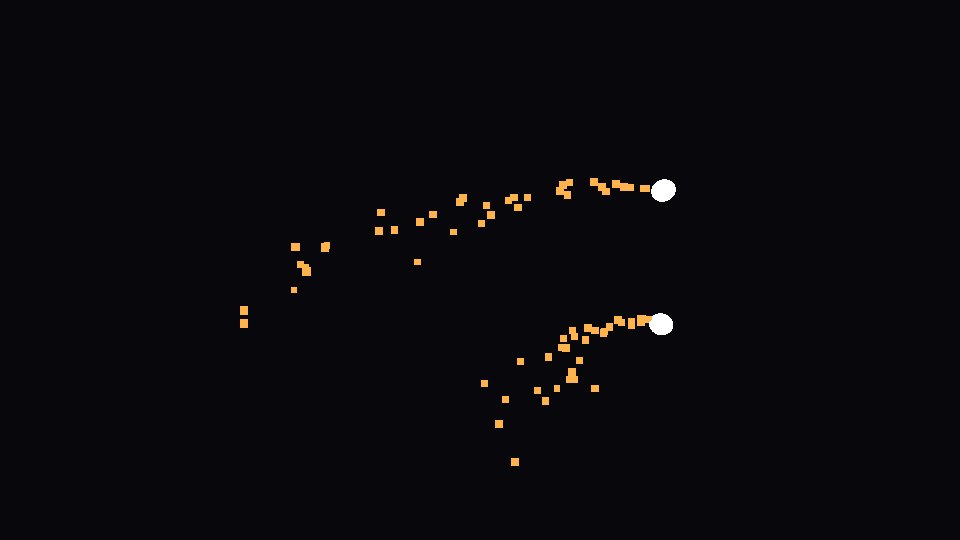
A GPUParticles3D with local_coords off, the default, leaves each particle where it was born, at the speed you gave it, so sparks from a fast sword or kart trail far behind. Set inherit_velocity_ratio in the ParticleProcessMaterial: 1 gives a new particle the emitter's full speed, 0.6 gives it 60%. Unlike local_coords, the particles are not glued to the emitter: when it stops, they fly on.
The code
Attach this to a GPUParticles3D on the moving object, or as a child of it, for sparks thrown up as it moves. The inherit_velocity_ratio line is the fix.
extends GPUParticles3D
## Sparks thrown off a moving object: they keep part of its speed, like sparks from
## a sword swing or dust behind a fast kart. Move this node, or its parent, in your game.


func _ready() -> void:
	amount = 40
	lifetime = 0.8
	var m := ParticleProcessMaterial.new()
	m.inherit_velocity_ratio = 0.6  # the fix: each new spark gets 60% of the emitter's speed
	m.direction = Vector3.UP
	m.spread = 60.0
	m.initial_velocity_min = 0.5
	m.initial_velocity_max = 1.0
	m.gravity = Vector3(0, -4, 0)
	process_material = m
	var mat := StandardMaterial3D.new()
	mat.shading_mode = BaseMaterial3D.SHADING_MODE_UNSHADED
	mat.billboard_mode = BaseMaterial3D.BILLBOARD_PARTICLES
	mat.albedo_color = Color(1.0, 0.7, 0.3)
	var q := QuadMesh.new()
	q.size = Vector2(0.06, 0.06)
	q.material = mat
	draw_pass_1 = q
What we measured
The emitter moved sideways at 4 meters per second. Its particles had no speed of their own and no gravity, lived 1 second, and 12 were alive at a time. After 1.5 seconds we measured where they were, in meters from the emitter (minus is behind it), with a camera that moved along with it. Three runs gave close numbers.
- Ratio 0, the default: from 3.63 to 0.24 meters behind. A long line, left where each particle was born.
- The script, 0.6: from 1.41 to 1.46 meters behind up to 0.02 to 0.08 meters behind. They kept 60% of the speed and fell back much less.
- Ratio 1: 0.03 to 0.10 meters up to 0.16 to 0.22 meters in front. They moved along with the emitter.
local_coordson, ratio 0: within 0.03 meters of the emitter.- A new ParticleProcessMaterial had
inherit_velocity_ratioat 0.0, and a new GPUParticles3D hadlocal_coordsoff.
Inherit velocity or local_coords
Ratio 1 and local_coords looked the same while the emitter moved. Then we stopped it and looked again 0.3 seconds later:
- Ratio 1: the particles flew on, up to 1.49 meters past the emitter. Ratio 0.6: up to 0.73 meters past it.
local_coordson: still within 0.03 meters. They stopped with it.
Use the ratio for things that are thrown off, such as sparks, debris and splashes. Use local_coords for things that belong to the object, such as an aura or engine glow.
What to change
inherit_velocity_ratio: 0 to 1. Lower values leave a longer trail.spread, the velocities andgravity: how high and wide the sparks go on top of the inherited speed.lifetime: how long the trail behind the object is.
Dust that should trail behind a running character: running dust particles. Sparks that circle and walk with a character: magic aura particles. Foam behind a boat: a boat wake. Particles that fall sideways when the emitter is turned: gravity on a rotated emitter.
Tested in Godot 4.7 with the Compatibility renderer.
More how-tos: Play, stop and remove effects
- Remove a one-shot particle effect when it ends
- Fade out and stop looping particles
- Spawn a hit effect facing the surface
- Hit sparks from a pool of emitters
- Changing one particle effect's color changes all of them
- Particles that play the same way every time
- Freeze particles in mid-air
- Running dust and landing puffs
- 2D particles follow the player or stay behind
- Footstep particles that match the ground
- A level up effect that plays while paused
- Hide particle effects far from the camera
- Death particles disappear when the enemy is freed
- Remove all particles at once