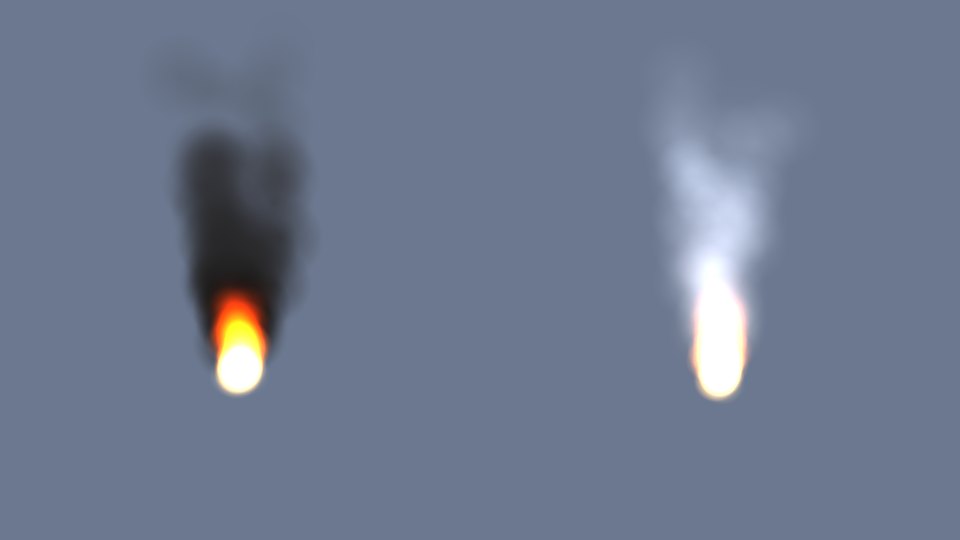
Use two GPUParticles3D under one node. Set the flame material blend_mode to Add so overlapping flames glow, keep the smoke on Mix so it can be darker than the sky, and give the flame material a higher render_priority than the smoke. Without that, the smoke was drawn over the flame when the camera looked down at the fire.
The code
Put this on a Node3D with a Camera3D pointed at it. The smoke is the first child and the flame is the second.
Need only one emitter? See fire that turns to smoke in a cone.
extends Node3D
## Bright fire with dark smoke: two GPUParticles3D under one node.
## The flame is additive, so it glows. The smoke uses alpha blending, so it can be darker than what is behind it.

func _ready() -> void:
	var smoke := _emitter(60, 3.0, 0.3, Vector2(0.8, 1.4), 20.0, _smoke_ramp(), _curve(0.35, 1.0))
	smoke.position = Vector3(0, 0.7, 0)  # starts inside the top of the flame
	smoke.visibility_aabb = AABB(Vector3(-3, -1, -3), Vector3(6, 8, 6))
	smoke.draw_pass_1 = _quad(1.6, BaseMaterial3D.BLEND_MODE_MIX, 0)
	add_child(smoke)

	var flame := _emitter(90, 0.9, 0.2, Vector2(1.2, 2.0), 12.0, _flame_ramp(), _curve(1.0, 0.35))
	flame.visibility_aabb = AABB(Vector3(-2, -1, -2), Vector3(4, 4, 4))
	flame.draw_pass_1 = _quad(0.9, BaseMaterial3D.BLEND_MODE_ADD, 1)  # priority 1 = drawn after the smoke
	add_child(flame)


func _emitter(amount: int, life: float, radius: float, speed: Vector2, spread: float, ramp: GradientTexture1D, grow: CurveTexture) -> GPUParticles3D:
	var fx := GPUParticles3D.new()
	fx.amount = amount
	fx.lifetime = life
	fx.preprocess = life  # start full, not from nothing
	var p := ParticleProcessMaterial.new()
	p.emission_shape = ParticleProcessMaterial.EMISSION_SHAPE_SPHERE
	p.emission_sphere_radius = radius
	p.direction = Vector3.UP
	p.spread = spread
	p.initial_velocity_min = speed.x
	p.initial_velocity_max = speed.y
	p.gravity = Vector3(0, 0.4, 0)  # hot air rises
	p.scale_min = 0.6
	p.scale_max = 1.2
	p.scale_curve = grow
	p.color_ramp = ramp
	fx.process_material = p
	return fx


func _flame_ramp() -> GradientTexture1D:
	return _ramp([0.0, 0.12, 0.55, 1.0], [
		Color(1.0, 0.85, 0.4, 0.0),
		Color(1.0, 0.6, 0.2, 0.9),
		Color(0.9, 0.22, 0.04, 0.5),
		Color(0.4, 0.05, 0.0, 0.0),
	])


func _smoke_ramp() -> GradientTexture1D:
	return _ramp([0.0, 0.1, 0.7, 1.0], [
		Color(0.08, 0.07, 0.06, 0.0),
		Color(0.1, 0.09, 0.08, 0.75),  # darker than most skies
		Color(0.18, 0.18, 0.19, 0.45),
		Color(0.24, 0.24, 0.25, 0.0),
	])


func _ramp(offsets: Array, colors: Array) -> GradientTexture1D:
	var g := Gradient.new()
	g.offsets = PackedFloat32Array(offsets)
	g.colors = PackedColorArray(colors)
	var t := GradientTexture1D.new()
	t.gradient = g
	return t


func _curve(start: float, end: float) -> CurveTexture:
	var c := Curve.new()
	c.add_point(Vector2(0.0, start))
	c.add_point(Vector2(1.0, end))
	var t := CurveTexture.new()
	t.curve = c
	return t


func _quad(size: float, blend: int, priority: int) -> QuadMesh:
	var g := Gradient.new()
	g.colors = PackedColorArray([Color(1, 1, 1, 1), Color(1, 1, 1, 0)])
	var soft := GradientTexture2D.new()
	soft.gradient = g
	soft.fill = GradientTexture2D.FILL_RADIAL
	soft.fill_from = Vector2(0.5, 0.5)
	soft.fill_to = Vector2(1.0, 0.5)

	var mat := StandardMaterial3D.new()
	mat.shading_mode = BaseMaterial3D.SHADING_MODE_UNSHADED
	mat.transparency = BaseMaterial3D.TRANSPARENCY_ALPHA
	mat.blend_mode = blend
	mat.billboard_mode = BaseMaterial3D.BILLBOARD_PARTICLES
	mat.vertex_color_use_as_albedo = true
	mat.albedo_texture = soft
	mat.render_priority = priority  # higher = drawn later, on top
	var q := QuadMesh.new()
	q.size = Vector2(size, size)
	q.material = mat
	return q
Why the smoke is not additive
Additive blending can only add light. We put the smoke alone in front of a light gray background and checked a grid of 129,600 points on the screen. With alpha blending, 7,143 points were darker than the background and none were brighter. Switched to additive, none were darker and 5,042 were brighter: the dark smoke turned into the pale haze on the right of the picture above.
Why the flame is additive
With alpha blending, a particle is never brighter than its own color, so flames that overlap do not get any hotter. On a dark background, the additive flame had 513 points close to white. The same flame with alpha blending had 0, and about a third fewer glowing points (672 against 1,006).
Keep the flame on top with render_priority
Godot sorts transparent objects by their distance to the camera, one emitter at a time, so which emitter is drawn last can change as the camera moves. With the same priority on both materials, the flame stayed on top when we looked from the side and from below. From a camera above the fire, the smoke was drawn last, and only 4 points of the flame were still close to white, against 347 with the flame on top.
A material with a higher render_priority is drawn later. With the flame at 1 and the smoke at 0, the flame stayed on top from all three cameras. The other way around, the smoke covered about two thirds of the flame even from the side (170 points close to white, against 514).
What to change
smoke.position: where the smoke starts. Keep it inside the top of the flame so there is no gap.- The second color in the smoke ramp: how dark the smoke is.
amounton each emitter: how thick the flame and the smoke look.render_priority: keep the flame higher than the smoke.
Smoke that leaves a hard line where it meets the ground: soft particles with Proximity Fade.
Tested in Godot 4.7 with the Compatibility renderer.
Ready-made: Fire, Ice, Wind & Earth Elemental VFX for Godot 4 has 52 ready-made spells, including a fire wall and a flamethrower.
More how-tos: Fire, smoke and explosions
- Fire that turns to smoke in a cone
- Smoke particles leave a hard line on the ground
- Particles drawing in the wrong order
- Explosion effect in one burst
- 3D debris particles not rotating
- Particles all disappear at once
- Muzzle flash with a real light
- Glowing particles in Godot 4
- Glowing particles cast dark shadows
- Particles from the surface of a mesh, at runtime
- Fireworks without sub-emitters
- Fire or dust over a whole building