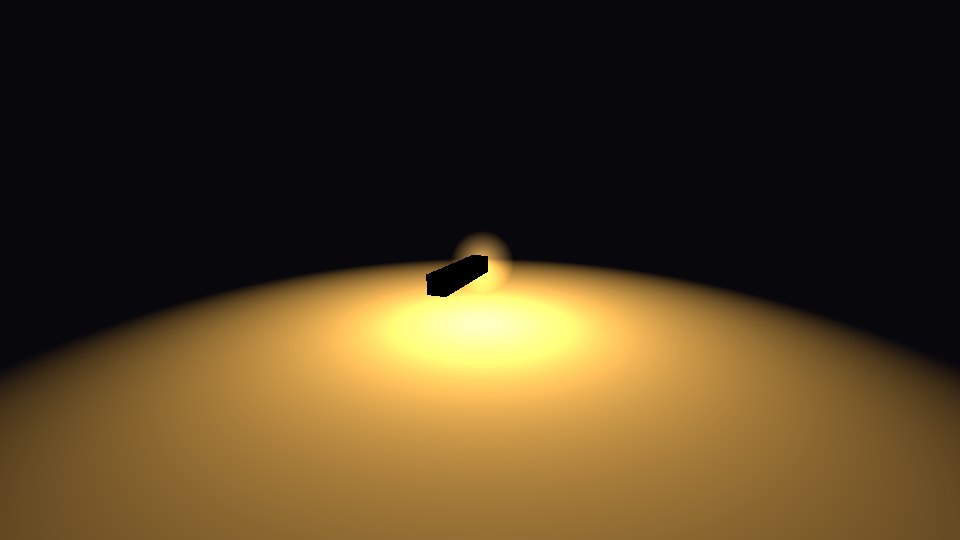
Use two parts at the barrel tip: an OmniLight3D that lights the scene for about 0.05 seconds and fades, and a small additive quad for the flash itself. Keep one countdown that every shot restarts, so a new shot never gets cut short by the one before it.
The code
Add this script to a Node3D at the tip of your gun and call fire() on every shot.
extends Node3D
## Muzzle flash: a short light plus a bright flash quad. Put it at the barrel tip and call fire() on every shot.

@export var flash_time := 0.05  # seconds
@export var light_energy := 2.5
@export var color := Color(1.0, 0.75, 0.35)

var _light := OmniLight3D.new()
var _flash := MeshInstance3D.new()
var _left := 0.0


func _ready() -> void:
	_light.light_color = color
	_light.omni_range = 3.0
	_light.light_energy = 0.0
	add_child(_light)
	var g := Gradient.new()  # white to black: with additive blending, black adds nothing
	g.colors = PackedColorArray([Color(1, 1, 1), Color(0, 0, 0)])
	var t := GradientTexture2D.new()
	t.gradient = g
	t.fill = GradientTexture2D.FILL_RADIAL
	t.fill_from = Vector2(0.5, 0.5)
	t.fill_to = Vector2(1.0, 0.5)
	var m := StandardMaterial3D.new()
	m.shading_mode = BaseMaterial3D.SHADING_MODE_UNSHADED
	m.blend_mode = BaseMaterial3D.BLEND_MODE_ADD
	m.billboard_mode = BaseMaterial3D.BILLBOARD_ENABLED
	m.albedo_texture = t
	m.albedo_color = color
	var q := QuadMesh.new()
	q.size = Vector2(0.5, 0.5)
	q.material = m
	_flash.mesh = q
	_flash.visible = false
	add_child(_flash)


func fire() -> void:
	_left = flash_time  # restart the timer: a new shot never gets cut short by the last one
	_flash.scale = Vector3.ONE * randf_range(0.8, 1.2)


func _process(delta: float) -> void:
	if _left <= 0.0:
		_light.light_energy = 0.0
		_flash.visible = false
		return
	_light.light_energy = light_energy * clampf(_left / flash_time, 0.0, 1.0)  # fades over the flash
	_flash.visible = true
	_left -= delta
In our test the floor in front of the gun was 19 times brighter on the first frame after a shot, then went back to exactly how it looked before. The light's energy was back at 0 and the flash quad was hidden.
The flash is a square
Our first try used a white-to-transparent texture with additive blending, and the flash showed up as a square: the transparent corners still added light. The texture in the script fades from white to black instead. Black adds nothing, so the flash is round.
Fast bursts
Each fire() restarts the same countdown instead of starting a new timer. We fired every 0.03 seconds, faster than the 0.05 second flash: the light did not go dark for a single frame during the burst, and it was off again after the last shot.
What to change
light_energyand_light.omni_range: how much of the scene the flash lights up.flash_time: 0.05 is a short gunshot. A bigger cannon can stay lit longer.color: warm orange for gunpowder, blue or green for energy weapons.
Sparks with a soft glow around them: glowing particles.
Tested in Godot 4.7 with the Compatibility renderer.
Ready-made: FPS Combat Kit for Godot 4 has a muzzle flash with a real light, shell ejection and barrel smoke when the barrel gets hot.
More how-tos: Fire, smoke and explosions
- Fire that turns to smoke in a cone
- Bright fire with dark smoke
- Smoke particles leave a hard line on the ground
- Particles drawing in the wrong order
- Explosion effect in one burst
- 3D debris particles not rotating
- Particles all disappear at once
- Glowing particles in Godot 4
- Glowing particles cast dark shadows
- Particles from the surface of a mesh, at runtime
- Fireworks without sub-emitters
- Fire or dust over a whole building