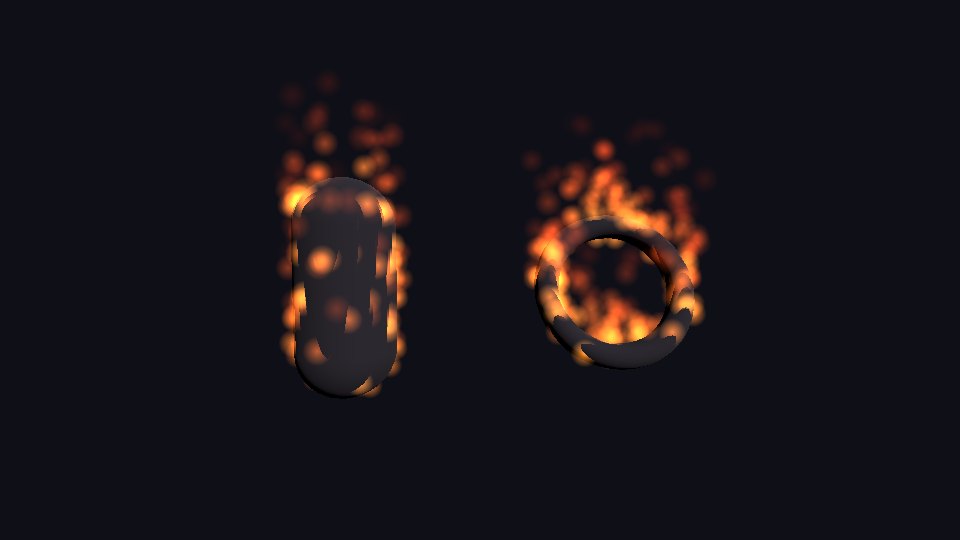
Read the triangles with mesh.get_faces(), pick random points on them with bigger triangles picked more often, and write the points into an Image in FORMAT_RGBF. Use it as emission_point_texture with the emission shape set to Points. Move the points from the mesh's space into the emitter's space first, or a mesh that is moved or scaled gets particles somewhere else. The editor can bake emission points for one mesh (the GPUParticles3D menu, Create Emission Points From Node). This script makes them from code, for any mesh, while the game runs.
The code
Add a GPUParticles3D next to your character, attach this script and set source to the character's MeshInstance3D. For an enemy you spawn from code, set source before you add the node, or call set_points_from() later.
extends GPUParticles3D
## Particles that start on the surface of a mesh: a character on fire, a poisoned enemy.
## Set source to a MeshInstance3D. Works on any mesh, also one spawned at runtime.

@export var source: MeshInstance3D
@export var point_count := 1024
@export var color := Color(1.0, 0.55, 0.15)


func _ready() -> void:
	amount = 160
	lifetime = 0.8
	local_coords = false
	var m := ParticleProcessMaterial.new()
	m.emission_shape = ParticleProcessMaterial.EMISSION_SHAPE_POINTS
	m.direction = Vector3.UP
	m.spread = 15.0
	m.initial_velocity_min = 0.3
	m.initial_velocity_max = 0.8
	m.gravity = Vector3(0, 1.5, 0)  # flames rise
	m.scale_min = 0.6
	var g := Gradient.new()
	g.colors = PackedColorArray([color, Color(1.0, 0.15, 0.05, 0.0)])
	var ramp := GradientTexture1D.new()
	ramp.gradient = g
	m.color_ramp = ramp
	process_material = m
	draw_pass_1 = _flame()
	if source:
		set_points_from(source)


func set_points_from(mesh_node: MeshInstance3D) -> void:
	var faces := mesh_node.mesh.get_faces()  # 3 corners per triangle, in the mesh's own space
	# Mesh space -> this node's space, so a mesh that is moved, turned or scaled still lines up.
	var to_here := global_transform.affine_inverse() * mesh_node.global_transform
	var sums := PackedFloat32Array()  # running total of triangle areas
	var total := 0.0
	for i in range(0, faces.size(), 3):
		total += (faces[i + 1] - faces[i]).cross(faces[i + 2] - faces[i]).length() * 0.5
		sums.append(total)
	var rng := RandomNumberGenerator.new()
	var img := Image.create_empty(point_count, 1, false, Image.FORMAT_RGBF)
	for n in point_count:
		# Pick a triangle, bigger ones more often, then a random point inside it.
		var t := mini(sums.bsearch(rng.randf() * total), sums.size() - 1)
		var a := faces[t * 3]
		var u := rng.randf()
		var v := rng.randf()
		if u + v > 1.0:
			u = 1.0 - u
			v = 1.0 - v
		var p := to_here * (a + (faces[t * 3 + 1] - a) * u + (faces[t * 3 + 2] - a) * v)
		img.set_pixel(n, 0, Color(p.x, p.y, p.z))
	var m := process_material as ParticleProcessMaterial
	m.emission_point_texture = ImageTexture.create_from_image(img)
	m.emission_point_count = point_count


func _flame() -> QuadMesh:
	var g := Gradient.new()
	g.colors = PackedColorArray([Color(1, 1, 1, 1), Color(1, 1, 1, 0)])
	var t := GradientTexture2D.new()
	t.gradient = g
	t.fill = GradientTexture2D.FILL_RADIAL
	t.fill_from = Vector2(0.5, 0.5)
	t.fill_to = Vector2(1.0, 0.5)
	var mat := StandardMaterial3D.new()
	mat.shading_mode = BaseMaterial3D.SHADING_MODE_UNSHADED
	mat.transparency = BaseMaterial3D.TRANSPARENCY_ALPHA
	mat.blend_mode = BaseMaterial3D.BLEND_MODE_ADD
	mat.billboard_mode = BaseMaterial3D.BILLBOARD_PARTICLES
	mat.vertex_color_use_as_albedo = true
	mat.albedo_texture = t
	var q := QuadMesh.new()
	q.size = Vector2(0.22, 0.22)
	q.material = mat
	return q
On a capsule 0.8 meters wide and 1.8 tall (3456 triangles), we read the 1024 points back from the texture: the farthest one was 2 millimeters from the surface of the capsule, and on average they were 0.7 millimeters from it. On screen the fire was 0.99 meters wide around the 0.8 meter body, and the flames rose 0.36 meters over its head.
Why pick big triangles more often
A mesh is not made of equal triangles. On the capsule, the round ends have many small ones. The straight middle part is 55.6% of the capsule's surface, and with picks weighted by area it got 57.4% of the points. With every triangle given the same chance, it got 31.7%: two thirds of the fire sat on the head and the feet.
A mesh that is moved or scaled
get_faces() gives corners in the mesh's own space. The emitter reads its points in its own space. We put a capsule 5 meters from the emitter and scaled it 1.5 times. With to_here, the points were at most 3 millimeters off its surface. Without it, they were 4.85 meters off on average: the fire burned where the emitter was, at the mesh's original size.
Build the points again with set_points_from() if the mesh node changes size or the emitter moves away from it.
What to change
point_count: more points for big meshes. Building the points took 4.72 ms for 1024 points and 2.61 ms for 4096 right after.colorand the gravity: green and slower for poison, blue and falling for frost.amountandlifetime: how thick the fire is and how far the flames go.
An effect around a character instead of on it: magic aura particles around a character. A flame that turns into smoke: fire and smoke with two emitters.
Tested in Godot 4.7 with the Compatibility renderer.
Ready-made: Status Effect VFX for Godot 4 has Burn, Soulfire Burn, Poison, Freeze, Petrify and more. Each one is a child of your character: apply() starts it, remove() fades it out, and Body Height scales it to your character.
More how-tos: Fire, smoke and explosions
- Fire that turns to smoke in a cone
- Bright fire with dark smoke
- Smoke particles leave a hard line on the ground
- Particles drawing in the wrong order
- Explosion effect in one burst
- 3D debris particles not rotating
- Particles all disappear at once
- Muzzle flash with a real light
- Glowing particles in Godot 4
- Glowing particles cast dark shadows
- Fireworks without sub-emitters
- Fire or dust over a whole building