Two things: glow_enabled on the Environment of your WorldEnvironment, which is off by default, and particles brighter than glow_hdr_threshold, which is 1.0 by default. A color tops out at 1.0, so use emission: emission_enabled on and emission_energy_multiplier above 1. It works in the Compatibility renderer too.
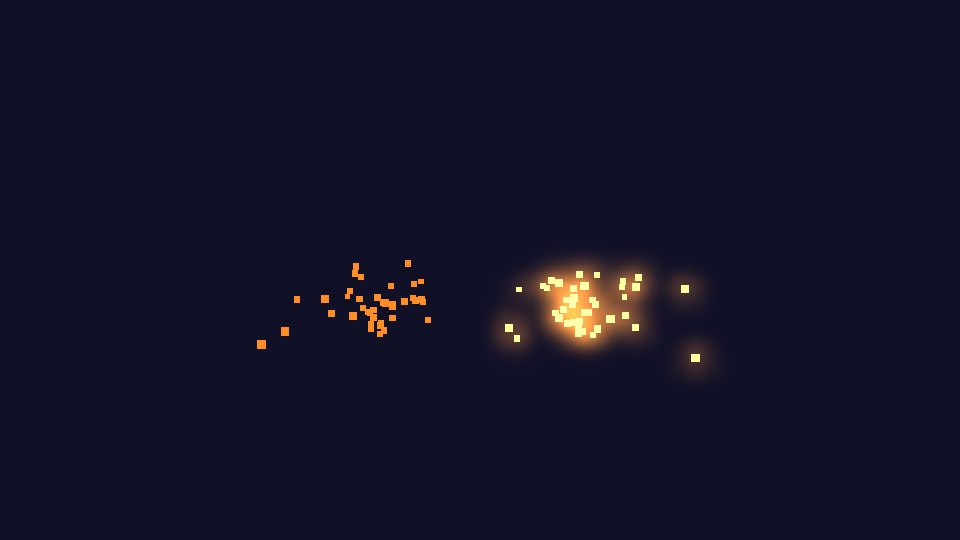
The code
Attach this to a Node3D for a fountain of sparks that glow. It makes its own WorldEnvironment: if your scene already has one, leave that part out and turn glow on in yours. The lines marked fix 1 and fix 2 are the two settings.
extends Node3D
## Sparks that glow. Two things are needed: glow turned on in the WorldEnvironment,
## and particles brighter than white, here from emission with an energy above 1.

var env := Environment.new()
var sparks := GPUParticles3D.new()


func _ready() -> void:
	env.background_mode = Environment.BG_COLOR
	env.background_color = Color(0.02, 0.02, 0.04)
	env.glow_enabled = true  # fix 1: glow is off by default
	env.glow_intensity = 1.0
	var we := WorldEnvironment.new()
	we.environment = env
	add_child(we)
	sparks.amount = 40
	sparks.lifetime = 1.0
	var m := ParticleProcessMaterial.new()
	m.direction = Vector3.UP
	m.spread = 35.0
	m.initial_velocity_min = 1.5
	m.initial_velocity_max = 2.5
	m.gravity = Vector3(0, -3, 0)
	sparks.process_material = m
	var mat := StandardMaterial3D.new()
	mat.billboard_mode = BaseMaterial3D.BILLBOARD_PARTICLES
	mat.albedo_color = Color.BLACK
	mat.emission_enabled = true
	mat.emission = Color(1.0, 0.55, 0.15)
	mat.emission_energy_multiplier = 4.0  # fix 2: brighter than white, so the glow picks it up
	var q := QuadMesh.new()
	q.size = Vector2(0.08, 0.08)
	q.material = mat
	sparks.draw_pass_1 = q
	add_child(sparks)
What we measured
One spark that does not move, in the middle of the screen. We counted the lit points on a grid of every second pixel, and read the color in the middle and 12 pixels to the side. Two runs gave the same numbers.
- The script: 265 lit points. 12 pixels out the color was 0.36/0.24/0.20, an orange glow around the spark.
- Glow off: 25 lit points, and 12 pixels out was the background, 0.02/0.02/0.04.
- Glow on, emission energy 1: 25 lit points and no orange around the spark. 12 pixels out: 0.06/0.06/0.15.
- Energy 4, but
glow_hdr_thresholdraised to 5: 25 lit points, no glow either. - A new Environment had glow off and a threshold of 1.0.
The middle turns pale
With energy 4, the middle of the spark read 1.00/1.00/0.63, pale yellow. At energy 1 it was the orange we set, 1.00/0.55/0.14. A spark bright enough to glow loses its color in the middle, and the color shows in the glow around it. Pick the emission color for the glow.
What to change
emission_energy_multiplier: how strong the glow of the sparks is.glow_intensityin the Environment: the glow of the whole screen.glow_hdr_threshold: raise it to keep the rest of the scene from glowing, and keep the sparks' energy above it.
Sparks that point where they fly: particle trails in Compatibility. A muzzle flash that lights up the room: muzzle flash with a light. Glowing sparks that throw dark squares on the floor: particles casting shadows.
Tested in Godot 4.7 with the Compatibility renderer.
More how-tos: Fire, smoke and explosions
- Fire that turns to smoke in a cone
- Bright fire with dark smoke
- Smoke particles leave a hard line on the ground
- Particles drawing in the wrong order
- Explosion effect in one burst
- 3D debris particles not rotating
- Particles all disappear at once
- Muzzle flash with a real light
- Glowing particles cast dark shadows
- Particles from the surface of a mesh, at runtime
- Fireworks without sub-emitters
- Fire or dust over a whole building