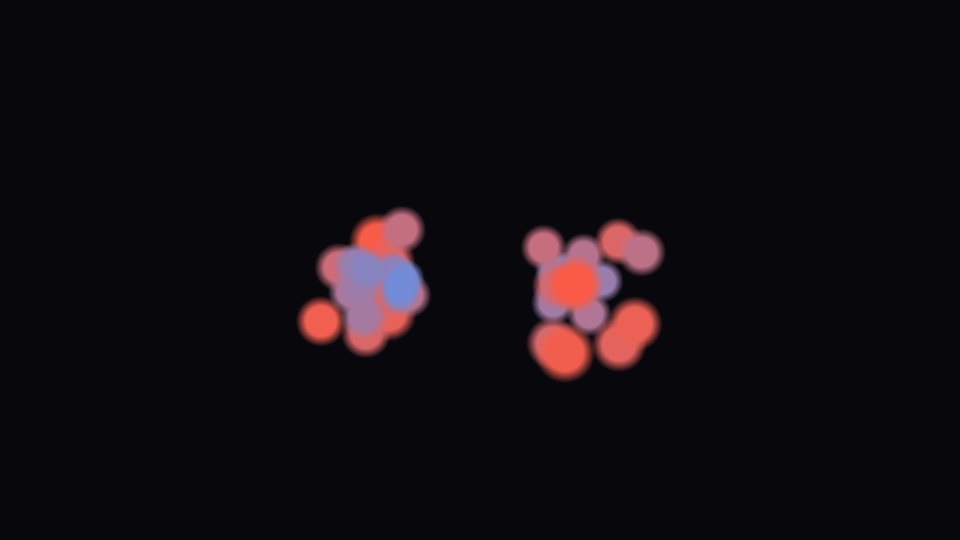
With transparent particles, the one drawn last ends up on top. With draw_order on Index, the default, that was simply the particle born last in our test, so a far particle covered a near one. Set draw_order to View Depth (Drawing, Draw Order in the Inspector): far particles are drawn first and near ones last, seen from wherever the camera is.
The code
Attach this to a GPUParticles3D for soft puffs that drift toward the camera, blue when born and red when old. The draw_order line is the fix. The puff is a GradientTexture2D, so there is no image file to import.
extends GPUParticles3D
## Soft colored puffs drifting toward the camera. Transparent particles are not
## sorted by distance unless you ask: draw_order View Depth puts near puffs on top.


func _ready() -> void:
	amount = 24
	lifetime = 3.0
	draw_order = GPUParticles3D.DRAW_ORDER_VIEW_DEPTH  # the fix: far puffs first, near puffs last
	var m := ParticleProcessMaterial.new()
	m.direction = Vector3(0, 0.25, 1)
	m.spread = 25.0
	m.initial_velocity_min = 0.6
	m.initial_velocity_max = 0.9
	m.gravity = Vector3.ZERO
	var ramp := Gradient.new()  # blue when born, red when old
	ramp.set_color(0, Color(0.3, 0.6, 1.0))
	ramp.set_color(1, Color(1.0, 0.35, 0.25))
	var rt := GradientTexture1D.new()
	rt.gradient = ramp
	m.color_ramp = rt
	process_material = m
	var dot := Gradient.new()  # a soft round puff without an image file
	dot.set_color(0, Color(1, 1, 1, 1))
	dot.set_color(1, Color(1, 1, 1, 0))
	dot.add_point(0.6, Color(1, 1, 1, 1))
	var dt := GradientTexture2D.new()
	dt.gradient = dot
	dt.fill = GradientTexture2D.FILL_RADIAL
	dt.fill_from = Vector2(0.5, 0.5)
	dt.fill_to = Vector2(1.0, 0.5)
	var mat := StandardMaterial3D.new()
	mat.shading_mode = BaseMaterial3D.SHADING_MODE_UNSHADED
	mat.transparency = BaseMaterial3D.TRANSPARENCY_ALPHA
	mat.billboard_mode = BaseMaterial3D.BILLBOARD_PARTICLES
	mat.vertex_color_use_as_albedo = true
	mat.albedo_texture = dt
	var q := QuadMesh.new()
	q.size = Vector2(0.6, 0.6)
	q.material = mat
	draw_pass_1 = q
What we measured
Two particles on the line between the camera and the emitter, both moving toward the camera. The first is born at 0 seconds, so after 1.5 seconds it is the nearer one and red. The second is born at 1 second, farther away and blue. We read the color in the middle of the screen, where they overlap. Two runs gave the same colors.
- Index (the default): 0.47/0.54/0.82, blue. The far particle covered the near one.
- Lifetime: the same blue.
- Reverse Lifetime: 0.81/0.42/0.45, red, the near one on top.
- View Depth: the same red.
Why View Depth and not Reverse Lifetime
Reverse Lifetime got it right here because the older particle was the nearer one. That depends on how your particles move. View Depth is the one that follows the camera. We moved the camera to the other side, so the blue particle was now the near one:
- View Depth: 0.46/0.54/0.83, blue. The near one was on top again.
- Index: blue as well, the same order as before. It only looked right because the camera had moved.
What to change
- The two colors of the ramp: they are there to show the order. Use your smoke colors once it looks right.
directionandspread: where the puffs go.q.sizeand the 0.6 point of the dot gradient: the size of a puff and how soft its edge is.
Particles behind a window or water surface: particles behind transparent water or glass. Smoke from a fire: fire and smoke with two emitters. A square box around each puff: particle texture shows a square box.
Tested in Godot 4.7 with the Compatibility renderer.
More how-tos: Fire, smoke and explosions
- Fire that turns to smoke in a cone
- Bright fire with dark smoke
- Smoke particles leave a hard line on the ground
- Explosion effect in one burst
- 3D debris particles not rotating
- Particles all disappear at once
- Muzzle flash with a real light
- Glowing particles in Godot 4
- Glowing particles cast dark shadows
- Particles from the surface of a mesh, at runtime
- Fireworks without sub-emitters
- Fire or dust over a whole building