A see-through surface and a see-through particle emitter are each sorted as one object, by where the object is. So when one emitter has particles on both sides of a window or a water surface, all of them are drawn either before it (all look behind it) or after it (all look in front of it). Set the particle material's transparency to Alpha Scissor: each particle is then drawn like a solid mesh and depth tested, so the ones behind the glass look behind it and the ones in front look in front.
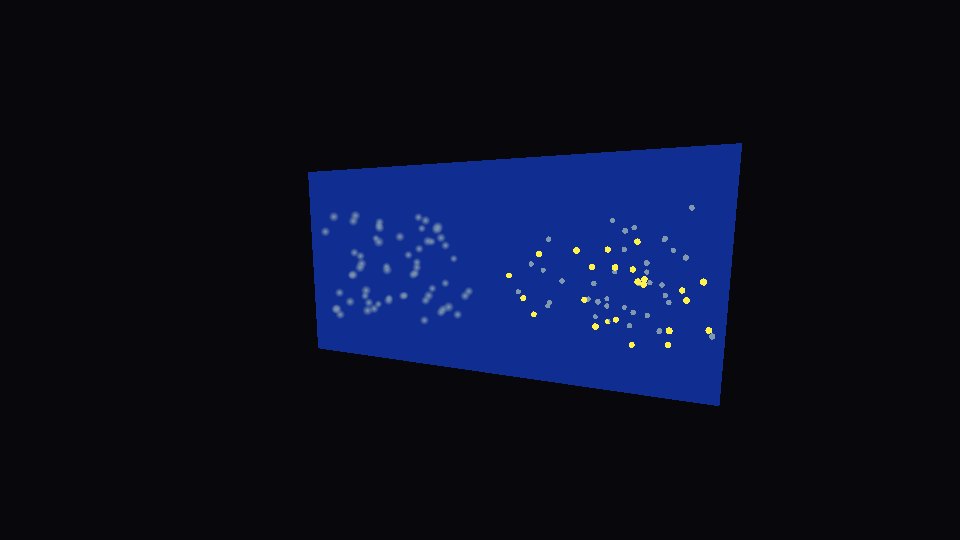
The code
Attach this to a GPUParticles3D near your water or window. It is a cloud of fireflies; the part that matters for the glass is the material at the end, with TRANSPARENCY_ALPHA_SCISSOR and a round dot texture.
extends GPUParticles3D
## Fireflies, bubbles or sparks that sit on both sides of water or glass and still look right.
## Alpha Scissor makes each particle solid or invisible per pixel, so it is depth tested
## like an opaque mesh instead of being sorted as one block with the other transparent objects.

@export var color := Color(1.0, 0.95, 0.3)
@export var size := 0.2
@export var cutoff := 0.5  # pixels of the dot texture below this alpha are not drawn


func _ready() -> void:
	amount = 60
	lifetime = 4.0
	var m := ParticleProcessMaterial.new()
	m.emission_shape = ParticleProcessMaterial.EMISSION_SHAPE_BOX
	m.emission_box_extents = Vector3(1.5, 1.0, 1.0)
	m.gravity = Vector3.ZERO
	m.initial_velocity_min = 0.0
	m.initial_velocity_max = 0.2
	process_material = m
	var g := Gradient.new()  # a round dot: solid in the middle, clear at the edge
	g.colors = PackedColorArray([Color(1, 1, 1, 1), Color(1, 1, 1, 0)])
	var t := GradientTexture2D.new()
	t.gradient = g
	t.fill = GradientTexture2D.FILL_RADIAL
	t.fill_from = Vector2(0.5, 0.5)
	t.fill_to = Vector2(1.0, 0.5)
	var mat := StandardMaterial3D.new()
	mat.shading_mode = BaseMaterial3D.SHADING_MODE_UNSHADED
	mat.billboard_mode = BaseMaterial3D.BILLBOARD_PARTICLES
	mat.transparency = BaseMaterial3D.TRANSPARENCY_ALPHA_SCISSOR
	mat.alpha_scissor_threshold = cutoff
	mat.albedo_texture = t
	mat.albedo_color = color
	var q := QuadMesh.new()
	q.size = Vector2(size, size)
	q.material = mat
	draw_pass_1 = q
What we tested
We put a blue see-through pane in front of the camera and one emitter that lets out particles from two fixed points: one 0.8 meters in front of the emitter and one 0.8 meters behind it, on opposite sides of the pane. Then we read the pixel in the middle of each particle. The same result came out in two runs.
- Normal alpha blending, emitter behind the pane: both particles tinted blue. The one in front looked behind the glass.
- Normal alpha blending, emitter in front of the pane: both particles bright yellow. The one behind looked in front of the glass.
- The script, emitter behind the pane and emitter in front of it: the particle in front bright, the one behind tinted, both times.
sorting_offset only moves the whole emitter
With the emitter behind the pane and sorting_offset set to 2, both particles came out bright yellow. It changes where the whole emitter is sorted, so all its particles jumped in front of the glass, including the one behind it.
The cost: hard edges
With Alpha Scissor, each pixel of a particle is either drawn or not, so a soft glow becomes a dot with a hard edge. cutoff picks where the edge is: lower for bigger dots. For soft smoke or glow that has to cross a window, use two emitters instead, one on each side, so each one sorts as a whole.
What to change
colorandsize: the look of each dot.emission_box_extentsin_ready(): the space the cloud fills.
Bubbles that stop at the water surface: underwater bubbles. A splash on top of it: a water splash on the surface. Particles of one emitter covering each other in the wrong order: particles drawing in the wrong order.
Tested in Godot 4.7 with the Compatibility renderer.
Ready-made: Water & Splash VFX has 60 splash, wave and waterspout effects for Godot 4.