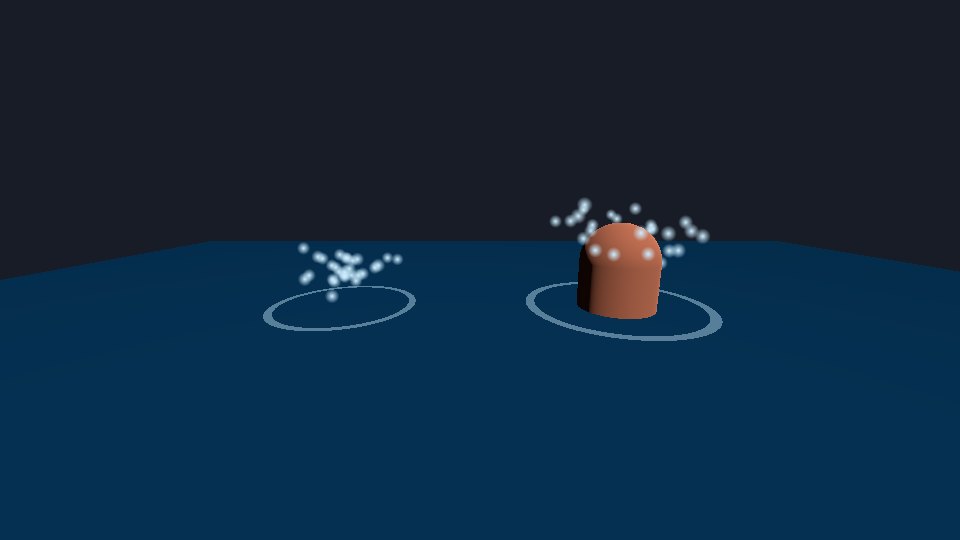
Put an Area3D on the water with a box whose top face is the water surface. In body_entered, read how fast the body is going down (velocity on a CharacterBody3D, linear_velocity on a RigidBody3D), skip slow ones so walking in stays quiet, and spawn the splash at the body's x and z but at the height of the surface. When the signal fires, a falling character's origin can still be more than half a meter above the water.
The code
Add an Area3D where your water is, give it a CollisionShape3D with a BoxShape3D, and move the box so its top face is the water surface. Attach this script. Connect splashed if you want a sound at the same point.
extends Area3D
## Water that splashes where things fall in. Give it a CollisionShape3D with a BoxShape3D:
## the top face of the box is the water surface. Works with CharacterBody3D and RigidBody3D.

signal splashed(body, at, strength)  # at = point on the surface, strength 0..1

@export var min_speed := 1.5  # m/s downward. Slower (walking in) = no splash
@export var full_speed := 10.0  # m/s downward for the biggest splash
@export var cooldown := 0.4  # seconds before the same body can splash again
@export var color := Color(0.8, 0.93, 1.0)

var _last := {}  # body id -> physics time of its last splash


func _ready() -> void:
	body_entered.connect(_on_body_entered)


func surface_y() -> float:
	for c in get_children():
		if c is CollisionShape3D and c.shape is BoxShape3D:
			return (c.global_transform * Vector3(0, c.shape.size.y * 0.5, 0)).y
	return global_position.y


func _on_body_entered(body: Node3D) -> void:
	var v := Vector3.ZERO
	if body is CharacterBody3D:
		v = body.velocity
	elif body is RigidBody3D:
		v = body.linear_velocity
	var now := Engine.get_physics_frames() / float(Engine.physics_ticks_per_second)
	var id := body.get_instance_id()
	if -v.y < min_speed or now - _last.get(id, -1000.0) < cooldown:
		return
	_last[id] = now
	# The body's origin is often well above or below the water here: use the surface height.
	var at := Vector3(body.global_position.x, surface_y(), body.global_position.z)
	var strength := clampf(-v.y / full_speed, 0.0, 1.0)
	_drops(at, strength)
	_ring(at, strength)
	splashed.emit(body, at, strength)


func _drops(at: Vector3, strength: float) -> void:
	var p := GPUParticles3D.new()
	p.one_shot = true
	p.explosiveness = 0.9
	p.lifetime = 0.9
	p.amount = int(lerpf(12, 48, strength))
	var m := ParticleProcessMaterial.new()
	m.emission_shape = ParticleProcessMaterial.EMISSION_SHAPE_RING
	m.emission_ring_axis = Vector3.UP
	m.emission_ring_radius = lerpf(0.2, 0.45, strength)
	m.emission_ring_inner_radius = m.emission_ring_radius * 0.6
	m.emission_ring_height = 0.0
	m.direction = Vector3.UP
	m.spread = 20.0
	m.initial_velocity_min = lerpf(1.5, 4.0, strength)
	m.initial_velocity_max = lerpf(2.5, 6.5, strength)
	m.gravity = Vector3(0, -12, 0)
	m.scale_min = 0.6
	p.process_material = m
	var dot := GradientTexture2D.new()
	dot.gradient = Gradient.new()
	dot.gradient.colors = PackedColorArray([Color(1, 1, 1, 1), Color(1, 1, 1, 0)])
	dot.fill = GradientTexture2D.FILL_RADIAL
	dot.fill_from = Vector2(0.5, 0.5)
	dot.fill_to = Vector2(1.0, 0.5)
	var mat := StandardMaterial3D.new()
	mat.shading_mode = BaseMaterial3D.SHADING_MODE_UNSHADED
	mat.transparency = BaseMaterial3D.TRANSPARENCY_ALPHA
	mat.billboard_mode = BaseMaterial3D.BILLBOARD_PARTICLES
	mat.albedo_texture = dot
	mat.albedo_color = color
	var q := QuadMesh.new()
	q.size = Vector2(0.14, 0.14)
	q.material = mat
	p.draw_pass_1 = q
	add_child(p)
	p.global_position = at
	p.finished.connect(p.queue_free)
	p.restart()  # restart(), not emitting = true, so finished fires and the node goes away


func _ring(at: Vector3, strength: float) -> void:
	var r := MeshInstance3D.new()
	var t := TorusMesh.new()
	t.inner_radius = 0.9
	t.outer_radius = 1.0
	var mat := StandardMaterial3D.new()
	mat.shading_mode = BaseMaterial3D.SHADING_MODE_UNSHADED
	mat.transparency = BaseMaterial3D.TRANSPARENCY_ALPHA
	mat.albedo_color = Color(color, 0.8)
	t.material = mat
	r.mesh = t
	add_child(r)
	r.global_position = at + Vector3(0, 0.02, 0)  # just above the water, so it does not flicker
	r.scale = Vector3(0.3, 0.05, 0.3)
	var size := lerpf(0.8, 1.8, strength)
	var tw := r.create_tween().set_parallel()
	tw.tween_property(r, "scale", Vector3(size, 0.05, size), 0.7).set_ease(Tween.EASE_OUT)
	tw.tween_property(mat, "albedo_color:a", 0.0, 0.7)
	tw.chain().tween_callback(r.queue_free)
We dropped a capsule character, 1.8 meters tall, from 1, 4 and 8 meters above the water. It reached the water at 4.57, 8.98 and 12.74 meters per second, which gave a strength of 0.46, 0.9 and 1.0 and splashes of 28, 44 and 48 drops. A RigidBody3D ball dropped from 4 meters reached it at 8.74 meters per second. Every splash started exactly at the surface height.
Why not spawn it at the body's position
When body_entered fired, the capsule's origin, in the middle of its body, was 0.79 meters above the water after the 1 meter drop, 0.71 after 4 meters and 0.51 after 8 meters. A splash spawned at global_position would have hung in the air. The ball's origin was 0.09 meters above. That is why surface_y() reads the top of the box, and only x and z come from the body.
Walking in, and bobbing at the surface
A character walking into the water from the side at 3 meters per second set off body_entered once and made 0 splashes: its downward speed was 0.
A character that went in and out of the water 10 times in 2 seconds made 10 splashes with cooldown at 0 and 4 with the default 0.4. The cooldown is per body: two balls that hit the water in the same frame made 2 splashes.
Nothing is left behind
1.5 seconds after the last splash, 0 splash nodes were left in the water. The drops free themselves on finished, which needs restart(), and the ring frees itself at the end of its tween. More on this: remove a one-shot particle effect when it ends.
What to change
min_speed: below this downward speed there is no splash, like the character that walked in above.full_speed: the fall speed for the biggest splash. A 4 meter fall reaches about 9 meters per second.cooldown: 0 splashes on every entry, even when a body bobs at the surface._drops()and_ring(): replace them with your own splash scene, spawned at the same point.
The water box can sit anywhere: in the test the Area3D was at a height of 0.5 and the box 1 meter below it inside, and every splash still started on the surface.
Splashes from walking through puddles: footstep particles that match the ground. An effect where something lands: spawn a hit effect at the impact point.
Tested in Godot 4.7 with the Compatibility renderer.
Ready-made: Water & Splash VFX for Godot 4 has a one-shot Splash with a crown of droplets, spray, ripple and mist, a Footstep Splash for puddles and mud, and Ripples. One-shot effects start with play().