Set the bubbles' ParticleProcessMaterial collision mode to Hide On Contact, then put a GPUParticlesCollisionBox3D above the water with its bottom face on the water surface. A bubble that rises into the box is hidden there. Particles with collision off, like fire or smoke above the water, pass through the box as if it was not there. This needs GPUParticles3D: CPUParticles3D ignore collision boxes.
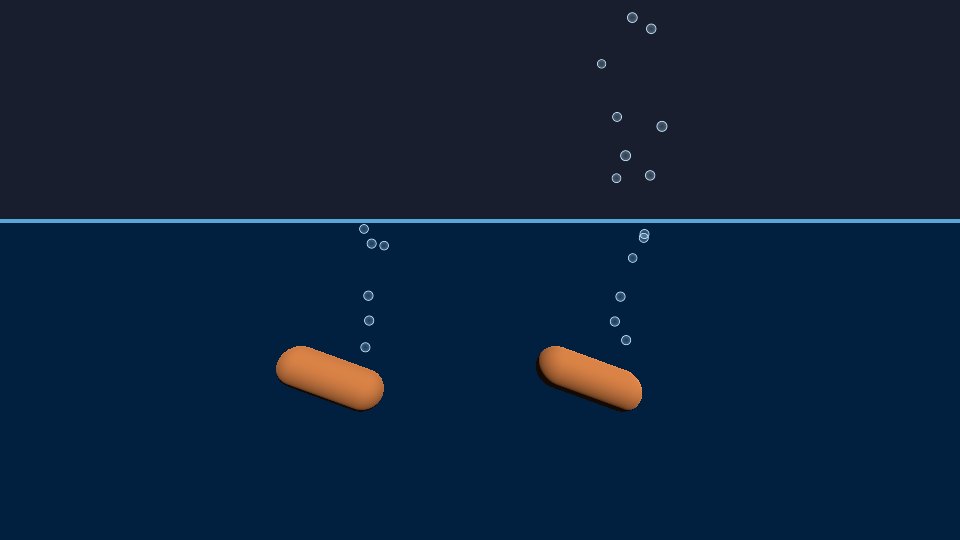
The bubbles
Add a GPUParticles3D where the bubbles come out, a diver's mouth or a vent on the sea floor, and attach this script. The line that matters is collision_mode. The rest is how the bubbles look and move.
extends GPUParticles3D
## Air bubbles that rise and vanish at the water surface.
## They need a GPUParticlesCollisionBox3D above the water: water_surface.gd below.

@export var max_depth := 6.0  # the deepest point you use this at, in meters
@export var rise_speed := Vector2(1.0, 1.8)  # slowest and fastest bubble, m/s
@export var size := 0.16
@export var color := Color(0.75, 0.9, 1.0)


func _ready() -> void:
	amount = 24
	local_coords = false
	# Long enough for the slowest bubble to reach the surface from max_depth.
	lifetime = max_depth / rise_speed.x + 0.5
	var m := ParticleProcessMaterial.new()
	m.emission_shape = ParticleProcessMaterial.EMISSION_SHAPE_SPHERE
	m.emission_sphere_radius = 0.1
	m.direction = Vector3.UP
	m.spread = 10.0
	m.initial_velocity_min = rise_speed.x
	m.initial_velocity_max = rise_speed.y
	m.gravity = Vector3.ZERO
	m.scale_min = 0.5
	m.scale_max = 1.0
	# The line that does the job: a particle that touches a collision shape is hidden.
	m.collision_mode = ParticleProcessMaterial.COLLISION_HIDE_ON_CONTACT
	process_material = m
	collision_base_size = size
	visibility_aabb = AABB(Vector3(-2, -1, -2), Vector3(4, max_depth + 3, 4))
	draw_pass_1 = _bubble()


func _bubble() -> QuadMesh:
	var g := Gradient.new()  # a thin bright ring with a faint middle
	g.offsets = PackedFloat32Array([0.0, 0.7, 0.85, 1.0])
	g.colors = PackedColorArray([Color(1, 1, 1, 0.15), Color(1, 1, 1, 0.3), Color(1, 1, 1, 1), Color(1, 1, 1, 0)])
	var t := GradientTexture2D.new()
	t.gradient = g
	t.fill = GradientTexture2D.FILL_RADIAL
	t.fill_from = Vector2(0.5, 0.5)
	t.fill_to = Vector2(1.0, 0.5)
	var mat := StandardMaterial3D.new()
	mat.shading_mode = BaseMaterial3D.SHADING_MODE_UNSHADED
	mat.transparency = BaseMaterial3D.TRANSPARENCY_ALPHA
	mat.billboard_mode = BaseMaterial3D.BILLBOARD_PARTICLES
	mat.albedo_texture = t
	mat.albedo_color = color
	var q := QuadMesh.new()
	q.size = Vector2(size, size)
	q.material = mat
	return q
Seen from the side, 10 meters away, with bubbles let out 2.5 meters under the water: 0 bubble pixels above the surface with the box below in the scene. With collision mode set back to Disabled, 27 pixels above the surface on average, and bubbles as high as 1.42 meters over the water.
The water surface
Add a GPUParticlesCollisionBox3D to your water scene and attach this script. You need one for each body of water, not one per bubble emitter. Set surface_y to the height of the water and water_size to how much of x and z the water covers.
extends GPUParticlesCollisionBox3D
## One per body of water. The bottom face of this box sits on the water surface,
## so particles with collision on (the bubbles above) vanish there.

@export var surface_y := 0.0  # world height of the water surface
@export var water_size := Vector2(40, 40)  # how much of x and z the water covers
@export var height := 20.0  # how far above the water the box reaches


func _ready() -> void:
	set_surface(surface_y)


func set_surface(y: float) -> void:  # call it again when the water level changes
	surface_y = y
	size = Vector3(water_size.x, height, water_size.y)
	global_position.y = y + height * 0.5
The box goes from the surface up to height meters above it. In the test its bottom face read 0.0, the height of the water.
Why collision_base_size
Godot's default collision_base_size is 0.01 meters, so a bubble was hidden when its middle reached the water. With that, in two runs of 30 frames, a few bubble pixels still showed above the surface, as high as 0.11 and 0.14 meters. With collision_base_size set to the bubble size, 0.16, there were 0 pixels above the surface in both runs.
Four things that look like bugs
- No bubbles at all. With the emitter 0.5 meters above the water, there were 0 bubble pixels anywhere: every bubble started inside the box and was hidden at once. A diver whose head is out of the water lets out no bubbles, which is what you want.
- Bubbles go up at one spot only. The box only covers
water_size. With the water set to 4 by 4 meters, bubbles inside it stopped at the surface (0 pixels above) and bubbles 3.5 meters to the side, outside the box, rose 31 pixels above it. - It works in one scene but not another. CPUParticles3D do not collide with the box. The same bubbles converted to CPUParticles3D rose 2.1 meters over the water.
- Bubbles never reach the top.
lifetimeis too short for the depth. From 6 meters down, a lifetime of 2 seconds left the highest bubble 2.5 meters under the surface. The script'smax_depthsets the lifetime to 6.5 seconds, and bubbles reached the last half meter under the surface.
What to change
set_surface(): call it when the water level changes. With the surface moved up to 1 meter, there were 0 bubble pixels above 1 meter and bubbles between 0 and 1 meter.max_depth: the deepest point you let bubbles out at.rise_speed: how fast the slowest and the fastest bubble go up.sizeandcolor: the look of each bubble.
Where something falls into the water: a water splash on the surface. Particles that fall through the floor instead: particles fall through the floor. Bubbles seen through a see-through water surface: particles in front of and behind water or glass.
Tested in Godot 4.7 with the Compatibility renderer.
Ready-made: Underwater Action VFX for Godot 4 has Diver Bubbles that wobble up, Dive Splash, Air Bubble Pickup, Treasure Chest Bubbles and Hydrothermal Vent Bubbles. Loops are turned on and off with emitting.