A new GPUParticles3D has cast_shadow on. With a light that casts shadows, every opaque particle throws one, even with an unshaded material that looks like light, so a fire leaves black squares on the floor. Set cast_shadow to Off (Geometry, Cast Shadow in the Inspector). Particles with a transparent material did not cast a shadow in our test either way.
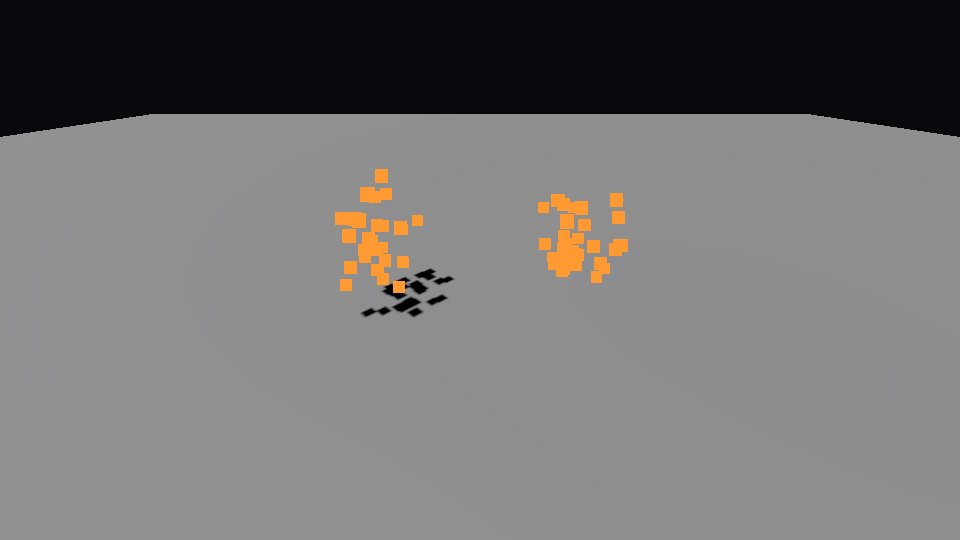
The code
Attach this to a GPUParticles3D for embers rising over the ground. The cast_shadow line is the fix.
extends GPUParticles3D
## Glowing embers over a lit floor, without dark squares under them.
## Opaque particles cast shadows by default, even unshaded ones that look like light.


func _ready() -> void:
	cast_shadow = GeometryInstance3D.SHADOW_CASTING_SETTING_OFF  # the fix: no shadows from these particles
	amount = 30
	lifetime = 1.5
	var m := ParticleProcessMaterial.new()
	m.emission_shape = ParticleProcessMaterial.EMISSION_SHAPE_BOX
	m.emission_box_extents = Vector3(0.4, 0.0, 0.4)
	m.direction = Vector3.UP
	m.spread = 15.0
	m.initial_velocity_min = 0.5
	m.initial_velocity_max = 0.9
	m.gravity = Vector3.ZERO
	process_material = m
	var mat := StandardMaterial3D.new()
	mat.shading_mode = BaseMaterial3D.SHADING_MODE_UNSHADED
	mat.billboard_mode = BaseMaterial3D.BILLBOARD_PARTICLES
	mat.albedo_color = Color(1.0, 0.6, 0.2)
	var q := QuadMesh.new()
	q.size = Vector2(0.08, 0.08)
	q.material = mat
	draw_pass_1 = q
What we measured
One particle that does not move, 1 meter wide and 1 meter above a floor, with a sun straight above it that casts shadows. We read the floor right under the particle and 2 meters away, where it was 0.59/0.59/0.59 (red/green/blue from 0 to 1). Two runs gave the same numbers.
- Cast Shadow on, the default, with an unshaded orange material: 0.00/0.00/0.00 under the particle. A black shadow.
- The same with a shaded material: the same black.
- The script, Cast Shadow off: 0.59/0.59/0.59 under the particle, the same as the rest of the floor.
- Cast Shadow on, but the material set to transparency Alpha: 0.59/0.59/0.59. No shadow.
- A new GPUParticles3D had
cast_shadowon.
Which particles should keep shadows
Fire, sparks, magic and anything that gives off light should not cast a shadow. Solid debris, such as rocks or wood chips from an explosion, can keep them, so they sit on the ground.
What to change
emission_box_extents: the area the embers come from.albedo_colorandq.size: the color and size of each ember.
Embers that also glow: glowing particles. Soft round particles instead of squares: particle texture shows a square box. A flash that lights the floor instead of darkening it: muzzle flash with a light.
Tested in Godot 4.7 with the Compatibility renderer.
More how-tos: Fire, smoke and explosions
- Fire that turns to smoke in a cone
- Bright fire with dark smoke
- Smoke particles leave a hard line on the ground
- Particles drawing in the wrong order
- Explosion effect in one burst
- 3D debris particles not rotating
- Particles all disappear at once
- Muzzle flash with a real light
- Glowing particles in Godot 4
- Particles from the surface of a mesh, at runtime
- Fireworks without sub-emitters
- Fire or dust over a whole building