Scaling a GPUParticles3D node does not scale the whole effect. In our Godot 4.7 test, sparks on a node scaled to 2 flew about 4 times as high, 145 against 37 pixels on screen, and were no bigger. Turn on local_coords, so the gravity is scaled too, and billboard_keep_scale in the particle material, so each particle grows with the node. Then a scale of 2 gave twice the height, 73 pixels, and sparks twice as wide.
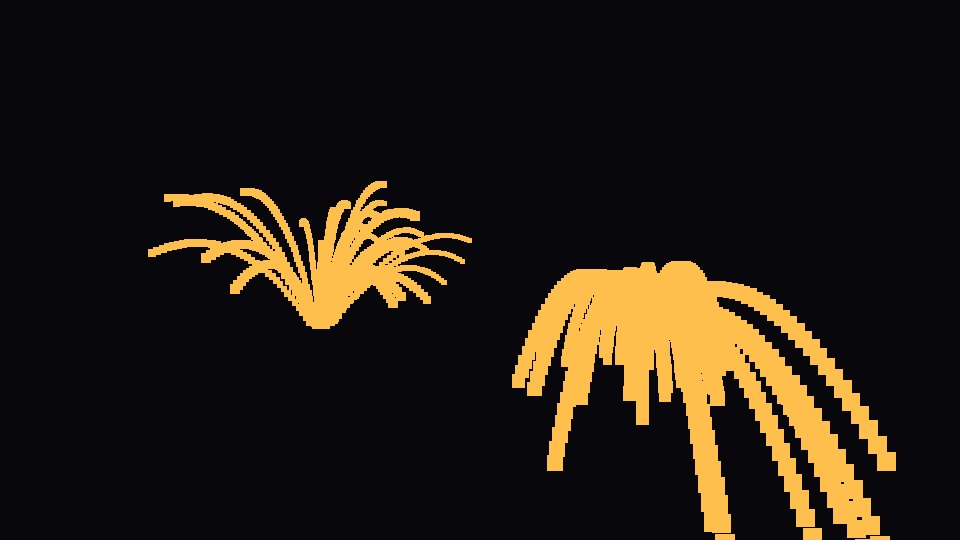
The code
Attach this to a GPUParticles3D and scale the node in the editor or from code, like any other node. The lines marked fix 1 and fix 2 are the change. The rest is an ordinary burst of sparks.
extends GPUParticles3D
## Sparks you can make bigger or smaller by scaling this node, like any other node.
## Two settings make the node's scale reach everything: the gravity and each particle's size.


func _ready() -> void:
	amount = 30
	lifetime = 1.6
	explosiveness = 1.0
	local_coords = true  # fix 1: the motion, gravity included, happens inside the node's scale
	var m := ParticleProcessMaterial.new()
	m.direction = Vector3.UP
	m.spread = 30.0
	m.initial_velocity_min = 3.0
	m.initial_velocity_max = 4.0
	m.gravity = Vector3(0, -6, 0)
	process_material = m
	var mat := StandardMaterial3D.new()
	mat.shading_mode = BaseMaterial3D.SHADING_MODE_UNSHADED
	mat.billboard_mode = BaseMaterial3D.BILLBOARD_PARTICLES
	mat.billboard_keep_scale = true  # fix 2: each particle grows and shrinks with the node
	mat.albedo_color = Color(1, 0.75, 0.3)
	var q := QuadMesh.new()
	q.size = Vector2(0.2, 0.2)
	q.material = mat
	draw_pass_1 = q
What we measured
One burst of 30 sparks from the same seed each time. We watched it for 1.5 seconds from 12 m away and recorded how high above the emitter the highest lit point got, and the most lit points in a single frame, which grows with the size of the sparks. Two runs of each.
- The script at scale 1: 37 pixels high, 271 to 278 lit points.
- The script at scale 2: 73 pixels high, 1,164 lit points.
- The script at scale 0.5: 19 pixels high, 68 to 70 lit points.
- Scale 2 with local_coords off: 145 pixels high, 325 to 330 lit points.
- Scale 2 with billboard_keep_scale off: 69 pixels high, 316 to 318 lit points.
Why the node's scale is not enough
With local_coords off, the particles live in world space, where the gravity is not scaled. The height fits sparks that start twice as fast under the same gravity: about 4 times as high instead of twice. A billboard material also drops the node's scale unless billboard_keep_scale is on, so the sparks stayed small. With local_coords off, turning on billboard_keep_scale alone did not help either: 330 lit points.
When the effect has to stay in world space
With local_coords on, particles already out move with the node. For smoke that should stay behind a moving object, leave it off and scale the effect by hand: double initial_velocity_min, initial_velocity_max, the gravity and the mesh size. That gave the same 73 pixels and 1,164 lit points as the script at scale 2. Change the max first: in our test, raising initial_velocity_min above the max raised the max with it.
More on local and world space: gravity on a rotated emitter.
What to change
- The node's scale: the size of the whole effect.
amount,initial_velocity_min,initial_velocity_maxandgravity: the effect itself.
Particles that should grow or shrink over their life: particle scale curve.
Tested in Godot 4.7 with the Compatibility renderer.
More how-tos: When particles do not show up
- GPUParticles3D not showing in Godot 4
- GPUParticles2D not showing in Godot 4
- GPUParticles2D collision: fall through or vanish
- Particles look black or dark
- Particles only fall down or fly sideways
- Particles not working in a web export
- Particles fall through the floor
- Particles on terrain and uneven ground
- Flipbook animation on GPUParticles3D
- GPUParticles2D sprite sheet not animating
- Pixel art particles look blurry
- Particle trails in the Compatibility renderer
- GPUParticles2D trails not working
- Particle color over lifetime not working
- Particle texture shows a square box
- Custom particle shader ignores the color ramp
- Particle scale curve not working
- Additive particles invisible on a white background
- Particles the same size on screen at any distance