Set collision_mode in the ParticleProcessMaterial to Rigid, which is off by default, and give the floor a LightOccluder2D with sdf_collision on. A StaticBody2D in the same place did nothing in our test: 2D particles use occluders, not physics shapes. With collision on and no occluder that has SDF Collision on, no particle showed at all in our test. It works in the Compatibility renderer.
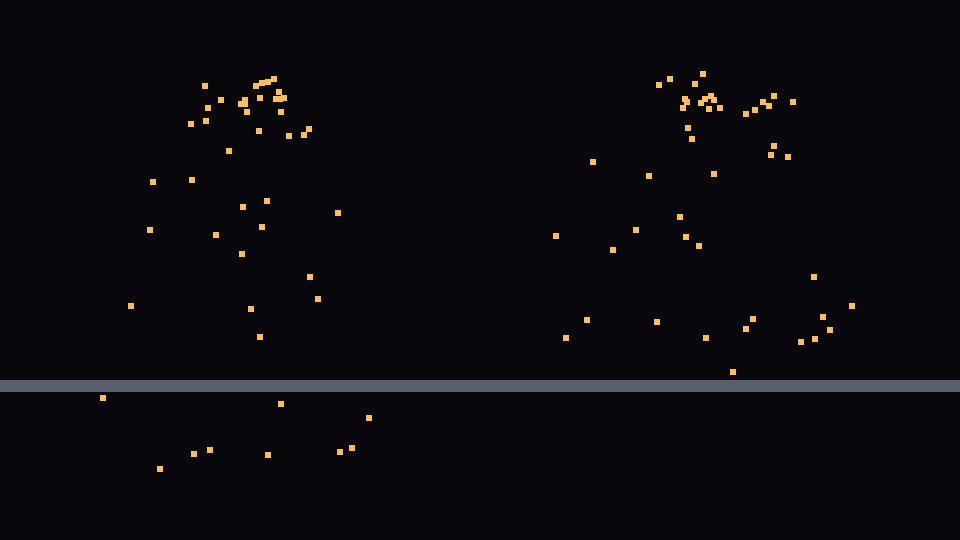
The code
Attach this to a Node2D for sparks that jump up, fall and bounce on a floor 260 pixels below the node. It makes the floor itself, a LightOccluder2D, and a small square texture for the sparks. The lines marked fix 1 and fix 2 are the two settings.
extends Node2D
## 2D sparks that fall and bounce on a floor. GPUParticles2D do not hit physics bodies:
## they collide with LightOccluder2D shapes that have SDF Collision on.

var sparks := GPUParticles2D.new()
var floor := LightOccluder2D.new()


func _ready() -> void:
	var poly := OccluderPolygon2D.new()  # the floor: a box 600 px wide, its top edge 260 px below this node
	poly.polygon = PackedVector2Array([Vector2(-300, 260), Vector2(300, 260), Vector2(300, 300), Vector2(-300, 300)])
	floor.occluder = poly
	floor.sdf_collision = true  # fix 1: the occluder takes part in particle collision
	add_child(floor)
	sparks.amount = 60
	sparks.lifetime = 2.0
	sparks.texture = make_dot()
	var m := ParticleProcessMaterial.new()
	m.direction = Vector3(0, -1, 0)
	m.spread = 40.0
	m.initial_velocity_min = 150.0
	m.initial_velocity_max = 250.0
	m.gravity = Vector3(0, 500, 0)
	m.collision_mode = ParticleProcessMaterial.COLLISION_RIGID  # fix 2: off by default
	m.collision_bounce = 0.4
	m.collision_friction = 0.2
	sparks.process_material = m
	sparks.collision_base_size = 6.0
	add_child(sparks)


func make_dot() -> Texture2D:
	var img := Image.create(6, 6, false, Image.FORMAT_RGBA8)
	img.fill(Color(1.0, 0.75, 0.3))
	return ImageTexture.create_from_image(img)
What we measured
The emitter was 260 pixels above the top of the floor. After 1.5 seconds we counted lit points on a grid of every second pixel, added up over 10 frames, above the floor, in the 40 pixels just above it, and below it. Three runs gave close numbers.
- The script: 0 to 14 points below the floor, and 288 to 467 just above it, where the sparks bounced.
- Collision Mode off: 582 to 657 points below the floor. They fell through.
- Collision on, but
sdf_collisionoff on the occluder: 0 points anywhere on screen. No particles at all. - Collision on, no occluder: 0 points anywhere.
- Collision on, a StaticBody2D with a box of the same size instead of the occluder: 0 points anywhere.
- A new LightOccluder2D had
sdf_collisionon, and a new ParticleProcessMaterial had collision off.
Floors you already have
If your floor is a StaticBody2D or tiles with physics shapes, add a LightOccluder2D with the same shape where particles should land. Our test scene had no lights: SDF Collision worked on its own.
What to change
collision_bounce: how much speed a spark keeps after a bounce. 0 means it stops.collision_friction: how fast sparks stop sliding along the floor.collision_base_sizeon the GPUParticles2D: the size of each spark for collision, in pixels.- The points of the polygon: the shape of your floor.
The 3D version, with a collision box: particles fall through the floor. 2D particles that do not show for other reasons: GPUParticles2D not showing.
Tested in Godot 4.7 with the Compatibility renderer.
More how-tos: When particles do not show up
- GPUParticles3D not showing in Godot 4
- GPUParticles2D not showing in Godot 4
- Particles look black or dark
- Particles only fall down or fly sideways
- Particles not working in a web export
- Particles fall through the floor
- Particles on terrain and uneven ground
- Flipbook animation on GPUParticles3D
- GPUParticles2D sprite sheet not animating
- Pixel art particles look blurry
- Particle trails in the Compatibility renderer
- GPUParticles2D trails not working
- Particle color over lifetime not working
- Particle texture shows a square box
- Custom particle shader ignores the color ramp
- Particle scale curve not working
- Additive particles invisible on a white background
- Scale a 3D particle effect evenly
- Particles the same size on screen at any distance