The color_ramp of a ParticleProcessMaterial gives each particle its color in COLOR. A StandardMaterial3D picks it up with a checkbox, a ShaderMaterial does not: write ALBEDO = COLOR.rgb for the colors and multiply ALPHA by COLOR.a for the fade. A ShaderMaterial also has no Billboard Mode, so turn the quad to the camera in vertex().
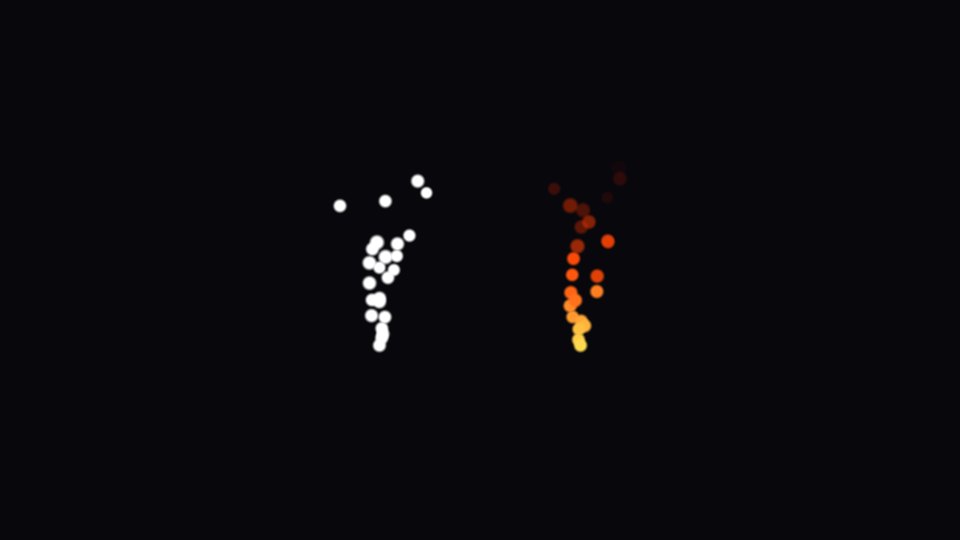
The code
Attach this to a GPUParticles3D for embers drawn with your own shader: soft round dots that go from yellow to red and fade out. The two lines in fragment() that use COLOR are the fix. The line in vertex() makes the dots face the camera.
extends GPUParticles3D
## Embers drawn with your own spatial shader that still follow the Color Ramp:
## yellow, then red, then a fade out. A custom shader has to read COLOR itself.

const SHADER := '''
shader_type spatial;
render_mode unshaded, depth_draw_never, cull_disabled;

void vertex() {
	// face the camera, like Billboard Mode in a StandardMaterial3D
	MODELVIEW_MATRIX = VIEW_MATRIX * mat4(INV_VIEW_MATRIX[0], INV_VIEW_MATRIX[1], INV_VIEW_MATRIX[2], MODEL_MATRIX[3]);
}

void fragment() {
	float d = length(UV - vec2(0.5)) * 2.0;
	ALBEDO = COLOR.rgb; // the Color Ramp
	ALPHA = (1.0 - smoothstep(0.5, 1.0, d)) * COLOR.a; // a soft round dot, and the fade in the ramp
}
'''


func _ready() -> void:
	amount = 24
	lifetime = 2.0
	var ramp := Gradient.new()
	ramp.set_color(0, Color(1.0, 0.85, 0.3, 1.0))
	ramp.set_color(1, Color(0.6, 0.05, 0.0, 0.0))
	ramp.add_point(0.45, Color(1.0, 0.3, 0.05, 1.0))
	var rt := GradientTexture1D.new()
	rt.gradient = ramp
	var m := ParticleProcessMaterial.new()
	m.color_ramp = rt
	m.direction = Vector3.UP
	m.spread = 20.0
	m.initial_velocity_min = 0.8
	m.initial_velocity_max = 1.2
	m.gravity = Vector3.ZERO
	process_material = m
	var sh := Shader.new()
	sh.code = SHADER
	var mat := ShaderMaterial.new()
	mat.shader = sh
	var q := QuadMesh.new()
	q.size = Vector2(0.2, 0.2)
	q.material = mat
	draw_pass_1 = q
What we measured
We let out one particle that does not move, in the middle of the screen, with a lifetime of 2 seconds, and read the pixel color (red/green/blue from 0 to 1) at three points of its life. The first run after a fresh import started late while the shader compiled. The next two runs gave the same numbers.
- The script: 1.00/0.75 to 0.77/0.25 to 0.26 (yellow) at 0.15 seconds, 1.00/0.30/0.03 (red) at 0.9, and 0.21/0.05/0.04 at 1.7, nearly the dark background (0.03/0.03/0.05).
- A shader that writes white and does not read COLOR: 1.00/1.00/1.00 at all three points.
COLOR.rgbin ALBEDO, but ALPHA not multiplied byCOLOR.a: the same yellow and red, then 0.71/0.11/0.00 at 1.7 seconds. The color changed, the fade did not happen.
Billboarding is gone too
Billboard Mode is a setting of StandardMaterial3D. A ShaderMaterial draws the quad as it is, flat and facing one way. We looked at the same particle from the side, 3 meters away.
- The script: a dot 20 by 20 pixels in the middle of the screen.
- Without the line in
vertex(): 0 lit pixels. The quad was edge-on to the camera.
What to change
- The colors and points of the gradient: where in the life each color is reached. The last color's alpha: 0 for a fade out, 1 to stay solid.
- 0.5 in
smoothstep(0.5, 1.0, d): lower for a softer edge, closer to 1.0 for a harder dot. q.size: the size of each dot in meters.
The same problem with a StandardMaterial3D: particle color ramp not working. Particles that do not show at all: GPUParticles3D not showing.
Tested in Godot 4.7 with the Compatibility renderer.
More how-tos: When particles do not show up
- GPUParticles3D not showing in Godot 4
- GPUParticles2D not showing in Godot 4
- GPUParticles2D collision: fall through or vanish
- Particles look black or dark
- Particles only fall down or fly sideways
- Particles not working in a web export
- Particles fall through the floor
- Particles on terrain and uneven ground
- Flipbook animation on GPUParticles3D
- GPUParticles2D sprite sheet not animating
- Pixel art particles look blurry
- Particle trails in the Compatibility renderer
- GPUParticles2D trails not working
- Particle color over lifetime not working
- Particle texture shows a square box
- Particle scale curve not working
- Additive particles invisible on a white background
- Scale a 3D particle effect evenly
- Particles the same size on screen at any distance