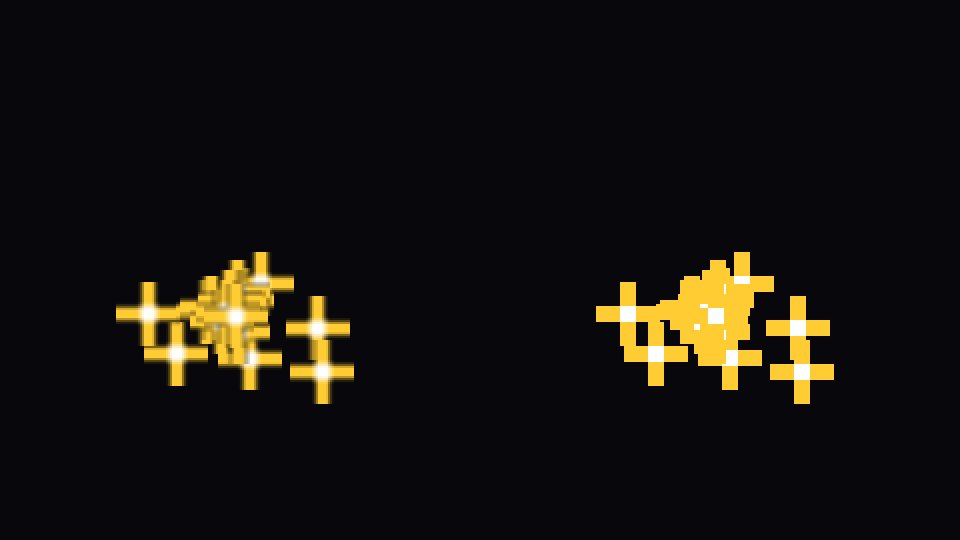
A GPUParticles2D draws its texture with the viewport's default filter, and that is Linear unless you change it, so a small pixel art sprite scaled up comes out soft and smeared. Set texture_filter on the particles to Nearest. In our test that left 0 blended pixels around a spark, against 364 with the default.
The code
Attach this to a GPUParticles2D for a burst of pixel art sparks. The texture_filter line is the fix. The 8x8 spark is drawn in code, so the script runs as it is.
extends GPUParticles2D
## Pixel art sparks that stay sharp. Each spark is an 8x8 sprite drawn 4 times bigger.
## With your own art, replace make_spark() with preload("res://your_spark.png").


func _ready() -> void:
	texture_filter = CanvasItem.TEXTURE_FILTER_NEAREST  # the fix: sharp pixels, no blur
	amount = 16
	lifetime = 1.0
	texture = make_spark()
	var m := ParticleProcessMaterial.new()
	m.direction = Vector3(0, -1, 0)
	m.spread = 50.0
	m.initial_velocity_min = 60.0
	m.initial_velocity_max = 110.0
	m.gravity = Vector3(0, 160, 0)
	m.scale_min = 4.0  # a whole number: every art pixel ends up the same size
	m.scale_max = 4.0
	process_material = m


func make_spark() -> Texture2D:
	# an 8x8 plus: yellow arms two pixels wide, a white 2x2 middle
	var img := Image.create(8, 8, false, Image.FORMAT_RGBA8)
	var yellow := Color(1.0, 0.8, 0.2)
	for i in 8:
		for j in [3, 4]:
			img.set_pixel(i, j, yellow)
			img.set_pixel(j, i, yellow)
	for x in [3, 4]:
		for y in [3, 4]:
			img.set_pixel(x, y, Color.WHITE)
	return ImageTexture.create_from_image(img)
What we measured
We stopped one spark in the middle of the screen and sorted every pixel in a 48 by 48 square around it: background, the sprite's yellow, its white, or a color in between. Two runs gave the same numbers.
- The script, Nearest: 384 yellow, 64 white, 0 in between. Across the arm: 8 background, 12 yellow, 8 white, 12 yellow, 8 background. Every art pixel was 4 screen pixels wide.
- Texture Filter left at its default: 364 pixels in between, and only 160 yellow and 16 white. A row near the top edge of the arm had no clean color at all: the yellow came out at 0.40, 0.32, 0.09 instead of 1.00, 0.80, 0.20. Through the middle, the white was 4 pixels wide with 4 blended pixels on each side.
- Default on the node, but the viewport's default filter set to Nearest: the same as the script, 0 in between.
Set it once for the whole project
texture_filter on a new GPUParticles2D starts at Parent Node, and the root viewport's default starts at Linear. For a pixel art game, set Project Settings, Rendering, Textures, Canvas Textures, Default Texture Filter to Nearest. That option sets the root viewport's default, which is what we changed in the third test: every 2D node left on Parent Node, particles included, then draws sharp.
Keep the scale a whole number
Nearest keeps the edges hard, but an art pixel cannot be 3.5 screen pixels wide. With scale_min and scale_max at 3.5, the row across our spark became 11 yellow, 7 white and 10 yellow: still 0 in between, but the left arm one pixel wider than the right. At 4, both arms were 12. Keep the scale on whole numbers.
What to change
scale_minandscale_max: how many screen pixels each art pixel takes.make_spark(): replace it with your own sprite.amount,spread, the velocities andgravity: the size and shape of the burst.
A pixel art sprite sheet on particles: GPUParticles2D sprite sheet animation. 2D particles that do not show at all: GPUParticles2D not showing.
Tested in Godot 4.7 with the Compatibility renderer.
Ready-made: VFX Collection for Godot 4 includes 247 ready-made 2D scenes, 108 of them pixel art.
More how-tos: When particles do not show up
- GPUParticles3D not showing in Godot 4
- GPUParticles2D not showing in Godot 4
- GPUParticles2D collision: fall through or vanish
- Particles look black or dark
- Particles only fall down or fly sideways
- Particles not working in a web export
- Particles fall through the floor
- Particles on terrain and uneven ground
- Flipbook animation on GPUParticles3D
- GPUParticles2D sprite sheet not animating
- Particle trails in the Compatibility renderer
- GPUParticles2D trails not working
- Particle color over lifetime not working
- Particle texture shows a square box
- Custom particle shader ignores the color ramp
- Particle scale curve not working
- Additive particles invisible on a white background
- Scale a 3D particle effect evenly
- Particles the same size on screen at any distance