With blend_mode set to Add, a particle adds its color to what is behind it. On a white background there is nothing left to add, so it disappears: in our test, additive sparks on white changed 0 of 129,600 points on the screen. Give the GPUParticles3D a second draw pass that uses alpha blending (BLEND_MODE_MIX) and a color darker than the background, and draw the additive pass on top of it.
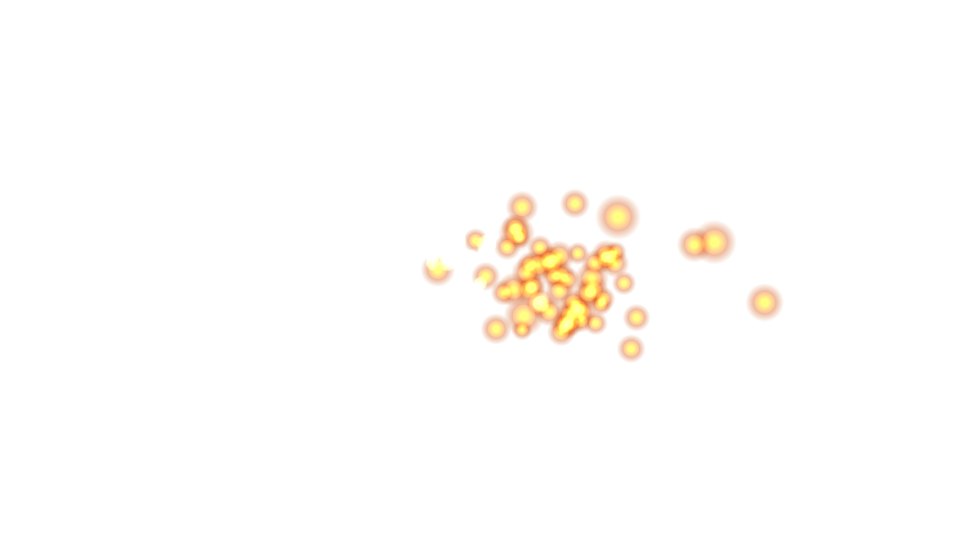
The code
Attach this to a GPUParticles3D. draw_passes = 2 and the alpha-blended draw_pass_1 are the fix. The additive draw_pass_2 keeps the glow, and its render_priority of 1 draws it after the body.
extends GPUParticles3D
## Sparks that glow on a dark background and still show on a white sky or snow.
## Two draw passes for every spark: a darker alpha-blended body, then an additive core on top.


func _soft(size: float, color: Color, blend: BaseMaterial3D.BlendMode) -> QuadMesh:
	var g := Gradient.new()
	g.colors = PackedColorArray([Color(1, 1, 1, 1), Color(1, 1, 1, 0)])
	var tex := GradientTexture2D.new()
	tex.gradient = g
	tex.fill = GradientTexture2D.FILL_RADIAL
	tex.fill_from = Vector2(0.5, 0.5)
	tex.fill_to = Vector2(1.0, 0.5)
	var mat := StandardMaterial3D.new()
	mat.shading_mode = BaseMaterial3D.SHADING_MODE_UNSHADED
	mat.transparency = BaseMaterial3D.TRANSPARENCY_ALPHA
	mat.blend_mode = blend
	mat.billboard_mode = BaseMaterial3D.BILLBOARD_PARTICLES
	mat.albedo_texture = tex
	mat.albedo_color = color
	var q := QuadMesh.new()
	q.size = Vector2(size, size)
	q.material = mat
	return q


func _ready() -> void:
	amount = 60
	lifetime = 1.0
	var m := ParticleProcessMaterial.new()
	m.direction = Vector3.UP
	m.spread = 30.0
	m.initial_velocity_min = 3.0
	m.initial_velocity_max = 4.5
	m.gravity = Vector3(0, -6, 0)
	process_material = m
	draw_passes = 2
	# Pass 1, the fix: alpha blending can make the screen darker, so the spark shows on white.
	draw_pass_1 = _soft(0.35, Color(0.8, 0.3, 0.05, 0.9), BaseMaterial3D.BLEND_MODE_MIX)
	# Pass 2: the additive core that glows on dark backgrounds.
	var core := _soft(0.2, Color(1, 0.75, 0.35), BaseMaterial3D.BLEND_MODE_ADD)
	core.material.render_priority = 1  # drawn after the body, so the body never covers it
	draw_pass_2 = core
What we measured
We ran the same sparks with the same seed on three backgrounds, checked a grid of 129,600 points on the screen 1.5 seconds in, and counted the points that differ from the background. Two runs of each.
- White background: only the additive pass, 0 points. The script, 2,461 to 2,476.
- Light blue sky: only the additive pass, about 1,150 points, and about 970 of them were close to white, so the sparks looked washed out. The script, 2,433 to 2,449, and about 1,650 of them darker than the sky.
- Dark background: the script had 460 to 466 bright points. Only the alpha pass had 0. The additive core is what makes the glow.
Why not just switch to Mix
An alpha-blended spark shows on any background, but it is never brighter than its own color, and sparks that overlap do not add up. Keeping both passes gives you a spark that shows on white and glows on dark. The same idea for fire and smoke: fire and smoke with two emitters.
What to change
- The body color in
draw_pass_1: keep it darker and more saturated than your brightest background. Its alpha, 0.9 here, sets how much it covers. - The core color and size in
draw_pass_2: the glow. amount,initial_velocity_min,initial_velocity_maxandgravity: how many sparks and how far they fly.
Particles that show up as squares instead: particle texture shows a square box.
Tested in Godot 4.7 with the Compatibility renderer.
More how-tos: When particles do not show up
- GPUParticles3D not showing in Godot 4
- GPUParticles2D not showing in Godot 4
- GPUParticles2D collision: fall through or vanish
- Particles look black or dark
- Particles only fall down or fly sideways
- Particles not working in a web export
- Particles fall through the floor
- Particles on terrain and uneven ground
- Flipbook animation on GPUParticles3D
- GPUParticles2D sprite sheet not animating
- Pixel art particles look blurry
- Particle trails in the Compatibility renderer
- GPUParticles2D trails not working
- Particle color over lifetime not working
- Particle texture shows a square box
- Custom particle shader ignores the color ramp
- Particle scale curve not working
- Scale a 3D particle effect evenly
- Particles the same size on screen at any distance