GPU particles fall straight through a roof mesh: in our test it did nothing. Put a GPUParticlesCollisionBox3D on each roof and set the rain's collision_mode to Hide On Contact, so drops vanish where they hit. Make the box at least 1 m tall: in our test a 0.1 m box let most of the rain through.
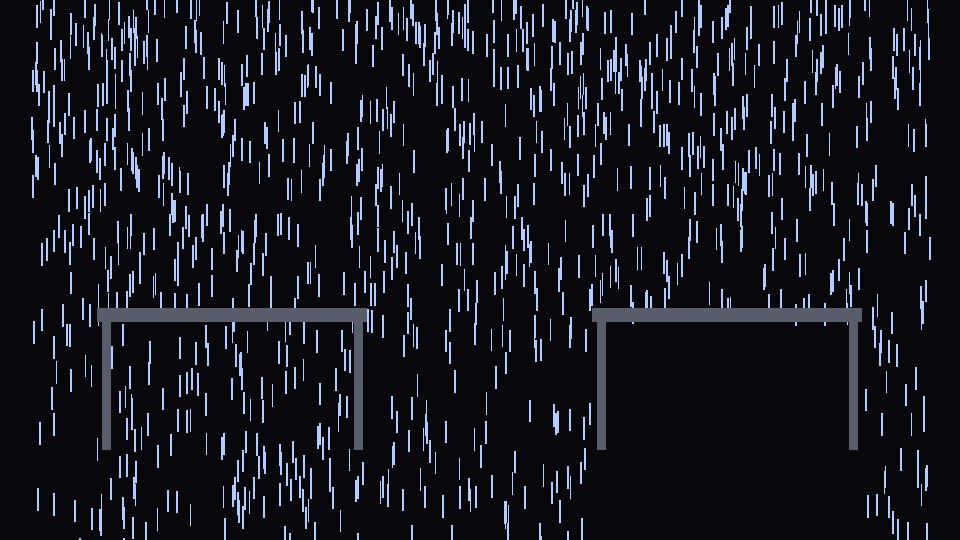
The code
Attach this to a GPUParticles3D above the area, with every roof (a MeshInstance3D with a BoxMesh) in a group named roofs. The script adds a collision box to each roof. Two parts are the fix: Hide On Contact, and the box in block().
extends GPUParticles3D
## Rain over a 20 x 20 m area that does not fall inside buildings.
## Put every roof in the "roofs" group: a MeshInstance3D with a BoxMesh.
## Add the roofs to the scene before this node.


func _ready() -> void:
	amount = 2000
	lifetime = 1.2
	visibility_aabb = AABB(Vector3(-11, -16, -11), Vector3(22, 28, 22))
	collision_base_size = 0.05
	var m := ParticleProcessMaterial.new()
	m.emission_shape = ParticleProcessMaterial.EMISSION_SHAPE_BOX
	m.emission_box_extents = Vector3(10, 0.1, 10)
	m.direction = Vector3.DOWN
	m.spread = 0.0
	m.initial_velocity_min = 8.0
	m.initial_velocity_max = 10.0
	m.gravity = Vector3(0, -20, 0)
	m.collision_mode = ParticleProcessMaterial.COLLISION_HIDE_ON_CONTACT  # the fix, part 1
	process_material = m
	var mat := StandardMaterial3D.new()
	mat.shading_mode = BaseMaterial3D.SHADING_MODE_UNSHADED
	mat.billboard_mode = BaseMaterial3D.BILLBOARD_FIXED_Y
	mat.albedo_color = Color(0.7, 0.8, 1.0)
	var q := QuadMesh.new()
	q.size = Vector2(0.04, 0.5)
	q.material = mat
	draw_pass_1 = q
	for roof in get_tree().get_nodes_in_group("roofs"):
		block(roof)


func block(roof: MeshInstance3D) -> void:  # the fix, part 2: a collision box on each roof
	var size := (roof.mesh as BoxMesh).size
	var box := GPUParticlesCollisionBox3D.new()
	box.size = Vector3(size.x, maxf(size.y, 1.0), size.z)  # at least 1 m tall, see below
	roof.add_child(box)
What we measured
We put a 6 m roof 3 m above the ground and counted the lit points every second pixel under it and in a patch of open ground of the same size, averaged over six frames. Six runs of each.
- No collision box: 238 to 281 under the roof, 223 to 298 outside. The roof did nothing.
- The script, a 1 m tall box: 0 to 16 under the roof, a few stray drops at most, against 205 to 352 outside.
- A 0.1 m box: 179 to 240 under it. Most of the rain went through.
- A 0.3 m box: 85 to 156 under it.
- The 1 m box, but the collision mode left at Disabled: 219 to 298 under it.
Why a thin box leaks
By the time they reach the roof our drops fall at about 19 m/s. A GPUParticles3D updates 30 times a second unless you change fixed_fps, so a drop moves about 0.6 m from one update to the next and can skip over a thin box. A box taller than one step catches it.
What to change
- The 1.0 in
block(): raise it if your rain falls faster than ours. collision_base_size: the size of one drop for collisions.amountandemission_box_extents: how much rain, over how big an area.
Rain that moves with the camera: rain that follows the camera. Rain on uneven ground: particles on terrain with a height field.
Tested in Godot 4.7 with the Compatibility renderer.
Ready-made: Weather & Storms VFX has rain, thunderstorms and lightning ready for Godot 4.
More how-tos: Auras, rings, beams and weather
- God rays without volumetric fog
- Magic aura particles that circle a character
- Charge-up particles that fly in to the middle
- Particle ring standing up instead of flat
- 2D particles from a sprite's shape
- A glowing circle on the ground
- A loot beam that never goes flat
- Chain lightning between enemies
- A tower's attack range ring
- Rain that follows the camera
- Snow particles not falling
- orbit_velocity not working in 3D: use tangential_accel
- Rain falls through the player
- Snow that stays on roofs
- Emit particles along a Path3D