Use a flat PlaneMesh with an additive, unshaded material, and lift it about 0.02 meters above the floor. At exactly the height of the floor, the circle flickered in our test. With the Compatibility renderer, the one web exports use, a Decal with the same texture drew nothing, while the flat plane did.
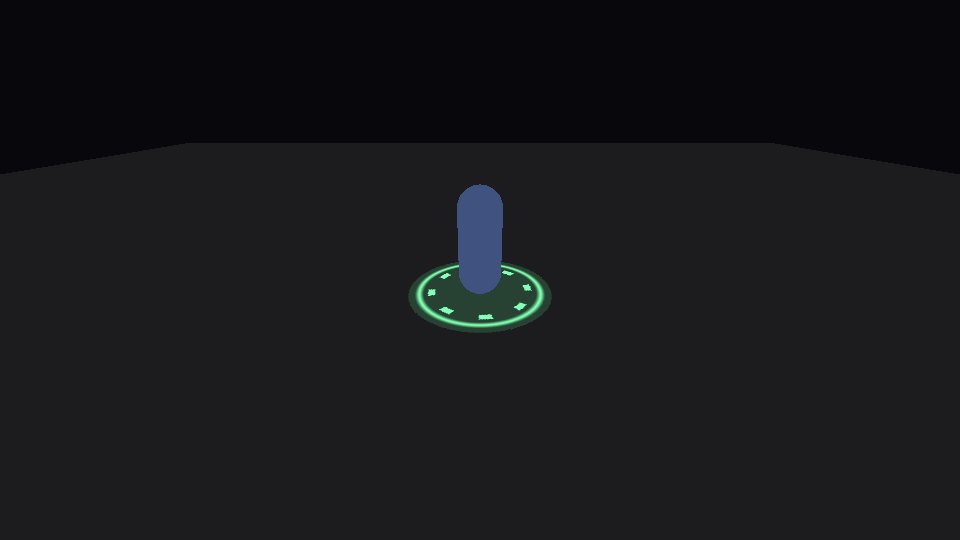
The code
Add a MeshInstance3D as a child of your character, at the feet, and give it this script. If the origin of your character is not at its feet, move the circle down to them.
extends MeshInstance3D
## A glowing circle on the ground: a heal, a target marker or a spell area.
## Add it as a child of the character, at the feet. It lies flat just above the floor and turns slowly.

@export var color := Color(0.4, 1.0, 0.6)
@export var radius := 1.2  # meters
@export var lift := 0.02  # meters above the floor, so the floor does not cover it
@export var spin := 0.6  # radians per second


func _ready() -> void:
	var p := PlaneMesh.new()  # flat, facing up
	p.size = Vector2(radius * 2.0, radius * 2.0)
	p.center_offset = Vector3(0, lift, 0)
	mesh = p
	var mat := StandardMaterial3D.new()
	mat.shading_mode = BaseMaterial3D.SHADING_MODE_UNSHADED
	mat.transparency = BaseMaterial3D.TRANSPARENCY_ALPHA
	mat.blend_mode = BaseMaterial3D.BLEND_MODE_ADD
	mat.cull_mode = BaseMaterial3D.CULL_DISABLED
	mat.albedo_color = color
	mat.albedo_texture = _ring()
	mat.texture_repeat = false
	material_override = mat
	cast_shadow = GeometryInstance3D.SHADOW_CASTING_SETTING_OFF


func _process(delta: float) -> void:
	rotate_y(spin * delta)


func _ring() -> ImageTexture:
	# A bright ring, a faint fill and 8 dots on the ring, so you can see it turn. Black adds nothing.
	var n := 128
	var img := Image.create(n, n, false, Image.FORMAT_RGBA8)
	for y in n:
		for x in n:
			var d := Vector2(x - n / 2.0 + 0.5, y - n / 2.0 + 0.5) / (n / 2.0)
			var r := d.length()
			var v := 0.0
			if r < 1.0:
				v = 0.15 + 0.85 * clampf(1.0 - absf(r - 0.85) / 0.06, 0.0, 1.0)
				var a := fposmod(atan2(d.y, d.x), TAU / 8.0) - TAU / 16.0
				if absf(r - 0.68) < 0.05 and absf(a) < 0.12:
					v = 1.0
			img.set_pixel(x, y, Color(v, v, v, 1.0))
	return ImageTexture.create_from_image(img)
With spin at 0.6, the circle turned 0.6 radians in one second.
The circle flickers
That is the circle at exactly the same height as the floor. We looked at it from 14 meters away and moved the camera a little on each of 20 frames. At height 0, the visible part of the circle jumped between 0 and 66 points on a grid of 129,600 over the screen. Lifted by 0.02 meters, it stayed between 54 and 56.
A Decal shows nothing
A Decal node projects a texture onto whatever is under it. With the Compatibility renderer, a Decal with the same texture and color drew 0 points in our test. The flat plane, in the same spot and from the same camera, drew 55.
What to change
color: green for a heal, red for an enemy target, gold for a buff.radius: in meters.lift: 0.02 was enough in our test at 14 meters.spin: 0 for a marker that should not turn. The 8 dots in the texture are what show the turn.
Particles that circle a character instead: magic aura particles around a character. The same lift on a ring that must match a real range: a tower's attack range ring.
Tested in Godot 4.7 with the Compatibility renderer.
Ready-made: Holy & Light VFX for Godot 4 has heal circles, halos, holy shields and smite beams, and works in Compatibility.
More how-tos: Auras, rings, beams and weather
- God rays without volumetric fog
- Magic aura particles that circle a character
- Charge-up particles that fly in to the middle
- Particle ring standing up instead of flat
- 2D particles from a sprite's shape
- A loot beam that never goes flat
- Chain lightning between enemies
- A tower's attack range ring
- Rain that follows the camera
- Rain falling through the roof
- Snow particles not falling
- orbit_velocity not working in 3D: use tangential_accel
- Rain falls through the player
- Snow that stays on roofs
- Emit particles along a Path3D