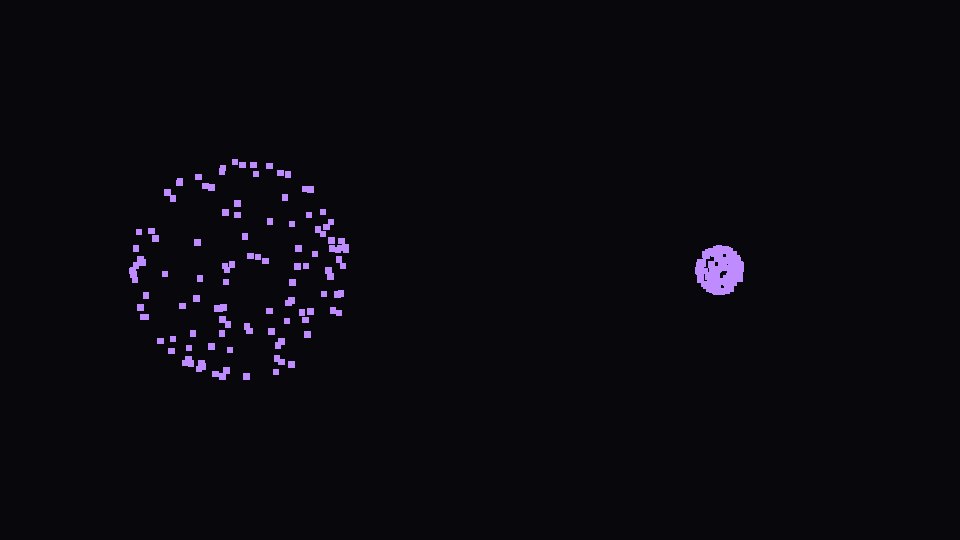
Start the particles on a sphere around the node and give them a negative radial_velocity_min and radial_velocity_max: they move at a steady speed toward velocity_pivot, the middle. Set the lifetime to the radius divided by that speed. In our test, sparks starting 1.6 m out at 2 m/s were 0.02 to 0.06 m from the middle at 0.8 seconds, then gone. A negative radial acceleration instead made them fly through the middle and out the other side.
The code
Attach this to a GPUParticles3D at a hand, a staff or a weapon. The two radial velocity lines are the fix, and the lifetime goes with them.
extends GPUParticles3D
## A charge-up effect: sparks start on a ball around the node and fly in to its middle.
## They reach the middle just as they die, so none fly past it or pile up there.


func _ready() -> void:
	amount = 120
	lifetime = 0.8
	var m := ParticleProcessMaterial.new()
	m.emission_shape = ParticleProcessMaterial.EMISSION_SHAPE_SPHERE_SURFACE
	m.emission_sphere_radius = 1.6
	m.radial_velocity_min = -2.0  # the fix: a steady 2 m/s toward the middle (velocity_pivot)
	m.radial_velocity_max = -2.0  # 1.6 m at 2 m/s takes 0.8 s: the same as the lifetime
	m.gravity = Vector3.ZERO
	process_material = m
	var mat := StandardMaterial3D.new()
	mat.shading_mode = BaseMaterial3D.SHADING_MODE_UNSHADED
	mat.billboard_mode = BaseMaterial3D.BILLBOARD_PARTICLES
	mat.albedo_color = Color(0.75, 0.55, 1.0)
	var q := QuadMesh.new()
	q.size = Vector2(0.06, 0.06)
	q.material = mat
	draw_pass_1 = q
What we measured
To read distances off the screen, we put the starting points on a ring facing the camera, started every spark at once with one_shot, and measured how far the lit pixels were from the middle with an orthographic camera. Two runs of each.
- The script, 2 m/s and a lifetime of 0.8 seconds: 1.11 to 1.17 m out at 0.26 seconds, 0.72 to 0.77 m at 0.46, 0.31 to 0.34 m at 0.66, 0.02 to 0.06 m at 0.8, and nothing left at 1.06.
- The same speed with a lifetime of 1.6 seconds: the same path, then every spark sat on top of the others in the middle, one dot, until they died.
radial_accel_minandradial_accel_maxat -5 instead, from standing still: they reached the middle at about 0.8 seconds, then flew out the other side, 0.80 m out at 1.05 seconds and 1.43 to 1.46 m at 1.36, nearly back where they started.- No radial setting at all, the default 0: they stayed 1.60 m out.
Lifetime is distance divided by speed
A radial velocity keeps the same speed the whole way, so the time to the middle is easy to work out: 1.6 m at 2 m/s is 0.8 seconds. If you change emission_sphere_radius or the speed, change lifetime to match. With a longer lifetime, they wait in the middle as one dot, as in our 1.6 second test.
What to change
emission_sphere_radius: how far out they start.radial_velocity_minandradial_velocity_max: negative pulls in, positive pushes out.velocity_pivot: the point they fly to, from the node.amount: how thick the stream is.
Particles pulled into a moving player instead: absorb particles into the player. Sparks that start on a ring around the feet: particle ring emission.
Tested in Godot 4.7 with the Compatibility renderer.
Ready-made: Xianxia VFX has Qi Absorption and Golden Core Formation: streams of qi drawn in from all around and compressed into a golden core, ready for Godot 4.
More how-tos: Auras, rings, beams and weather
- God rays without volumetric fog
- Magic aura particles that circle a character
- Particle ring standing up instead of flat
- 2D particles from a sprite's shape
- A glowing circle on the ground
- A loot beam that never goes flat
- Chain lightning between enemies
- A tower's attack range ring
- Rain that follows the camera
- Rain falling through the roof
- Snow particles not falling
- orbit_velocity not working in 3D: use tangential_accel
- Rain falls through the player
- Snow that stays on roofs
- Emit particles along a Path3D