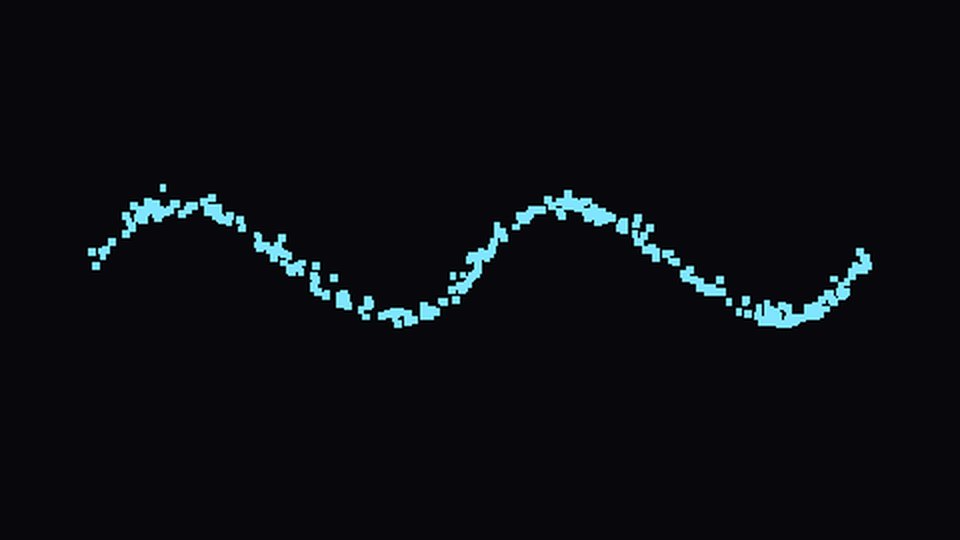
A ParticleProcessMaterial has no path shape, but it can emit from a list of points. Sample the Path3D's curve with sample_baked(), write the positions into an image, and give it to emission_point_texture with EMISSION_SHAPE_POINTS. The points are in the emitter's own space, so convert each one with global_transform.affine_inverse(). In our Godot 4.7 test, 98% of the lit points were within 12 pixels of the curve. Without the conversion, with the emitter 1 m above the path: 0%.
The code
Attach this to a GPUParticles3D and set path to your Path3D. points is how many places along the curve the particles can start from.
extends GPUParticles3D
## Sparks that come out all along a Path3D's curve, like a magic line or an electric fence.
## Set path to a Path3D. Its curve becomes a list of emission points once, in _ready().

@export var path: Path3D
@export var points := 200


func _ready() -> void:
	var curve := path.curve
	var length := curve.get_baked_length()
	var img := Image.create(points, 1, false, Image.FORMAT_RGBF)
	for i in points:
		var world := path.global_transform * curve.sample_baked(length * i / (points - 1))
		var p := global_transform.affine_inverse() * world  # emission points are in this node's space
		img.set_pixel(i, 0, Color(p.x, p.y, p.z))
	amount = 300
	lifetime = 0.8
	var m := ParticleProcessMaterial.new()
	m.emission_shape = ParticleProcessMaterial.EMISSION_SHAPE_POINTS
	m.emission_point_texture = ImageTexture.create_from_image(img)
	m.emission_point_count = points
	m.direction = Vector3.UP
	m.spread = 30.0
	m.initial_velocity_min = 0.1
	m.initial_velocity_max = 0.3
	m.gravity = Vector3.ZERO
	process_material = m
	var mat := StandardMaterial3D.new()
	mat.shading_mode = BaseMaterial3D.SHADING_MODE_UNSHADED
	mat.billboard_mode = BaseMaterial3D.BILLBOARD_PARTICLES
	mat.albedo_color = Color(0.5, 0.9, 1.0)
	var q := QuadMesh.new()
	q.size = Vector2(0.06, 0.06)
	q.material = mat
	draw_pass_1 = q
What we measured
A wave-shaped curve 6 m wide, with the emitter placed 1 m above the Path3D. One second in, we counted the lit points and how many of them were within 12 pixels of the curve on screen. Two runs of each.
- The script: 269 to 273 lit points, 98% of them on the curve.
- The same points without the conversion: 0% on the curve. They were taken as positions relative to the emitter, which sits 1 m higher.
- A box emission shape around the curve instead: 14 to 15% on the curve.
If the path or the emitter moves
The points are worked out once, in _ready(). If you move the Path3D or the emitter later, or edit the curve, run that loop again.
What to change
points: more places along the curve. Raise it for long paths.amountandlifetime: how dense the line is.initial_velocity_min,initial_velocity_maxandspread: how far the sparks drift off the line.
Particles from the surface of a mesh instead: particles from a mesh surface. A line that jumps between enemies: chain lightning.
Tested in Godot 4.7 with the Compatibility renderer.
More how-tos: Auras, rings, beams and weather
- God rays without volumetric fog
- Magic aura particles that circle a character
- Charge-up particles that fly in to the middle
- Particle ring standing up instead of flat
- 2D particles from a sprite's shape
- A glowing circle on the ground
- A loot beam that never goes flat
- Chain lightning between enemies
- A tower's attack range ring
- Rain that follows the camera
- Rain falling through the roof
- Snow particles not falling
- orbit_velocity not working in 3D: use tangential_accel
- Rain falls through the player
- Snow that stays on roofs