Use one tall quad with an additive material and set its Billboard Mode to Y-Billboard (BILLBOARD_FIXED_Y). It turns around the Y axis to face the camera, so it looks the same from every side, and it still points straight up. A plain quad disappears when you see it edge-on, and a full billboard leans toward a camera that looks down.
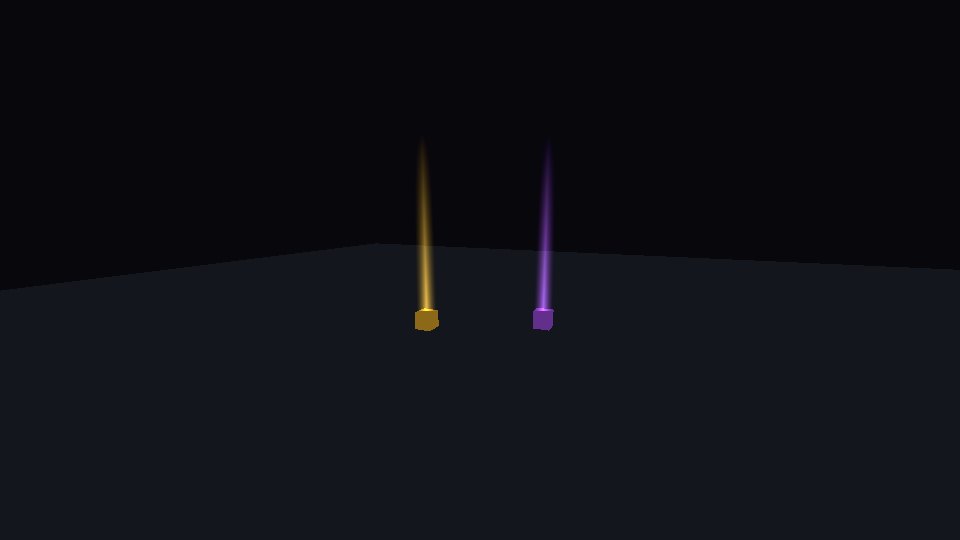
The code
Add a MeshInstance3D as a child of the item and give it this script. It makes its own mesh and material. Set the color per rarity.
extends MeshInstance3D
## A beam of light over dropped loot. Add it as a child of the item.
## It turns to face the camera around the Y axis only, so it never goes flat and never leans.

@export var color := Color(1.0, 0.75, 0.2)  # gold here; one color per rarity
@export var height := 4.0
@export var width := 0.5


func _ready() -> void:
	var q := QuadMesh.new()
	q.size = Vector2(width, height)
	q.center_offset = Vector3(0, height / 2.0, 0)  # starts at the item and goes up
	mesh = q
	var mat := StandardMaterial3D.new()
	mat.shading_mode = BaseMaterial3D.SHADING_MODE_UNSHADED
	mat.transparency = BaseMaterial3D.TRANSPARENCY_ALPHA
	mat.blend_mode = BaseMaterial3D.BLEND_MODE_ADD
	mat.billboard_mode = BaseMaterial3D.BILLBOARD_FIXED_Y  # faces the camera, stays upright
	mat.cull_mode = BaseMaterial3D.CULL_DISABLED
	mat.albedo_color = color
	mat.albedo_texture = _beam_texture()
	mat.texture_repeat = false  # with repeat on, the bright bottom row bleeds into a thin line at the top
	material_override = mat
	cast_shadow = GeometryInstance3D.SHADOW_CASTING_SETTING_OFF


func _beam_texture() -> ImageTexture:
	# Bright in the middle, dark at the sides and the top. Additive: dark adds nothing.
	var img := Image.create(32, 128, false, Image.FORMAT_RGBA8)
	for y in 128:
		for x in 32:
			var side := 1.0 - absf(x - 15.5) / 16.0
			var v := side * side * (float(y) / 127.0)  # row 0 is the top of the beam
			img.set_pixel(x, y, Color(v, v, v, 1.0))
	return ImageTexture.create_from_image(img)
We moved the camera around the beam at the same distance. From the front, at 60 degrees and at 90 degrees, it covered the same 489 points on a grid of 129,600 over the screen.
The beam vanishes from the side
That is a plain quad with no billboard. From the front it covered 489 points, at 60 degrees 245, and at 90 degrees, seen edge-on, 0: the beam was gone.
The beam leans when the camera looks down
A full billboard (Billboard Enabled) turns to face the camera on every axis, so it tilts toward a camera above it. We put the camera 7 meters up, looking down at the item. The real top of the 4 meter beam was at row 129 of the screen. With Y-Billboard the beam ended exactly there. With a full billboard it reached row 85, 44 pixels past its real top.
A thin line at the top of the beam
In our first screenshot a thin bright line showed at the very top of the beam. Textures repeat by default, so the bright bottom row bled into the top edge. With texture_repeat off, the line was gone.
What to change
color: one color per rarity.heightandwidth: in meters.side * sidein the texture: a higher power makes a thinner, sharper core.- The texture fades to black, not to transparent, because the material is additive. Why that matters: muzzle flash with a real light.
Tested in Godot 4.7 with the Compatibility renderer.
Ready-made: VFX Collection for Godot 4 has loot beams in 5 rarities, plus chest opening, item reveal and pickup effects.
More how-tos: Auras, rings, beams and weather
- God rays without volumetric fog
- Magic aura particles that circle a character
- Charge-up particles that fly in to the middle
- Particle ring standing up instead of flat
- 2D particles from a sprite's shape
- A glowing circle on the ground
- Chain lightning between enemies
- A tower's attack range ring
- Rain that follows the camera
- Rain falling through the roof
- Snow particles not falling
- orbit_velocity not working in 3D: use tangential_accel
- Rain falls through the player
- Snow that stays on roofs
- Emit particles along a Path3D