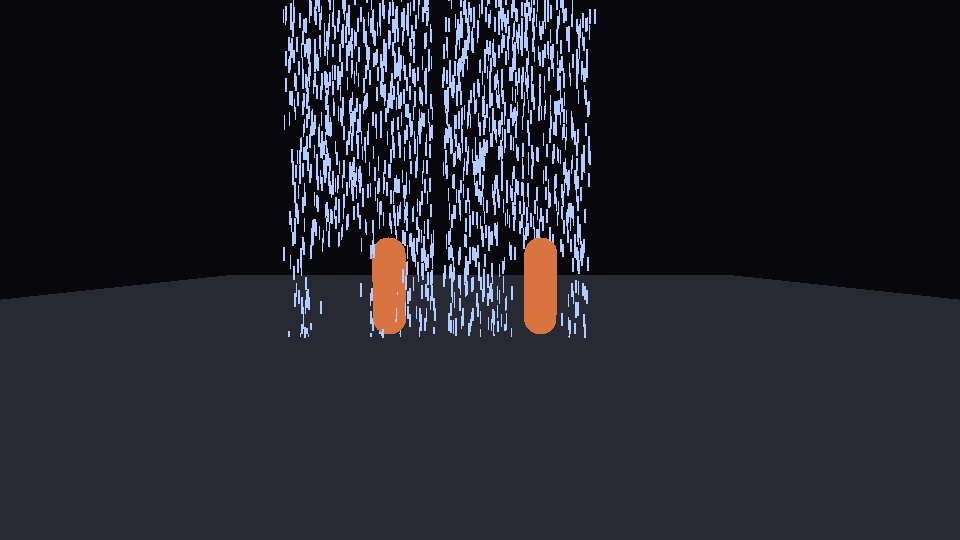
GPU particles do not collide with physics bodies or their CollisionShape3D. They only see particle colliders such as GPUParticlesCollisionSphere3D, and only when the rain's collision_mode is turned on. Make the sphere a child of the player so it walks with them. In our Godot 4.7 test, a player walked through rain and we counted lit points under their head: 0 with the script, 82 to 94 every frame with no sphere.
The code
Attach this to a GPUParticles3D above the level and set player in the Inspector. The collision_mode line and the sphere on the player are the fix.
extends GPUParticles3D
## Rain that stops on the player instead of falling through them, wherever they walk.
## Set player to your character. A collision sphere goes on the player, and the rain hides when it touches it.

@export var player: Node3D


func _ready() -> void:
	amount = 1500
	lifetime = 1.0
	visibility_aabb = AABB(Vector3(-6, -8, -6), Vector3(12, 10, 12))
	var m := ParticleProcessMaterial.new()
	m.emission_shape = ParticleProcessMaterial.EMISSION_SHAPE_BOX
	m.emission_box_extents = Vector3(5, 0.1, 3)
	m.direction = Vector3.DOWN
	m.spread = 0.0
	m.initial_velocity_min = 7.0
	m.initial_velocity_max = 8.0
	m.gravity = Vector3(0, -9.8, 0)
	m.collision_mode = ParticleProcessMaterial.COLLISION_HIDE_ON_CONTACT  # off by default
	process_material = m
	collision_base_size = 0.05
	var mat := StandardMaterial3D.new()
	mat.shading_mode = BaseMaterial3D.SHADING_MODE_UNSHADED
	mat.billboard_mode = BaseMaterial3D.BILLBOARD_PARTICLES
	mat.albedo_color = Color(0.7, 0.8, 1.0)
	var q := QuadMesh.new()
	q.size = Vector2(0.03, 0.25)
	q.material = mat
	draw_pass_1 = q
	var shield := GPUParticlesCollisionSphere3D.new()
	shield.radius = 0.5
	shield.position = Vector3(0, 1.6, 0)  # head and shoulders
	player.add_child.call_deferred(shield)  # the fix: on the player, so it walks with them
What we measured
The player walked 4 m in 2.7 seconds under the rain. Every frame from 1 second on, we counted lit points in a box under the player's head, from 0.2 to 1 m up. Two runs of each.
- The script: 0 per frame.
- No sphere: 82 to 94 per frame.
- The sphere left where the player started instead of on the player: 74 to 85. It kept a dry spot there, and the player walked out of it.
- The sphere on the player, but
collision_modeleft at Disabled, the default: 77 to 79. The rain ignores colliders until collisions are on.
Why call_deferred
The script adds the sphere with add_child.call_deferred() in case the rain is a child of the player. While a node is still adding its own children, Godot refuses add_child() on it.
What to change
- The sphere's
radiusandposition: what stays dry. A bigger sphere above the head works as an umbrella. collision_base_size: the size of one drop for collisions.amountandemission_box_extents: how heavy the rain is and how far it reaches.
Rain that comes through a roof: rain falling through a roof. Rain that stays around a moving camera: rain follows the camera.
Tested in Godot 4.7 with the Compatibility renderer.
Ready-made: Weather & Storms VFX has rain, thunderstorms and lightning ready for Godot 4.
More how-tos: Auras, rings, beams and weather
- God rays without volumetric fog
- Magic aura particles that circle a character
- Charge-up particles that fly in to the middle
- Particle ring standing up instead of flat
- 2D particles from a sprite's shape
- A glowing circle on the ground
- A loot beam that never goes flat
- Chain lightning between enemies
- A tower's attack range ring
- Rain that follows the camera
- Rain falling through the roof
- Snow particles not falling
- orbit_velocity not working in 3D: use tangential_accel
- Snow that stays on roofs
- Emit particles along a Path3D