Set the process material's emission_shape to Points and give it an emission_point_texture: a float texture where each pixel holds one starting position. The editor's Load Emission Mask builds one from an image. The script below does it in code, one point for every pixel that is not see-through. Measure the points from the middle of the image: in our test, points measured from the top-left corner put the shape 78 to 80 pixels right of and below the node.
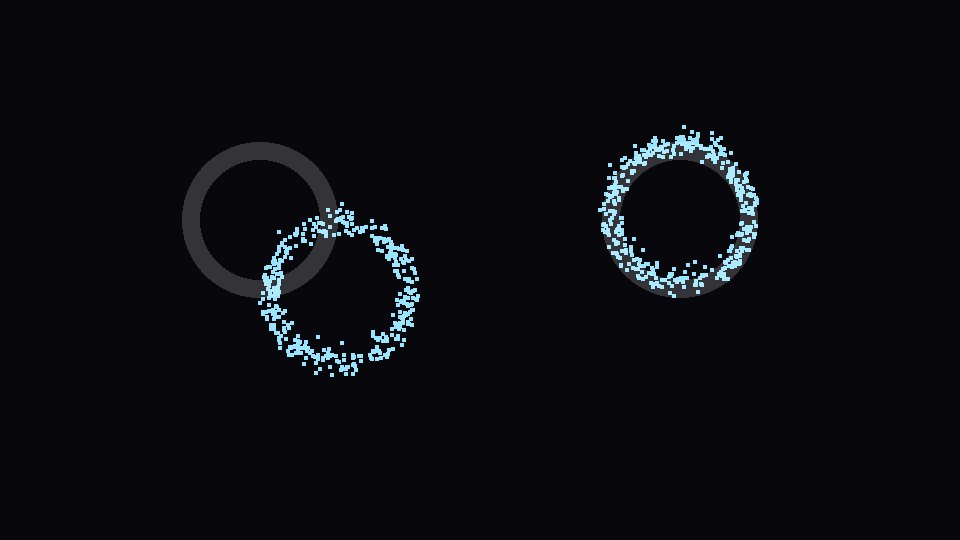
The code
Attach this to a GPUParticles2D and set mask to your sprite: a logo, a letter, a character. Without a mask it draws a ring, so it runs as it is. The line that subtracts half is the fix.
extends GPUParticles2D
## 2D sparkles that come out of a sprite's shape: the editor's Load Emission Mask, in code.
## Set mask to your sprite. Without one, a ring is drawn in code so the script runs as it is.

@export var mask: Texture2D


func _ready() -> void:
	if mask == null:
		mask = make_ring()
	amount = 400
	lifetime = 1.5
	texture = make_dot()
	var points := mask_points(mask.get_image())
	var m := ParticleProcessMaterial.new()
	m.emission_shape = ParticleProcessMaterial.EMISSION_SHAPE_POINTS
	m.emission_point_texture = points
	m.emission_point_count = points.get_width()
	m.direction = Vector3(0, -1, 0)
	m.spread = 20.0
	m.initial_velocity_min = 5.0
	m.initial_velocity_max = 15.0
	m.gravity = Vector3.ZERO
	process_material = m


func mask_points(img: Image) -> ImageTexture:
	# one point for every pixel that is not see-through, in a 1-pixel-tall float texture
	var half := Vector2(img.get_width(), img.get_height()) / 2.0
	var list: Array[Vector2] = []
	for y in img.get_height():
		for x in img.get_width():
			if img.get_pixel(x, y).a > 0.5:
				list.append(Vector2(x, y) - half)  # the fix: from the middle, like a centered Sprite2D
	var out := Image.create(list.size(), 1, false, Image.FORMAT_RGF)
	for i in list.size():
		out.set_pixel(i, 0, Color(list[i].x, list[i].y, 0.0))
	return ImageTexture.create_from_image(out)


func make_ring() -> Texture2D:
	var img := Image.create(160, 160, false, Image.FORMAT_RGBA8)
	for y in 160:
		for x in 160:
			var d := Vector2(x - 79.5, y - 79.5).length()
			if d >= 60.0 and d <= 78.0:
				img.set_pixel(x, y, Color.WHITE)
	return ImageTexture.create_from_image(img)


func make_dot() -> Texture2D:
	var img := Image.create(4, 4, false, Image.FORMAT_RGBA8)
	img.fill(Color(0.6, 0.9, 1.0))
	return ImageTexture.create_from_image(img)
What we measured
We stopped the particles from moving and counted the blue points every second pixel by their distance from the node, averaged over four frames. Two runs of each.
- The script: the 160 by 160 ring gave 7812 points. 1098 to 1126 blue points on the ring, 0 in the hole, 0 outside it. Their middle was within 3 pixels of the node.
- Points measured from the top-left corner: 147 to 158 on the ring, 136 to 166 in the hole and 812 to 874 outside. Their middle was 78 to 80 pixels right and 78 to 80 pixels down, half the size of the image.
- Emission Shape left at its default, Point: all 400 particles drew as one dot on the node.
Why from the middle
Emission points are positions from the node, and a Sprite2D is centered on its node by default. Pixel positions start at the top-left corner of the image, so subtract half the image size and the particles line up with the sprite, as on the right of the picture.
What to change
mask: any texture. Pixels with an alpha above 0.5 become points.amount: how many particles are alive at once. More makes the shape easier to read.direction,spreadand the velocities: here a slow drift up, like sparkles.
A ring of particles on the ground in 3D: particle ring emission. Particles from the surface of a 3D model: particles from a mesh surface.
Tested in Godot 4.7 with the Compatibility renderer.
More how-tos: Auras, rings, beams and weather
- God rays without volumetric fog
- Magic aura particles that circle a character
- Charge-up particles that fly in to the middle
- Particle ring standing up instead of flat
- A glowing circle on the ground
- A loot beam that never goes flat
- Chain lightning between enemies
- A tower's attack range ring
- Rain that follows the camera
- Rain falling through the roof
- Snow particles not falling
- orbit_velocity not working in 3D: use tangential_accel
- Rain falls through the player
- Snow that stays on roofs
- Emit particles along a Path3D