From the caster, find the nearest enemy that is within range and has not been hit yet. Draw a jagged bolt to it, then search again from that enemy. Draw each bolt as a flat ribbon of triangles that faces the camera: a line drawn with PRIMITIVE_LINES was 1 pixel thick in our test. Move the kinks every 0.05 seconds so the bolt flickers, fade it out, and free it.
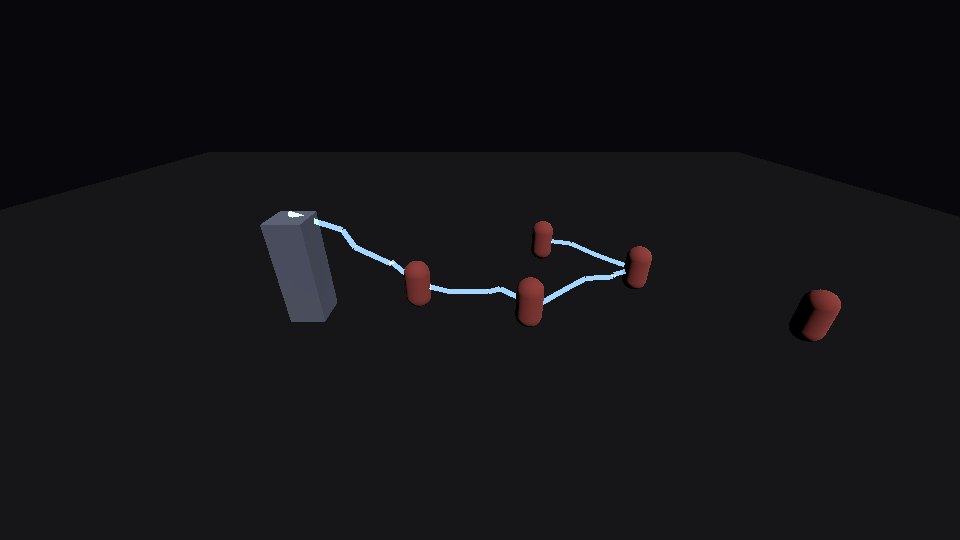
The code
Add a Node3D anywhere in the level and give it this script. When the spell fires, call strike(start, enemies) with the position of the hand or the tower, and an array of enemy nodes. It returns the enemies it hit, in order, and emits hit for each one, so you can deal the damage there.
extends Node3D
## Chain lightning: a jagged bolt to the nearest enemy, then on to the next one.
## Add this node anywhere in the level and call strike(start, enemies).
## Each bolt is a flat ribbon that faces the camera. It flickers, fades and frees itself.

signal hit(enemy)

@export var jumps := 4  # how many enemies one cast can reach
@export var jump_range := 6.0  # meters from one hit to the next
@export var width := 0.12  # meters
@export var color := Color(0.55, 0.75, 1.0)
@export var life := 0.35  # seconds
@export var segment := 0.5  # one kink every half meter
@export var jitter := 0.25  # how far a kink can move, in meters


func strike(start: Vector3, enemies: Array) -> Array:
	var chain := []
	var point := start
	var left := enemies.duplicate()
	for i in jumps:
		var best: Node3D = null
		var best_d := jump_range
		for e in left:
			var d := point.distance_to(e.global_position)
			if d <= best_d:
				best = e
				best_d = d
		if best == null:
			break  # nothing left in range
		left.erase(best)  # never the same enemy twice
		chain.append(best)
		_bolt(point, best.global_position)
		hit.emit(best)
		point = best.global_position
	return chain


func _bolt(a: Vector3, b: Vector3) -> void:
	var mi := MeshInstance3D.new()
	mi.mesh = ImmediateMesh.new()
	mi.top_level = true  # the points are world positions
	var mat := StandardMaterial3D.new()
	mat.shading_mode = BaseMaterial3D.SHADING_MODE_UNSHADED
	mat.transparency = BaseMaterial3D.TRANSPARENCY_ALPHA
	mat.blend_mode = BaseMaterial3D.BLEND_MODE_ADD
	mat.cull_mode = BaseMaterial3D.CULL_DISABLED
	mat.albedo_color = color
	mi.material_override = mat
	mi.cast_shadow = GeometryInstance3D.SHADOW_CASTING_SETTING_OFF
	add_child(mi)
	var t := 0.0
	while t < life:
		_build(mi.mesh, a, b)  # new kinks = the flicker
		mat.albedo_color.a = 1.0 - t / life
		await get_tree().create_timer(0.05).timeout
		t += 0.05
	mi.queue_free()


func _build(im: ImmediateMesh, a: Vector3, b: Vector3) -> void:
	var cam := get_viewport().get_camera_3d()
	var n := maxi(2, int(a.distance_to(b) / segment))
	var pts := [a]
	for i in range(1, n):
		var off := Vector3(randf_range(-1, 1), randf_range(-1, 1), randf_range(-1, 1)) * jitter
		pts.append(a.lerp(b, float(i) / n) + off)
	pts.append(b)  # the ends stay exactly on the caster and the enemy
	im.clear_surfaces()
	im.surface_begin(Mesh.PRIMITIVE_TRIANGLES)
	for i in pts.size() - 1:
		var p0: Vector3 = pts[i]
		var p1: Vector3 = pts[i + 1]
		var eye := cam.global_position if cam else p0 + Vector3.BACK
		var side := (p1 - p0).cross(eye - p0).normalized() * width * 0.5
		for v in [p0 - side, p0 + side, p1 + side, p0 - side, p1 + side, p1 - side]:
			im.surface_add_vertex(v)
	im.surface_end()
With the values above, half a second after the cast the bolt lit 0 points on the screen, and the node had 0 bolt children left.
How it picks the next enemy
We placed 5 enemies around the caster, with a range of 6 meters. The nearest one was 3 meters away, the next 3.04 meters from it, and the next 4 meters further. From there, the last two enemies were 6.95 and 8.08 meters away, so the chain stopped after 3 hits even though 4 jumps were allowed. The hit signal came 3 times, in the same order. With jumps at 2, the same cast hit only the first 2.
An enemy is removed from the list as soon as it is hit, so the bolt can never go back and forth between two enemies that stand close together.
Why not just draw a line
An ImmediateMesh with PRIMITIVE_LINES is the quickest way to draw a line in 3D, but the line has no width. Across a straight bolt 6 meters from the camera, the line covered 1 pixel. The ribbon from the script above, 0.12 meters wide, covered 8.
The flicker
Every 0.05 seconds the script moves each kink to a new random spot, and the two ends stay exactly on the caster and the enemy. Next to each enemy that was hit, the bolt lit between 36 and 93 points on the screen. Next to the 2 enemies out of range, 0. Between two frames 0.05 seconds apart, 309 sample points on the screen changed, so the bolt looks alive, not like a drawn line.
What to change
jump_range: the most important one. Too long and the bolt reaches across the map.jumps: how many enemies one cast can hit. A good stat for a tower upgrade.widthandcolor: a wider, whiter bolt for a strong spell.segmentandjitter: more kinks and wilder kinks. Withjitterat 0 the bolt is a straight beam.life: how long each bolt stays. The fade follows it.
A hit effect at the point where something lands: spawn a hit effect at the impact point.
Tested in Godot 4.7 with the Compatibility renderer.
Ready-made: Tower Defense VFX for Godot 4 has Tesla_Coil_Charge for the top of the tower and Chain_Lightning_Hit for each enemy the bolt reaches.
More how-tos: Auras, rings, beams and weather
- God rays without volumetric fog
- Magic aura particles that circle a character
- Charge-up particles that fly in to the middle
- Particle ring standing up instead of flat
- 2D particles from a sprite's shape
- A glowing circle on the ground
- A loot beam that never goes flat
- A tower's attack range ring
- Rain that follows the camera
- Rain falling through the roof
- Snow particles not falling
- orbit_velocity not working in 3D: use tangential_accel
- Rain falls through the player
- Snow that stays on roofs
- Emit particles along a Path3D