Add a second material in next_pass that draws only the back faces (cull_front), a little bigger, in one flat color. Most examples grow the mesh along NORMAL, which works on smooth shapes but opens gaps at the edges of a box, because each face moves its own way. Pushing the vertices out from the mesh center keeps the shell closed.
The code
Put this script on a MeshInstance3D in place of its own script. It copies the mesh's material, adds the outline as its next_pass, and show_outline(false) turns it off.
extends MeshInstance3D
## Outline around a 3D mesh: a second pass draws the mesh a little bigger, inside out, in one flat color.

@export var outline_color := Color(1.0, 0.8, 0.1)
@export var width := 0.04  # in meters
@export var from_center := true  # true: push out from the mesh origin (boxes, hard edges) · false: along the normals

const OUTLINE_SHADER := """
shader_type spatial;
render_mode unshaded, cull_front;
uniform vec4 outline_color : source_color = vec4(1.0, 0.8, 0.1, 1.0);
uniform float width = 0.04;
uniform bool from_center = true;

void vertex() {
	// along NORMAL, the faces of a box move apart and leave gaps at the edges
	vec3 dir = from_center ? normalize(VERTEX) : NORMAL;
	VERTEX += dir * width;
}

void fragment() {
	ALBEDO = outline_color.rgb;
}
"""

var _outline: ShaderMaterial


func _ready() -> void:
	_outline = ShaderMaterial.new()
	_outline.shader = Shader.new()
	_outline.shader.code = OUTLINE_SHADER
	var base := get_active_material(0)
	base = base.duplicate() if base else StandardMaterial3D.new()
	material_override = base  # a copy, so other meshes that share the material get no outline
	show_outline(true)


func show_outline(on: bool) -> void:
	_outline.set_shader_parameter("outline_color", outline_color)
	_outline.set_shader_parameter("width", width)
	_outline.set_shader_parameter("from_center", from_center)
	material_override.next_pass = _outline if on else null  # drawn after the mesh's own material
On a box with the outline on, our test frame had 559 outline-colored sample points. After show_outline(false) it had none.
Gaps at the corners of a box
We measured the thin ring of background right around each shape and counted how much of it the outline covered. On a sphere both ways covered all of it. On a box, growing along NORMAL covered 80%: the faces of a box have their own normals, so they move apart and leave gaps at the edges. With from_center on, the box was covered 100%.
from_center pushes out from the mesh origin. We tested it on a box and a sphere with the origin in the middle. For a mesh whose origin is far from its middle, turn it off and grow along the normals.
Every copy gets an outline
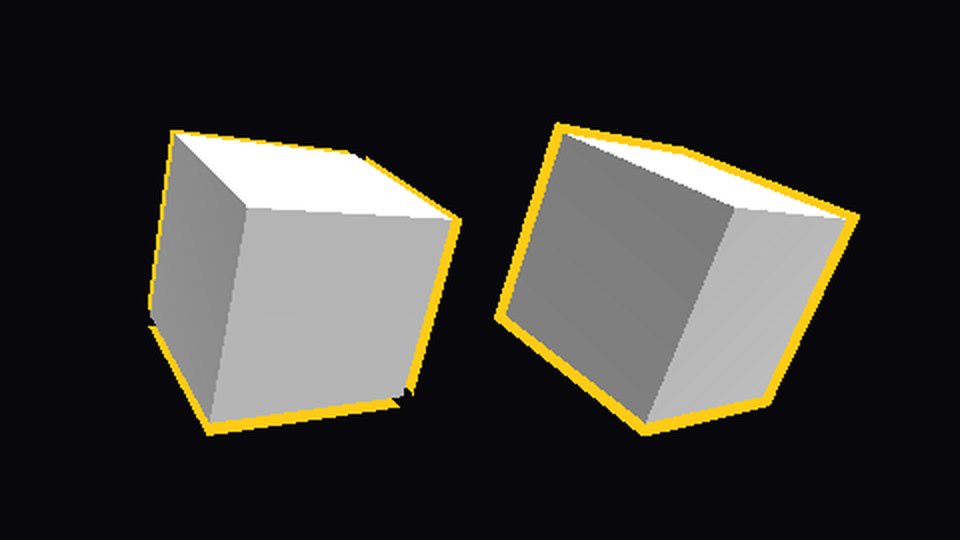
That happens when you set next_pass on a material that many meshes share. We gave two boxes one material and set the outline as its next_pass: both boxes were outlined. With the script on one of them instead, that box was outlined and the other had no outline color at all, because the script works on its own copy of the material.
What to change
width: in meters, so it is the same size in the world, not on screen.outline_color: the outline pass isunshaded, so lights do not shade it.- Meshes with more than one surface: the script reads the material of the first surface and uses its copy for the whole mesh.
For 2D sprites, see the 2D outline page.
Tested in Godot 4.7 with the Compatibility renderer.
Ready-made: PD Toon World Starter Kit for Godot 4 has a toon outline that keeps the same width on screen at any distance, with a mode for cubes and hard-edged props so the corners never split.