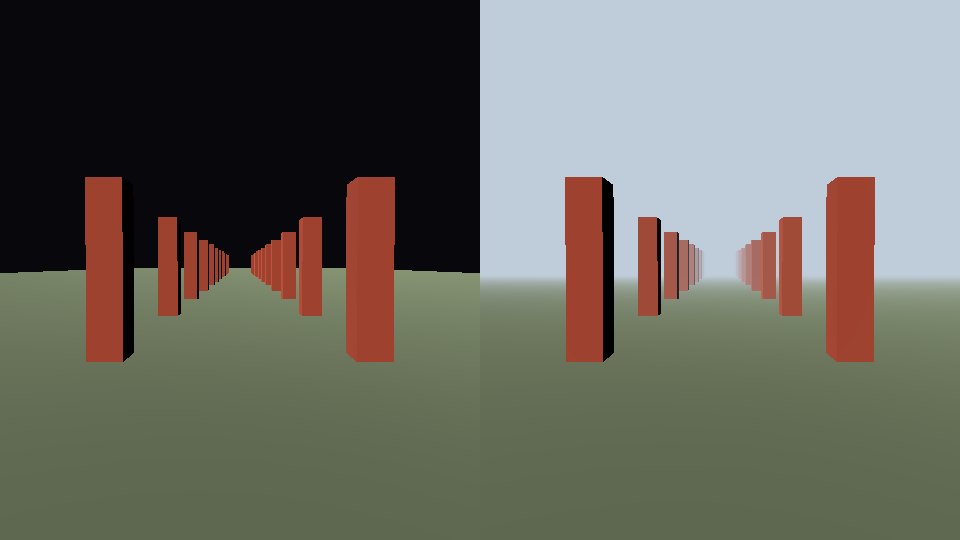
Draw a 2 x 2 QuadMesh with a spatial shader that sets POSITION = vec4(VERTEX.xy, 1.0, 1.0), read hint_screen_texture and hint_depth_texture, and rebuild the depth with the Compatibility line vec3(SCREEN_UV, depth) * 2.0 - 1.0. In our Godot 4.7 test with the Compatibility renderer, the Forward+ line put no fog at all on red boxes 4, 10 and 25 m away, while the script below gave 0.00, 0.09 and 0.90, close to what smoothstep(5, 30, distance) gives (0.00, 0.10 and 0.90).
The code
Add a MeshInstance3D anywhere in your 3D scene and attach this script. It builds its own quad and shader. Set fog_color, fog_start and fog_end in the Inspector. For your own effect, keep everything above the last line of fragment() and change the ALBEDO line: the screen texture is the rendered image and dist is how many metres away that pixel is.
extends MeshInstance3D
## A full-screen post-process for 3D: depth fog that fades the scene into fog_color.
## Add a MeshInstance3D anywhere in your scene and attach this script. Works in the Compatibility renderer.

@export var fog_color := Color(0.75, 0.8, 0.85):
	set(v):
		fog_color = v
		_apply()
@export var fog_start := 5.0:  ## metres from the camera where the fog begins
	set(v):
		fog_start = v
		_apply()
@export var fog_end := 30.0:  ## metres where everything is fog
	set(v):
		fog_end = v
		_apply()

const SHADER := """
shader_type spatial;
render_mode unshaded, cull_disabled, depth_test_disabled, depth_draw_never, fog_disabled, shadows_disabled;

uniform sampler2D screen_tex : hint_screen_texture, filter_linear_mipmap, repeat_disable;
uniform sampler2D depth_tex : hint_depth_texture, filter_nearest, repeat_disable;
uniform vec3 fog_color : source_color;
uniform float fog_start;
uniform float fog_end;

void vertex() {
	POSITION = vec4(VERTEX.xy, 1.0, 1.0);  // the 2 x 2 quad covers the whole screen
}

void fragment() {
	float d = texture(depth_tex, SCREEN_UV).r;
#if CURRENT_RENDERER == RENDERER_COMPATIBILITY
	vec3 ndc = vec3(SCREEN_UV, d) * 2.0 - 1.0;
#else
	vec3 ndc = vec3(SCREEN_UV * 2.0 - 1.0, d);
#endif
	vec4 view = INV_PROJECTION_MATRIX * vec4(ndc, 1.0);
	float dist = -view.z / view.w;  // metres in front of the camera
	ALBEDO = mix(texture(screen_tex, SCREEN_UV).rgb, fog_color, smoothstep(fog_start, fog_end, dist));
}
"""


func _ready() -> void:
	var q := QuadMesh.new()
	q.size = Vector2(2, 2)
	mesh = q
	extra_cull_margin = 16384.0  # the quad still lives at this node; without this it vanishes when the camera looks away
	cast_shadow = GeometryInstance3D.SHADOW_CASTING_SETTING_OFF
	var mat := ShaderMaterial.new()
	mat.shader = Shader.new()
	mat.shader.code = SHADER
	material_override = mat
	_apply()


func _apply() -> void:
	var mat := material_override as ShaderMaterial
	if mat:
		mat.set_shader_parameter("fog_color", fog_color)
		mat.set_shader_parameter("fog_start", fog_start)
		mat.set_shader_parameter("fog_end", fog_end)
What we measured
Three unshaded red boxes with their front faces 4, 10 and 25 m from the camera, a pure blue fog color and fog from 5 to 30 m. We read the blue of each box as the amount of fog (0 = none, 1 = all fog). Two runs gave the same numbers.
- The script: 0.00, 0.09 and 0.90. The empty background turned fully blue, because it is further away than fog_end.
fog_start0 andfog_end10: 0.35 at 4 m, 1.00 at 10 and 25 m.- The Forward+ depth line on Compatibility: 0.00 on all three boxes and only 0.03 blue on the background. The effect is just gone.
- Without the POSITION line, with the node at the camera: no fog anywhere. With the node 2 m in front of the camera: only the middle box, the one behind a 2 x 2 m square in the world, got its 0.09.
- Node 20 m behind the camera: the script still fogged everything. With
extra_cull_marginset back to 0: no fog at all, because Godot culled the quad.
Why there are two depth lines
The depth texture does not store metres. To get them back, the shader builds the point in normalized device coordinates and multiplies it by the inverse projection. The Compatibility renderer needs the whole vector, depth included, moved from the 0 to 1 range to -1 to 1. The other line is the one the Godot docs give for Forward+ and Mobile. The #if CURRENT_RENDERER picks the right one; we tested the Compatibility side.
Why the quad needs extra_cull_margin
The shader moves the quad onto the screen, but Godot still decides whether to draw it from where the node is in the world. When the camera looks away from that spot, the quad is culled and the effect switches off. extra_cull_margin makes its box so large that it is always on screen.
What to change
fog_startandfog_end: in metres from the camera, not from the world origin.fog_color: match your sky so the far end blends into it.- The
ALBEDOline: any full-screen effect that needs the scene and its depth, such as outlines from depth changes or a tint by distance.
A full look built the same way: PD Ink Wash LITE uses this quad and depth reading to repaint a whole 3D scene as a Chinese ink painting, with ink tones, brush outlines from depth and misty distance.
Tested in Godot 4.7 with the Compatibility renderer.
Ready-made: PD Ink Wash has 12 ink looks for 3D, 2D full-screen and sprite shaders, and 8 ink brush scene transitions.