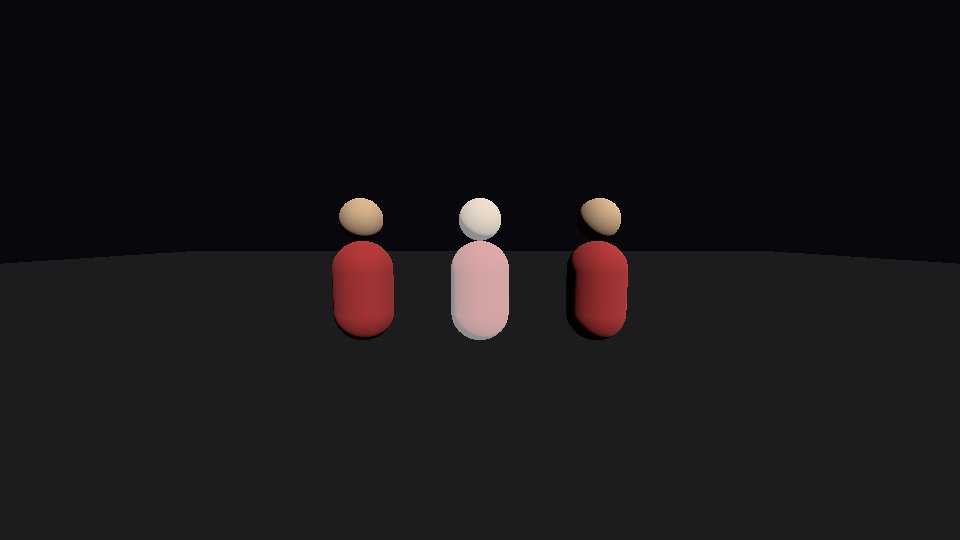
Give every mesh of the enemy the same material_overlay: an unshaded, transparent StandardMaterial3D. On a hit, set its color to white and tween the alpha back to 0. The enemy's own materials never change, so two enemies that share a material do not flash together.
The code
Add a Node as a child of the enemy and give it this script. Call flash() from your damage code.
extends Node
## Flash a 3D enemy white when it takes a hit. Add it as a child of the enemy and call flash().
## It draws on top with material_overlay, so the enemy's own materials are never changed.

@export var color := Color(1, 1, 1)
@export var duration := 0.15  # seconds from full white back to normal

var _mat := StandardMaterial3D.new()  # one per enemy: flashing this enemy never flashes another
var _tween: Tween


func _ready() -> void:
	_mat.shading_mode = BaseMaterial3D.SHADING_MODE_UNSHADED
	_mat.transparency = BaseMaterial3D.TRANSPARENCY_ALPHA
	_mat.albedo_color = Color(color, 0.0)
	_add_overlay(get_parent())


func flash() -> void:
	if _tween:
		_tween.kill()  # a new hit restarts the flash instead of fighting the old one
	_mat.albedo_color = Color(color, 1.0)
	_tween = create_tween()
	_tween.tween_property(_mat, "albedo_color:a", 0.0, duration)


func _add_overlay(node: Node) -> void:
	# Every mesh of the enemy: body, head, weapon. Each keeps its own materials.
	if node is MeshInstance3D:
		node.material_overlay = _mat
	for child in node.get_children():
		_add_overlay(child)
Both enemies in our test used one red body material, and each head had its own material. Right after flash(), enemy A's body read red 0.96, green 0.91, blue 0.91 on the screen and its head 0.97, 0.96, 0.94: close to white. Enemy B, with the very same body material, stayed red at 0.58, 0.18, 0.18.
Why not change the material color
If you set the shared material to white instead, every enemy that uses it flashes. In our test enemy B turned 1.0, 1.0, 1.0 when only A was meant to flash. The overlay is drawn on top of the mesh, and each copy of the script makes its own overlay, so the shared red material was the same red after every hit.
The fade and fast hits
duration is the fade from white back to normal. With 0.15 seconds, 93 milliseconds after the hit the overlay was at 0.56 alpha and the body read 0.78, 0.55, 0.55. At 277 milliseconds it was back to 0.6, 0.19, 0.19, the same as before the hit.
Five hits 0.05 seconds apart kept restarting the flash, and 0.25 seconds after the last one the body was back to normal with the overlay alpha at 0. flash() stops the running tween first, so two fades never fight over the same color.
What to change
duration: shorter for fast weapons, so the flash does not hide the next hit.color: any color works, the overlay ignores the lights, so the color is exactly what you set.material_overlayholds one material per mesh. If your enemy already uses it, for an outline for example, this script replaces it.
The same idea for sprites: a hit flash shader in 2D. For the death after the last hit: dissolve a 3D model with a glowing edge.
Tested in Godot 4.7 with the Compatibility renderer.
Ready-made: FPS Combat Kit for Godot 4 returns the hits of every shot from fire_from_camera() and sends an impact signal with the surface name, so you know which enemy to flash.