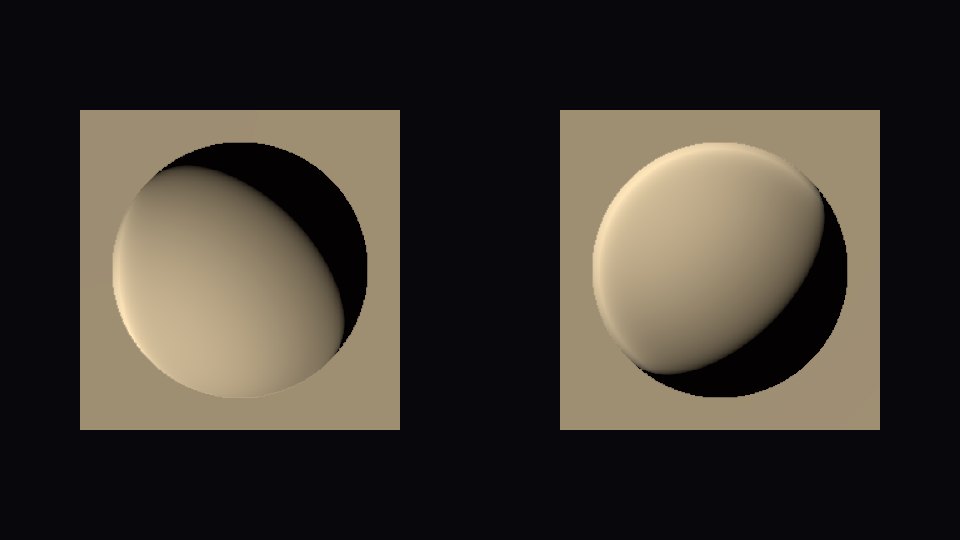
Godot expects OpenGL normal maps, where green points up. A DirectX map, the Unreal convention often named _DX or Y-, swaps only up and down: in our Godot 4.7 test, with the light coming from the upper left, the top of a bump read 0.34 and its bottom 0.55, the reverse of the OpenGL map (0.55 and 0.35), while left and right stayed right. Use the _GL file, turn on Normal Map Invert Y in the Import dock, or run the script below, which tells the two apart and flips the DirectX ones.
The code
Attach this script to any node and drag your MeshInstance3D into mesh. On start it prints one line per surface that has a normal map: DirectX, OpenGL or unclear. With fix_directx on, it flips the DirectX ones on that mesh only: the material is copied first, so other meshes that share it stay as they were.
extends Node
## Finds DirectX (Y-) normal maps on a mesh and flips them to the OpenGL (Y+) maps Godot expects.
## Attach to any node and drag your MeshInstance3D into "mesh". It prints one line per surface.

@export var mesh: MeshInstance3D
@export var fix_directx := true
const CLEAR := 0.1  ## scores between -0.1 and 0.1 print "unclear" and are left alone


func _ready() -> void:
	if mesh == null or mesh.mesh == null:
		return
	for i in mesh.mesh.get_surface_count():
		var mat := mesh.get_active_material(i) as BaseMaterial3D
		if mat == null or not mat.normal_enabled or mat.normal_texture == null:
			continue
		var score := directx_score(mat.normal_texture)
		var kind := "DirectX, flip it" if score > CLEAR else ("OpenGL, fine" if score < -CLEAR else "unclear")
		print(mesh.name, " surface ", i, ": ", kind, " (score ", snappedf(score, 0.01), ")")
		if fix_directx and score > CLEAR:
			mat = mat.duplicate()  # the fix stays on this mesh only
			mat.normal_texture = to_opengl(mat.normal_texture)
			mesh.set_surface_override_material(i, mat)


## Near 1: DirectX. Near -1: OpenGL. A normal map made from a height map has to bend
## red down the image and green across it in opposite directions (OpenGL) or the same one (DirectX).
static func directx_score(tex: Texture2D) -> float:
	var img := _rgba(tex)
	var step := maxi(1, img.get_width() / 256)
	var sum := 0.0
	var size := 0.0
	for y in range(0, img.get_height() - step, step):
		for x in range(0, img.get_width() - step, step):
			var c := img.get_pixel(x, y)
			var red_down := img.get_pixel(x, y + step).r - c.r
			var green_right := img.get_pixel(x + step, y).g - c.g
			sum += red_down * green_right
			size += absf(red_down * green_right)
	return sum / size if size > 0.0 else 0.0


## Flips the green channel: DirectX normal map in, OpenGL normal map out.
static func to_opengl(tex: Texture2D) -> ImageTexture:
	var img := _rgba(tex)
	img.clear_mipmaps()
	var data := img.get_data()
	for i in range(1, data.size(), 4):
		data[i] = 255 - data[i]
	img.set_data(img.get_width(), img.get_height(), false, Image.FORMAT_RGBA8, data)
	img.generate_mipmaps()
	return ImageTexture.create_from_image(img)


static func _rgba(tex: Texture2D) -> Image:
	var img := tex.get_image()
	if img.is_compressed():
		img.decompress()  # textures imported as VRAM Compressed
	img.convert(Image.FORMAT_RGBA8)
	return img
The quickest fix: Normal Map Invert Y
If you know a texture is DirectX, select it in the FileSystem dock, open the Import dock, turn on Process > Normal Map Invert Y and press Reimport. In our test that gave the same light as the OpenGL map (top 0.55, bottom 0.34) and costs nothing while the game runs. If your pack ships both files, use the one named _GL or OpenGL. The script is for when you do not know which one you have, or have a lot of them.
What we measured
A 2 m quad facing the camera, a 256 px normal map of one round bump that we drew in code, and a DirectionalLight3D from the upper left. We read the brightness (0 = black, 1 = white) halfway between the middle of the bump and its edge, above, below, left and right of it. Two runs gave the same numbers.
- No normal map: 0.48 at all four points.
- OpenGL map: top 0.55, bottom 0.35, left 0.55, right 0.35. Lit from the upper left, as it should be.
- DirectX map as is: top 0.34, bottom 0.55, left 0.55, right 0.35. Up and down swapped, left and right fine.
normal_scale-1 on the DirectX map: top 0.54, bottom 0.38, left 0.37, right 0.54. It fixes up and down and breaks left and right.- Normal Map Invert Y on import: top 0.55, bottom 0.34, left 0.55, right 0.34.
- The script: top 0.55, bottom 0.35, left 0.55, right 0.35, the same as the OpenGL map.
How the script tells them apart
A DirectX and an OpenGL normal map of the same surface look almost the same, so the script measures them. In a normal map made from a height map, red changes as you go down the image and green changes as you go across it, in opposite directions in an OpenGL map and in the same direction in a DirectX one. The score is near -1 for OpenGL and near 1 for DirectX.
- Our bump: -1.00 for OpenGL, 1.00 for DirectX.
- Temple Stone Path, 1K: _Normal_GL -0.98, _Normal_DX 0.98. Imported as VRAM Compressed with Normal Map set to Enable: -0.97 and 0.97.
- Bamboo Poles, 1K, VRAM Compressed: -0.89 and 0.90.
- The Temple Stone DirectX map after the script flipped it: -0.97.
Is it worth fixing?
We put the Temple Stone Path maps on the same quad and compared whole frames with the OpenGL one. The DirectX map used as is was further from it (an average difference of 0.058) than no normal map at all (0.042). After the flip the difference was 0.000. Flipping took 56 ms for a 1K map and about 0.37 seconds for a 2K map on our PC, so for many textures flip them once on import instead.
What to change
fix_directxoff: the script only prints, to check a whole pack before you change anything.CLEAR: scores between -0.1 and 0.1 print unclear and are left alone. Our real maps scored 0.89 to 0.98 either way.directx_score()andto_opengl()are static, so you can call them from your own code on any Texture2D, for example on textures you load while the game runs.
Maps to try it on: Stylized Asian PBR Free has 2 seamless materials (Bamboo Poles and Temple Stone Path) with both _Normal_GL and _Normal_DX in 2K and 1K, and its Godot 4 materials already use the GL ones.
Tested in Godot 4.7 with the Compatibility renderer.
Ready-made: Stylized Asian PBR Textures has 10 seamless materials in 2K and 1K, each with OpenGL and DirectX normal maps, and ready Godot 4 materials.