A canvas_item shader can only draw inside the sprite's own rectangle. If the art reaches the edge of its texture, there is no room for an outline and it gets cut off. Make the rectangle bigger in vertex() and stretch UV to match, then treat everything outside the texture as empty when you look for neighbors in fragment().
The code
Put this script on a Sprite2D in place of its own script. It builds the shader itself. Call show_outline(false) to hide the outline, for example when the mouse leaves.
extends Sprite2D
## Outline around a 2D sprite. The sprite's quad grows, so the outline is not cut off at the texture edge.

@export var outline_color := Color.WHITE
@export var width := 2.0  # in texture pixels

const OUTLINE_SHADER := """
shader_type canvas_item;
uniform vec4 outline_color : source_color = vec4(1.0);
uniform float width = 2.0;

void vertex() {
	// grow the quad by width on every side and stretch UV to match, so there is room for the outline
	vec2 size = 1.0 / TEXTURE_PIXEL_SIZE;
	VERTEX += (UV * 2.0 - 1.0) * width;
	UV = (UV - 0.5) * (size + 2.0 * width) / size + 0.5;
}

float alpha_at(sampler2D tex, vec2 uv) {
	if (uv.x < 0.0 || uv.y < 0.0 || uv.x > 1.0 || uv.y > 1.0) {
		return 0.0; // outside the texture counts as empty
	}
	return texture(tex, uv).a;
}

void fragment() {
	vec4 c = texture(TEXTURE, UV) * COLOR;
	c.a = alpha_at(TEXTURE, UV) * COLOR.a;
	vec2 reach = TEXTURE_PIXEL_SIZE * width;
	float around = 0.0;
	for (int i = 0; i < 8; i++) {
		float angle = float(i) * 0.785398; // 8 directions, 45 degrees apart
		around = max(around, alpha_at(TEXTURE, UV + vec2(cos(angle), sin(angle)) * reach));
	}
	float line_a = outline_color.a * around;
	float a = c.a + line_a * (1.0 - c.a); // the sprite drawn over its outline
	vec3 rgb = (c.rgb * c.a + outline_color.rgb * line_a * (1.0 - c.a)) / max(a, 0.0001);
	COLOR = vec4(rgb, a);
}
"""

func _ready() -> void:
	var mat := ShaderMaterial.new()
	mat.shader = Shader.new()
	mat.shader.code = OUTLINE_SHADER
	material = mat  # made here, so every sprite has its own outline
	show_outline(true)


func show_outline(on: bool) -> void:
	var m := material as ShaderMaterial
	m.set_shader_parameter("width", width)
	m.set_shader_parameter("outline_color", outline_color if on else Color(outline_color, 0.0))
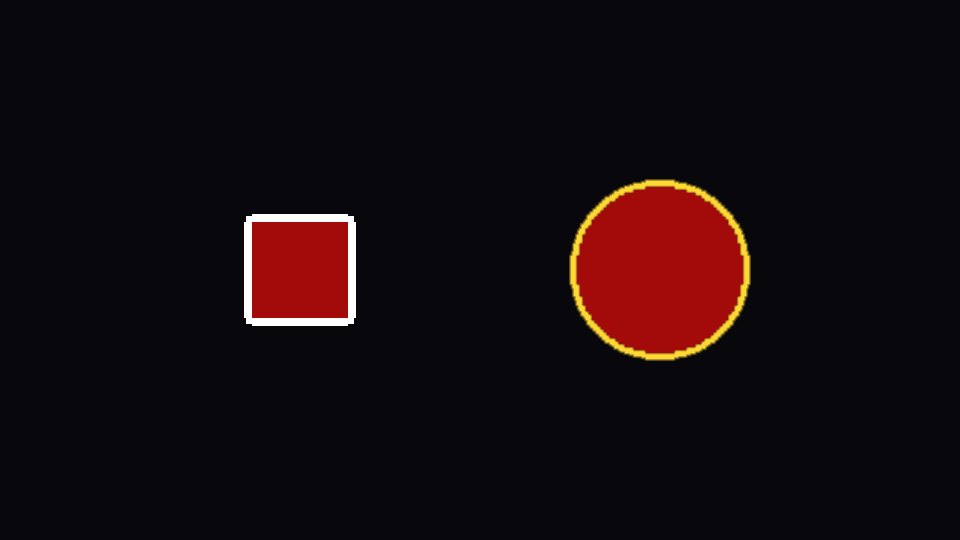
On a square that fills its texture to the edge, our test found the outline on the right and on the top, the inside still red, and nothing past the outline width.
Why the usual short shader shows no outline
The short version you often see only has a fragment() that looks at the neighbors. We put it on the same square: the pixels just outside it stayed background, no outline, because every pixel the shader can draw is already inside the art. On a round sprite with a few empty pixels around it, the same short shader did draw an outline.
Make the width bigger than that empty border and it gets cut again. With a width of 8 texture pixels on the round sprite, the short shader's outline stopped at the edge of the texture, while the script above kept drawing it past the edge.
Width is in texture pixels
width counts pixels of the texture, not of the screen. In our test the sprite was scaled 3 times, so a width of 2 reached 5 screen pixels out and was gone by 9.
What to change
outline_color: one color per sprite. The script makes a new material for each sprite, so they do not share it.modulatestill works: at half gray our sprite drew darker, with the shader on.- This version is written for a sprite that shows its whole texture. We did not test it on sprite sheet frames (hframes or a region).
Outlining a 3D mesh instead? See the 3D outline page. For a white flash when a sprite takes damage, see the hit flash shader.
Tested in Godot 4.7 with the Compatibility renderer.
Ready-made: Card Game VFX & Shaders for Godot 4 has nine 2D card shaders, including a glow outline for hover and playable cards.