Put an additive, unshaded shader on a sphere and make it brighter toward the edge with a fresnel term: pow(1.0 - dot(NORMAL, VIEW), power). The middle stays almost clear, so you can still see the character inside. For a hit, send the hit point and the time since the hit to the shader, and draw a thin ring at the distance the wave has traveled.
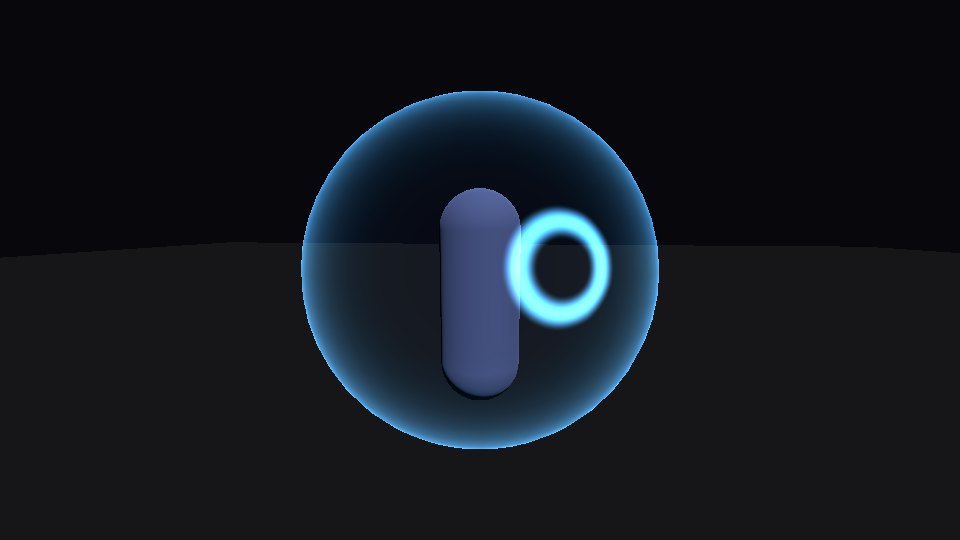
The code
Add a MeshInstance3D as a child of the character and give it this script. It builds the sphere and the shader itself. When a bullet or a sword reaches the shield, call hit(position) with the world position of the impact.
extends MeshInstance3D
## A force field bubble: bright at the edges (fresnel), almost clear in the middle,
## and a ring that runs out from the point where it was hit. Call hit(world_position).

@export var radius := 1.2  # meters
@export var color := Color(0.3, 0.7, 1.0)

const SHADER := """
shader_type spatial;
render_mode unshaded, blend_add, depth_draw_never, cull_back;

uniform vec4 color : source_color = vec4(0.3, 0.7, 1.0, 1.0);
uniform float rim_power = 3.0;   // higher = thinner bright edge
uniform float base = 0.05;       // how much the middle glows
uniform vec3 hit_point = vec3(0.0, 0.0, 1.0);  // on the bubble, local space
uniform float hit_age = 100.0;   // seconds since the hit
uniform float ripple_speed = 2.0;  // meters per second
uniform float ripple_life = 0.6;   // seconds

varying vec3 local_pos;

void vertex() {
	local_pos = VERTEX;
}

void fragment() {
	float rim = pow(1.0 - abs(dot(NORMAL, VIEW)), rim_power);
	float ripple = 0.0;
	if (hit_age < ripple_life) {
		float front = hit_age * ripple_speed;
		float d = distance(local_pos, hit_point);
		ripple = (1.0 - smoothstep(0.0, 0.08, abs(d - front))) * (1.0 - hit_age / ripple_life);
	}
	ALBEDO = color.rgb * (base + rim + ripple * 2.0);
}
"""

var _mat := ShaderMaterial.new()
var _age := 100.0


func _ready() -> void:
	var s := SphereMesh.new()
	s.radius = radius
	s.height = radius * 2.0
	s.radial_segments = 48
	s.rings = 24
	mesh = s
	var sh := Shader.new()
	sh.code = SHADER
	_mat.shader = sh
	_mat.set_shader_parameter("color", color)
	material_override = _mat
	cast_shadow = GeometryInstance3D.SHADOW_CASTING_SETTING_OFF


func hit(world_pos: Vector3) -> void:
	# A bullet can be anywhere: push the point onto the bubble, in local space.
	_mat.set_shader_parameter("hit_point", to_local(world_pos).normalized() * radius)
	_age = 0.0


func _process(delta: float) -> void:
	_age += delta  # the age comes from here, so the shader needs no clock of its own
	_mat.set_shader_parameter("hit_age", _age)
Across the middle row of the screen, the center of the bubble read 0.15 (red + green + blue added up) and the brightest point on its edge 1.89.
The hit ripple
We called hit() with a point 1.8 meters outside the bubble, toward the camera. hit() pushes the point onto the surface, so the ripple still started on the bubble. Compared with the frame before the hit, 586 sample points were brighter 0.15 seconds later, on average 32 pixels from the hit point. At 0.35 seconds it was 804 points, on average 65 pixels away: the ring had grown. At 0.8 seconds, 0 points: the ripple was over.
The script counts the time since the hit and sends it every frame, so the ring always starts from zero on the frame you call it.
Why additive
With blend_add, the bubble can only add light to what is behind it. Over a gray background, the pixel behind the middle of the bubble went from 1.2 to 1.24 with the shield on: a little brighter, never darker.
What to change
rim_power: 3 gives a soft edge. Higher values make the bright edge thinner.base: how much the middle glows. 0 makes the middle fully clear.ripple_speedandripple_life: with 2 meters per second and 0.6 seconds, the ring travels 1.2 meters, about half the bubble.radiusandcolor: set them before the node enters the scene.
Another shader that reacts to a hit, in 2D: a hit flash shader.
Tested in Godot 4.7 with the Compatibility renderer.
Ready-made: Holy & Light VFX for Godot 4 has Holy Shield, a fresnel bubble with a hexagon cell pattern, and a Sanctuary Dome.