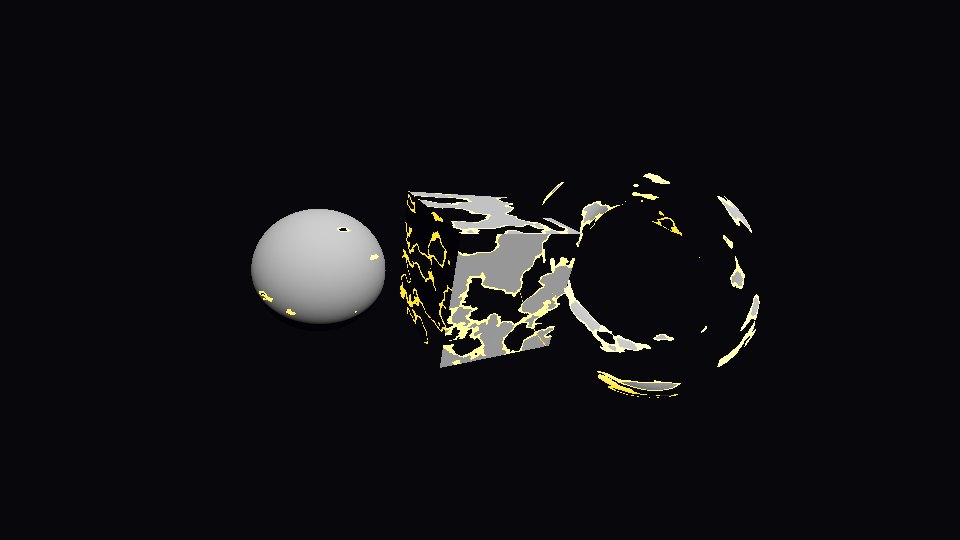
Sample a noise texture in a spatial shader and discard every pixel whose noise value is below amount. Pixels just above the cut get EMISSION for a burning edge. Tween amount from 0 to 1 to make the mesh vanish, and back to 0 to bring it back.
The code
Put this script on a MeshInstance3D in place of its own script, then call dissolve() or appear(). It builds the shader and the noise itself.
extends MeshInstance3D
## Burn a mesh away with noise. Call dissolve() to make it vanish, appear() to bring it back.

@export var duration := 1.2
@export var color := Color(0.8, 0.8, 0.8)
@export var edge_color := Color(1.0, 0.45, 0.1)

const DISSOLVE_SHADER := """
shader_type spatial;
uniform sampler2D noise;
uniform float amount : hint_range(0.0, 1.0) = 0.0;
uniform float edge_width = 0.06;
uniform vec4 albedo : source_color = vec4(0.8, 0.8, 0.8, 1.0);
uniform vec4 edge_color : source_color = vec4(1.0, 0.45, 0.1, 1.0);

void fragment() {
	float n = texture(noise, UV).r;
	if (n < amount) {
		discard;
	}
	ALBEDO = albedo.rgb;
	if (amount > 0.0 && n < amount + edge_width) {
		EMISSION = edge_color.rgb * 2.0; // the burning edge
	}
}
"""

func _ready() -> void:
	var tex := NoiseTexture2D.new()
	tex.noise = FastNoiseLite.new()
	tex.seamless = true
	var mat := ShaderMaterial.new()
	mat.shader = Shader.new()
	mat.shader.code = DISSOLVE_SHADER
	mat.set_shader_parameter("noise", tex)
	mat.set_shader_parameter("albedo", color)
	mat.set_shader_parameter("edge_color", edge_color)
	material_override = mat  # made here, so every copy dissolves on its own


func dissolve() -> Tween:
	return _tween_to(1.0)


func appear() -> Tween:
	return _tween_to(0.0)


func _tween_to(value: float) -> Tween:
	var t := create_tween()
	t.tween_property(material_override, "shader_parameter/amount", value, duration)
	return t
On a sphere in our test, about 55% of the pixels were left at an amount of 0.5, none at 1.0, and the whole sphere at 0. After dissolve() and its duration the sphere was gone, and appear() brought every pixel back.
The burning edge
edge_width is how far above the cut the edge color reaches. At an amount of 0.5 our test frame had 104 orange sample points along the edges, and none with edge_width at 0.
One copy at a time
The script makes a new material in _ready(), so every mesh dissolves on its own. With two spheres in the scene, dissolving one left the other whole. If you share one material file between meshes instead, turn on Local to Scene for it, the same fix as on the hit flash page.
What to change
duration: seconds for a full dissolve.edge_color: orange for fire, blue or green for magic.- The noise: it is read with the mesh UVs, so the pattern follows the UV layout of your model.
Tested in Godot 4.7 with the Compatibility renderer.
Ready-made: Spawn, Death & Respawn VFX for Godot 4 has spawns, deaths, respawns and loot beams, plus a dissolve shader for any 3D model.
Want ready-made effects? Try the free Arcane VFX pack or the VFX Collection for Godot 4.