Set the StyleBoxTexture's texture margins to the size of the frame's corner art; with all four left at 0, Godot stretches the whole PNG. In our Godot 4.7 test, a 32 px corner on a 128 px frame grew to 160 px wide on a 640 x 320 panel, and stayed 32 px once the margins were 32. The script below also sets the edges to Tile Fit, so a dotted edge kept 8 px dots instead of 72 px smears.
The code
Attach this script to a PanelContainer, drag your window PNG into frame and set corner to how many pixels the corner ornament takes from the edge of the PNG. Leave tile_edges on for frames with a pattern along the edges, turn it off for plain edges.
extends PanelContainer
## A window frame that keeps its corners and edge pattern sharp at any size (9-slice).
## Attach to a PanelContainer, set "frame" to your window PNG and "corner" to the size of its corner art.

@export var frame: Texture2D:
	set(v):
		frame = v
		_apply()
@export var corner := 46:  ## pixels from each edge of the PNG that must never stretch
	set(v):
		corner = v
		_apply()
@export var tile_edges := true:  ## repeat the edge pattern instead of stretching it
	set(v):
		tile_edges = v
		_apply()


func _ready() -> void:
	_apply()


func _apply() -> void:
	if frame == null:
		return
	var sb := StyleBoxTexture.new()
	sb.texture = frame
	sb.set_texture_margin_all(corner)  # these pixels are drawn at their real size
	var mode := StyleBoxTexture.AXIS_STRETCH_MODE_TILE_FIT if tile_edges else StyleBoxTexture.AXIS_STRETCH_MODE_STRETCH
	sb.axis_stretch_horizontal = mode
	sb.axis_stretch_vertical = mode
	add_theme_stylebox_override("panel", sb)
What we measured
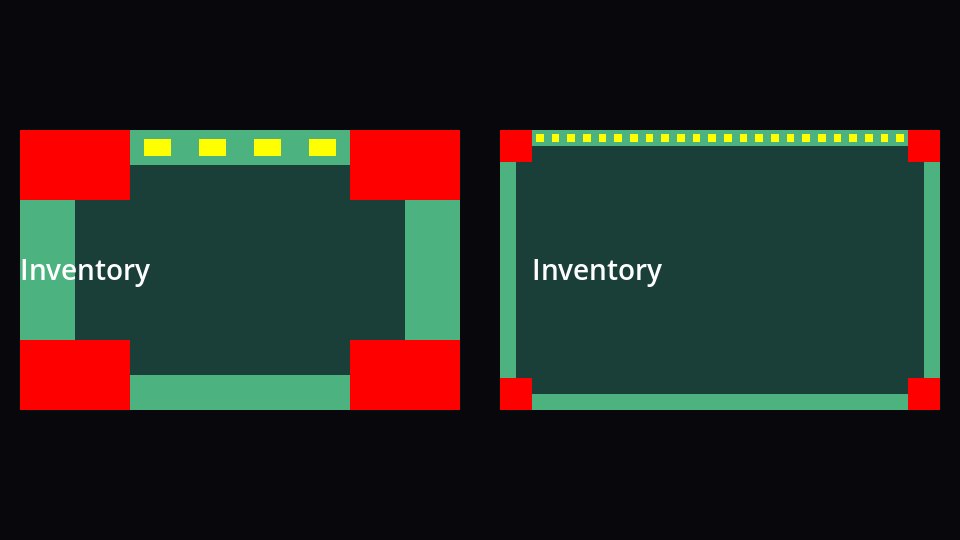
A 128 px frame drawn in code: 32 px red corners, a 16 px green border and 8 px yellow dots every 16 px along the top edge, on a 640 x 320 panel. We measured the red corner along the top row and the yellow dots on the top edge, with Nearest filtering so every pixel counts. Two runs gave the same numbers.
- StyleBoxTexture with the margins at 0: corner 160 px wide, five times too big, and the content started at the panel's edge (0, 0), on top of the frame.
- Margins 32: corner 32 px, the content started at (32, 32), inside the frame, but the 4 dots became 72 px dashes.
- The script (margins 32, Tile Fit): corner 32 px, 36 dots of 8 px along the top edge, content at (32, 32).
- NinePatchRect behaves the same:
patch_marginat 0 gave a 160 px corner, 32 gave 32 px and the same 72 px dashes.
StyleBoxTexture or NinePatchRect
Both cut the texture the same way. A StyleBoxTexture on a PanelContainer also places the children: with margins set, our child started at (32, 32). A NinePatchRect is a plain picture and left its child at (0, 0), so use it for frames with nothing inside or position the content yourself.
What to change
corner: measure the corner ornament in your PNG. If the left and top differ from the right and bottom, set the fourtexture_margin_*values one by one instead ofset_texture_margin_all().tile_edges: Tile Fit repeats the middle part of each edge instead of stretching it. In our test the 64 px middle of the top edge repeated 9 times.
A frame to try it with: Xianxia UI Free Sample has a 9-slice Jade window (46 px left and top, 49 px right and bottom at 1x), a title bar, buttons and a qi bar, with a ready Godot 4 theme.
Tested in Godot 4.7 with the Compatibility renderer.
Ready-made: Xianxia UI & Formation Circles has 8 window styles, 24 formation circles, bars, HUD slots and realm badges, every PNG also at @2x, with Godot 4 themes.