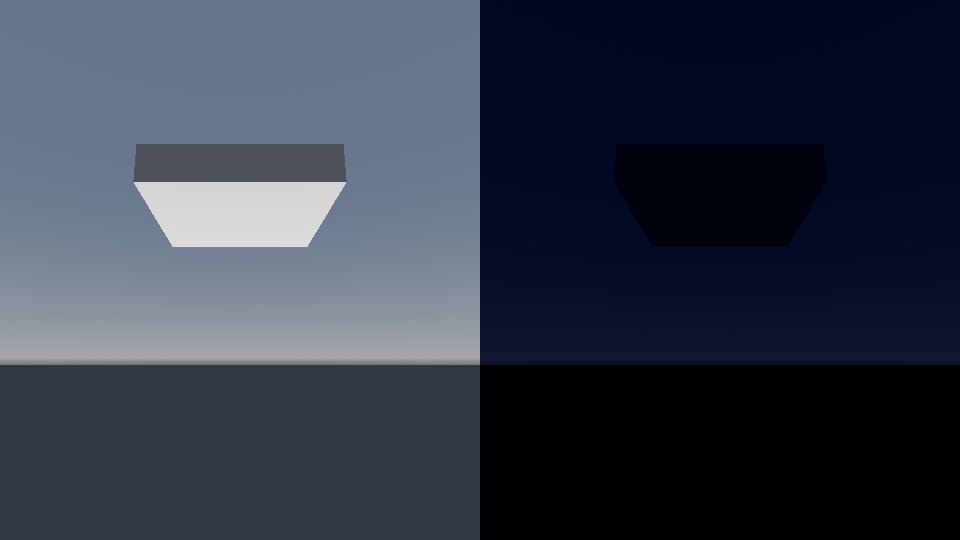
Rotating the DirectionalLight3D is only half of a day and night cycle. In our Godot 4.7 test, with only the sun rotated to midnight, the sky kept the same blue as at noon and the underside of a floating slab went from 0.12 to 0.84 brightness, because the light now points up from under the ground. The script below moves the sun, sets its light_energy to 0 under the horizon, and recolors the ProceduralSkyMaterial and the ambient light from the same hour.
The code
Add a Node to your level, attach this script, then drag your DirectionalLight3D into sun and your WorldEnvironment into world_env. The WorldEnvironment needs Background set to Sky with a ProceduralSkyMaterial. hour is the start time and day_seconds is how long a full day takes.
extends Node
## Day/night cycle: one node that moves the sun AND recolors the sky and the ambient light.
## Rotating the DirectionalLight3D alone keeps a blue sky at midnight and lights the scene from below.
## Add it to your level, then drag your DirectionalLight3D and WorldEnvironment into sun and world_env.
## The WorldEnvironment needs Background = Sky with a ProceduralSkyMaterial.

@export var sun: DirectionalLight3D
@export var world_env: WorldEnvironment
@export var day_seconds := 240.0  ## real seconds for one full day
@export_range(0.0, 24.0, 0.1) var hour := 8.0
@export var sun_energy := 1.0
@export var paused := false

const DAY_TOP := Color(0.25, 0.5, 0.9)
const DAY_HORIZON := Color(0.7, 0.82, 0.95)
const DUSK_TOP := Color(0.3, 0.25, 0.5)
const DUSK_HORIZON := Color(1.0, 0.55, 0.3)
const NIGHT_TOP := Color(0.03, 0.05, 0.14)
const NIGHT_HORIZON := Color(0.08, 0.1, 0.2)


func _ready() -> void:
	world_env.environment.ambient_light_source = Environment.AMBIENT_SOURCE_COLOR
	apply()


func _process(delta: float) -> void:
	if not paused:
		hour = fmod(hour + 24.0 * delta / day_seconds, 24.0)
	apply()


func apply() -> void:
	var elevation := (hour - 6.0) * 15.0  # 6:00 = east horizon, 12:00 = straight up, 18:00 = west horizon
	sun.rotation_degrees = Vector3(-elevation, 30.0, 0.0)
	var up := sin(deg_to_rad(elevation))  # 1 at noon, 0 on the horizon, below 0 at night
	var day := clampf(up * 4.0, 0.0, 1.0)  # full day once the sun is about 15 degrees up
	var night := clampf(-up * 4.0, 0.0, 1.0)
	sun.light_energy = sun_energy * day  # no light from below the ground at night
	var top := DUSK_TOP.lerp(DAY_TOP, day).lerp(NIGHT_TOP, night)
	var horizon := DUSK_HORIZON.lerp(DAY_HORIZON, day).lerp(NIGHT_HORIZON, night)
	var sky := world_env.environment.sky.sky_material as ProceduralSkyMaterial
	sky.sky_top_color = top
	sky.sky_horizon_color = horizon
	sky.ground_horizon_color = horizon
	sky.ground_bottom_color = top
	world_env.environment.ambient_light_color = horizon
	world_env.environment.ambient_light_energy = 0.2 + 0.3 * day
What we measured
A gray ground, a 2 m slab floating 2.4 m up and a camera below it, with shadows off. We read the brightness (0 = black, 1 = white) of the sky at the top of the screen, the ground and the slab's underside. Two runs gave the same numbers.
- Sun rotated only, noon: sky 0.46, ground 0.60, underside 0.12.
- Sun rotated only, midnight: sky 0.46 (the same color as noon), ground 0.23, underside 0.84.
- The script at noon: sky 0.55, ground 0.63. At 18:00: a purple sky at 0.35, ground 0.14. At midnight: a dark navy sky at 0.05, ground 0.00, underside 0.02, and the sun's light_energy at 0.
day_seconds = 24withhourstarting at 6: hour read 9.0 after 3 seconds, one game hour per real second.
Why the light comes from below
A DirectionalLight3D does not know where the ground is. Rotated past the horizon it keeps shining, now upward, and every surface that faces down gets lit. The script multiplies light_energy by how high the sun is, so it fades out as the sun reaches the horizon and stays at 0 all night. A ProceduralSkyMaterial does not change color by itself either, so the script sets its four colors from the same value.
What to change
- The six color constants: the sky at day, dusk and night. The ground and the ambient light follow the horizon color.
day_seconds: 240 is a 4 minute day. Setpaused = trueto hold the time and sethourfrom your own code, for sleeping or cutscenes.sun_energy: how bright the sun gets at noon.- The 30 in
rotation_degrees: the compass direction the sun travels. NIGHT_HORIZON: at midnight the slab was at 0.02, almost black. Raise it if the player needs to see at night.
Painted skies instead of a procedural one: PD Toon Skies Free has 3 anime cel skies (day, sunset and night) and a PDDayCycle node that blends them while it moves the sun.
Tested in Godot 4.7 with the Compatibility renderer.
Ready-made: PD Toon Skies has 40 painted skies and a live sky shader with a 0 to 24 time of day slider.