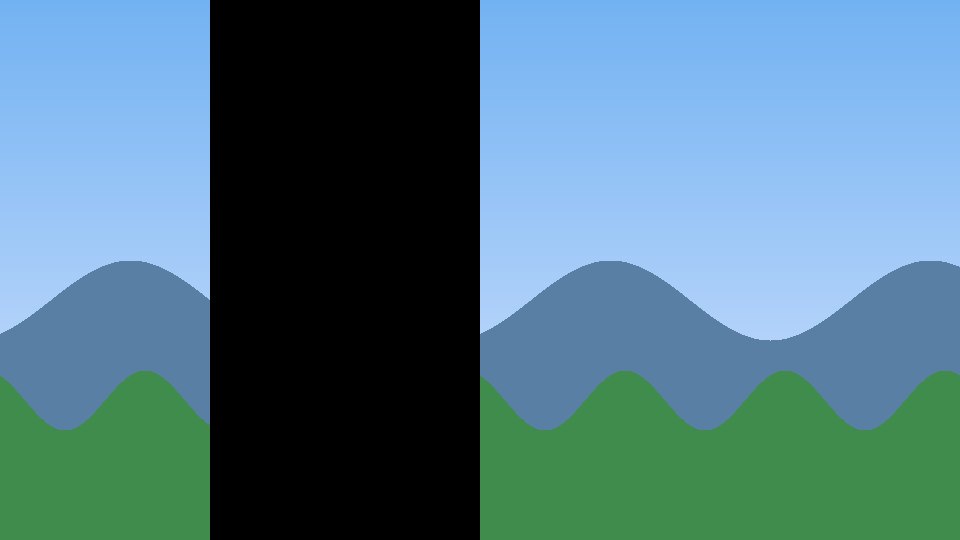
Set repeat_size to exactly the texture's width and raise repeat_times when the texture is narrower than the screen. In our Godot 4.7 test with a 320 px layer on a 960 px screen, the default repeat_times of 1 still left up to 510 black pixels on the middle row, 4 left 190, and the script below, which sets 6, left 0 at every camera position we tried.
The code
Make one node per layer (sky, far hills, near trees), attach this script and set texture and speed: 0 is a sky that never moves, 1 moves with the camera, above 1 is for things in front of the player. Turn on pixel_art for pixel art layers. If your Camera2D zooms out during play, call fit() after the zoom changes.
extends Parallax2D
## One parallax layer that tiles forever, sized from its own texture.
## Make one node per layer (sky, far hills, near trees) under your level, each with its own speed.

@export var texture: Texture2D
@export_range(0.0, 2.0, 0.05) var speed := 0.5  ## 0 = static sky, 1 = moves with the camera, above 1 = foreground
@export var pixel_art := false


func _ready() -> void:
	var s := Sprite2D.new()
	s.texture = texture
	s.centered = false  # the repeat starts at the texture's left edge
	if pixel_art:
		s.texture_filter = CanvasItem.TEXTURE_FILTER_NEAREST
	add_child(s)
	scroll_scale = Vector2(speed, 1.0)
	repeat_size = Vector2(texture.get_width(), 0.0)  # exactly one texture width, no gap and no overlap
	fit()


## Call again after your Camera2D zooms out.
func fit() -> void:
	var view := get_viewport_rect().size.x
	var cam := get_viewport().get_camera_2d()
	if cam:
		view /= cam.zoom.x  # zoomed out = more of the layer on screen
	repeat_times = 2 * int(ceil(view / texture.get_width()))  # half of this left gaps in our test
What we measured
A 320 x 180 px layer on a 960 x 540 screen at speed 0.5. We counted the black pixels on the middle row, where the layer did not cover the screen, with the camera at x 0, 777, 1500, 5000 and -2000, and kept the worst. Two runs gave the same numbers.
repeat_sizeleft at 0: 640 of 960 pixels black at the start and all 960 after the camera moved 1500 px. The layer does not repeat.repeat_size320 withrepeat_times1, the default: up to 510 black.- repeat_times 4 (screen width divided by texture width, plus one): up to 190 black.
- repeat_size 330, 10 px more than the texture, with repeat_times 6: up to 30 black, thin stripes between the tiles.
- The script (repeat_times 6): 0 at every camera position.
- Camera2D zoom 0.5 with the same 6: up to 175 black. After
fit(): repeat_times 12 and 0 black. - Speed 0.5: moving the camera 200 px moved the layer 100 px on screen.
How many copies
The obvious guess, screen width divided by texture width plus one, was 4 here and still left a 190 px gap. The script uses twice the ratio and divides the screen width by the camera zoom, which covered the screen in every case we measured.
What to change
speedper layer: 0 for the sky, lower numbers for far layers, 1 for the layer the player walks on.pixel_art: Nearest filtering, so pixel art stays crisp.fit(): call it after a zoom out. Zooming in needs no change.
Layers to try it with: Asian Fantasy Parallax Free has 2 scenes (Torii and Sakura Hill, Thai Temple Fields) with 7 tiling layers each, in day, dusk and night, as 320 x 180 pixel art plus HD.
Tested in Godot 4.7 with the Compatibility renderer.
Ready-made: Asian Fantasy Parallax has 12 scenes with 7 tiling layers each, in day, dusk and night, and ready Godot 4 Parallax2D scenes.