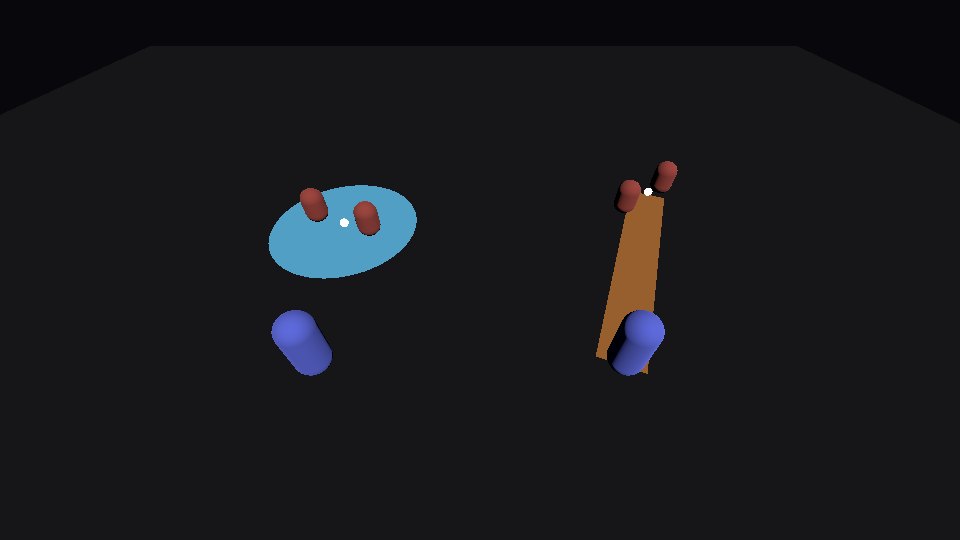
Turn the mouse position into a ray with project_ray_origin() and project_ray_normal(), and intersect it with a Plane at the height of the player's feet. That gives the point on the floor under the cursor without any collision shape. Clamp it to the cast range with limit_length(), then put the AoE circle there, or stretch a lane from the player to it.
The code
Add a Node3D as a child of the player, at the feet, and give it this script. It aims every frame from the mouse. Set mode to AREA for a spell that lands on a spot, or LANE for a skillshot. When the player clicks, cast the spell at target.
extends Node3D
## Aim a spell with the mouse on a 3D floor: a circle for an area spell, a lane for a skillshot.
## Add it as a child of the player, at the feet. It uses the current Camera3D.

enum Mode { AREA, LANE }
@export var mode := Mode.AREA:
	set(v):
		mode = v
		if is_node_ready():
			_build()
@export var cast_range := 8.0  # meters from the player
@export var area_radius := 2.0  # meters
@export var lane_width := 1.0  # meters
@export var color := Color(0.4, 0.8, 1.0, 0.35)

var target := Vector3.ZERO  # where the spell lands (AREA) or the far end of the lane (LANE)
var _mark := MeshInstance3D.new()


func _ready() -> void:
	var mat := StandardMaterial3D.new()
	mat.shading_mode = BaseMaterial3D.SHADING_MODE_UNSHADED
	mat.transparency = BaseMaterial3D.TRANSPARENCY_ALPHA
	mat.cull_mode = BaseMaterial3D.CULL_DISABLED
	mat.albedo_color = color
	_mark.material_override = mat
	_mark.cast_shadow = GeometryInstance3D.SHADOW_CASTING_SETTING_OFF
	_mark.top_level = true  # placed in world space: it does not turn when the player turns
	add_child(_mark)
	_build()


func _process(_delta: float) -> void:
	aim(get_viewport().get_mouse_position())


func aim(screen_pos: Vector2) -> void:
	var cam := get_viewport().get_camera_3d()
	if cam == null:
		return
	# A flat plane at the player's feet. The floor needs no collision shape for this.
	var ground := Plane(Vector3.UP, global_position.y)
	var hit = ground.intersects_ray(cam.project_ray_origin(screen_pos), cam.project_ray_normal(screen_pos))
	if hit == null:
		return  # the cursor is above the horizon: keep the last target
	var flat: Vector3 = hit - global_position
	flat.y = 0.0
	flat = flat.limit_length(cast_range)  # past the range, stop at the edge of the range
	target = global_position + flat
	if mode == Mode.AREA:
		_mark.global_transform = Transform3D(Basis(), target + Vector3(0, 0.02, 0))
	elif flat.length() > 0.05:
		var b := Basis.looking_at(flat)
		b.x *= lane_width
		b.z *= flat.length()
		_mark.global_transform = Transform3D(b, global_position + flat * 0.5 + Vector3(0, 0.02, 0))
	_mark.visible = mode == Mode.AREA or flat.length() > 0.05


func _build() -> void:
	if mode == Mode.AREA:
		var disc := CylinderMesh.new()
		disc.top_radius = area_radius
		disc.bottom_radius = area_radius
		disc.height = 0.01
		disc.radial_segments = 64
		_mark.mesh = disc
	else:
		var lane := PlaneMesh.new()
		lane.size = Vector2(1, 1)  # stretched to lane_width x length in aim()
		_mark.mesh = lane
In our test the camera sat 10 meters up and 8 meters back, looking down at the player. With the cursor over 3 points on the floor, target landed on each of them, 0.000 meters off. A real mouse sits on whole pixels: over 100 points inside the range, the worst miss was 0.038 meters. The middle of the screen showed 27.5 pixels per meter, so that is about one pixel.
Why a Plane and not a raycast
A physics raycast only hits collision shapes. Our floor was a plain MeshInstance3D, and the same ray from the camera came back empty. Plane.intersects_ray() needs nothing in the scene. Use a physics raycast when the floor has hills or stairs and you need the exact surface. Then the floor needs a StaticBody3D.
Put the plane at the player's feet
We stood the player on a platform 1 meter high. The plane at the feet found the point under the cursor exactly. A plane fixed at height 0 put the same click 1.16 meters away, because the camera ray keeps going down past the platform. That is why the script builds the plane from global_position.y every time.
Range, the horizon and the lane
With cast_range at 8 and the cursor 12 meters away, target stopped at 8 meters in the same direction, and the lane was 8 meters long. In LANE mode one end sat at the player's feet and the other under the cursor, 0.000 meters off at both ends, and the lane was 1 meter wide. With the cursor on top of the player, the lane hides instead of flipping around.
When the camera looks almost level, the top of the screen is above the horizon and the ray never reaches the floor. aim() then keeps the last target. We turned the player 90 degrees and the circle stayed under the cursor, 0.000 meters off.
What to change
cast_range: in meters, the same number your spell uses.area_radius: match the real damage radius, so players can trust the circle.lane_width: match the width the projectile hits.color: the alpha keeps the floor readable. At 0.35 on a floor of 0.1 gray, the middle of the circle read red 0.27, green 0.5, blue 0.62, and the floor 3 meters away stayed 0.09.
A ring that must match a real range: a tower's attack range ring. Why the marks sit 0.02 meters above the floor: a glowing circle on the ground without flicker.
Tested in Godot 4.7 with the Compatibility renderer.
Ready-made: Spell Casting Kit for Godot 4 has the aim shapes ready: a range ring, an AoE circle, a skillshot lane with an arrow and a ring under the target, red when you cannot cast.